
25 No‑Code Plays to Control Stripe Receipt Emails in 2026: Allowlists, Segmentation, Deliverability, and Audit‑Ready KPIs
A single misrouted receipt can cost a company two hours of support time and risk unwanted data exposure. A no-code solution for stripe receipt distribution lets businesses control which customers receive Stripe invoices without webhooks or developer time. Our app, RouteReceipts, installs from the Stripe Marketplace and uses an allowlist so teams choose who receives receipts. RouteReceipts logs decisions for auditability, offers a dashboard-native UI, and includes plan management; the setup guide walks through installation. The app starts with a free plan that includes 20 receipts per month and tiered upgrades for higher volume. This listicle-roundup presents 25 no-code plays to control Stripe receipt emails, ranked by ease, deliverability, and audit-ready KPIs. Which method best balances inbox hygiene, compliance, and measurable outcomes?
1) What are 25 no-code plays to control Stripe receipt emails?
These 25 plays are practical, no-code tactics grouped into allowlisting, segmentation, multi-channel delivery, deliverability and monitoring, and compliance so teams can pick quick wins or higher-impact changes. Use these plays to stop global receipt blasts, send receipts only when required, and keep an auditable trail that finance can operate without engineering. RouteReceipts starts with a free plan that includes 20 receipts per month and installs from the Stripe Marketplace to manage allowlists and decision logs.
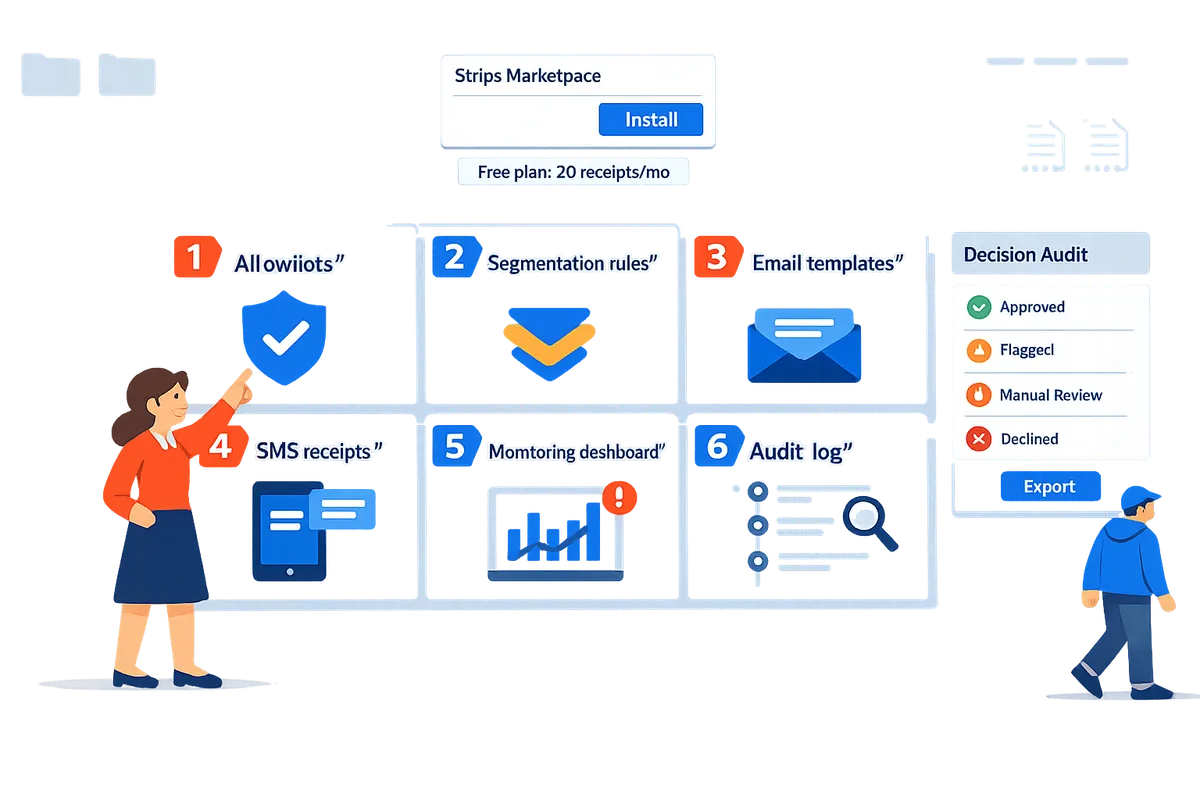
🔒 Allowlist plays
Use allowlists to restrict receipt sends to specific customers, accounts, or invoices without writing code. RouteReceipts provides a dashboard-native allowlist so finance can add or remove customers from the UI rather than asking for engineering time.
- Account-level enterprise allowlist. Add enterprise customer IDs to the allowlist so every invoice they receive generates a receipt. Example: mark 42 enterprise accounts during onboarding so their expense teams get receipts automatically.
- Per-invoice toggle via Stripe Dashboard notes. Add a manual flag on high-value invoices and then import those invoice IDs into RouteReceipts for one-off receipts. This avoids changing global receipt settings.
- CSV bulk import. Upload a CSV of customer emails or Stripe IDs to create large allowlists for events or reseller partners. Use the import to onboard 300 reseller accounts in under 10 minutes.
- Subscription-based rules. Map subscription product IDs to allowlist entries so only subscribers on "Expense-Eligible" tiers receive receipts.
- Reseller or partner allowlists. Maintain a separate allowlist for resellers so receipts route to partner billing contacts, not end users.
- Temporary allowlist entries. Grant a 30-day allowlist entry for trial customers who request official receipts for reimbursement.
RouteReceipts makes these actions auditable and reversible from the Stripe Marketplace UI. For step-by-step setup, see our how-to guide on limiting Stripe receipts.
🧭 Segmentation and rule-based plays
Use segmentation to send receipts only when specific business conditions match. RouteReceipts reads customer metadata and invoice fields so teams can define business rules without webhooks.
- High-value invoice threshold. Only send receipts for invoices greater than a set amount, for example $500, to reduce low-value clutter. Finance sets the threshold in the dashboard.
- Expense-account customers. Tag customers used for client billable expenses and route receipts to the tagged accounting inbox.
- Manual accounting flag. A quick internal workflow: accounting sets a "receipt_needed" tag in the CRM, then syncs tags to RouteReceipts via CSV or no-code connector.
- Tax or country-specific routing. Send receipts for customers in VAT jurisdictions to local tax teams while suppressing them elsewhere.
- Product-line filters. Only send receipts for product families that require receipts, such as professional services versus freemium features.
- Billing cadence rules. Route receipts only for annual charges or for first payments on a subscription.
These segmentation plays reduce inbox noise and align receipts with internal workflows. Read our beginner's guide to selective delivery for templates and common rule patterns.
📨 Multi-channel delivery and templates 😊
Use multiple channels and formatted templates so recipients get receipts in the format their workflows require. RouteReceipts integrates with email templating and PDF attachments to avoid custom engineering.
- Branded email templates. Build receipt templates with your company branding and legal footer for accounting teams. Store templates in the RouteReceipts dashboard.
- SMS receipts for mobile-first customers. Send a short SMS with a secure link to the full PDF when customers prefer mobile delivery.
- Accounting inbox forwarding. RouteReceipts can copy receipts to a central accounting email address for reconciliation systems.
- Slack or Teams notifications. Send a summary message plus PDF link to a client-facing channel for enterprise customers that prefer chat notifications.
- PDF attachments formatted for expense systems. Generate PDFs with clear fields: invoice number, tax ID, line items, and a single-file layout that imports cleanly into Concur or Expensify.
These tactics reduce manual forwarding and speed up expense reconciliation. For examples of templates and channel mappings, see our selective delivery guide.
📈 Deliverability and monitoring plays 😊
Implement deliverability best practices and real-time monitoring so receipts arrive and you can prove delivery. RouteReceipts supports auditing of delivery decisions and integrates with monitoring tools.
- Dedicated sending domain. Use a dedicated sending domain for receipt emails to protect your primary marketing domain and improve reputation.
- DKIM and SPF verification checks. Publish and verify DKIM and SPF records before enabling production sends to avoid bounces.
- Soft-failure handling with retries. Configure RouteReceipts to queue and retry transient delivery failures instead of creating duplicate accounting work.
- Delivery dashboards and bounce monitoring. Track delivery rate, bounces, and retry outcomes in a dashboard so finance can spot patterns and remediate quickly.
⚠️ Warning: Misconfigured DNS or missing DKIM can cause high bounce rates and harm sender reputation. Validate records before scaling sends.
These plays reduce failed deliveries and create evidence you can use during audits or vendor disputes.
🛡️ Compliance, audit trail, and privacy plays 😊
Apply governance practices to keep receipt routing auditable and privacy-compliant while still using no-code workflows. RouteReceipts logs every routing decision to meet audit needs.
- Decision audit logs for each routing event. Record who added the allowlist entry, the rule matched, and the timestamp so auditors can trace receipt decisions.
- Consent flags for recipients. Store explicit consent fields in customer metadata and require consent before sending non-transactional receipts.
- Data retention and deletion policies. Define how long receipt copies and routing logs persist and automate deletion to meet regional privacy rules.
- Encryption and secure storage notes. Keep PDFs and logs in encrypted storage and restrict access to finance and compliance roles.
💡 Tip: Always use double opt-in for SMS receipt signups to avoid carrier complaints and consent disputes.
These governance plays reduce compliance risk while preserving the ability to demonstrate why a receipt was or was not sent. See our FAQ for details about RouteReceipts data handling and privacy.
Tools and business trade-offs: side-by-side comparison table
This table compares RouteReceipts, Stripe Dashboard only, no-code automation platforms, and DIY webhook approaches on the criteria finance teams care about.
| Approach | Setup time | Required engineering hours | Targeting granularity | Audit logs and traceability | Pricing impact | Failure-handling business risk | Supports allowlist plays | Supports segmentation plays | Supports multi-channel templates | Supports deliverability monitoring | Supports compliance logs |
|---|---|---|---|---|---|---|---|---|---|---|---|
| RouteReceipts | Low (minutes to install) | Minimal (finance-owned) | High (customer, invoice, subscription) | Built-in decision audit log | Predictable, tiered pricing | Low (dashboard retries, logs) | Yes | Yes | Yes | Yes | Yes |
| Stripe Dashboard only | Low | None | Low (global or none) | Limited (payment logs only) | No extra cost | Medium (all-or-none risk) | Partial | Limited | No | Limited | No |
| No-code automation platforms (Zapier, Make) | Medium | Low to medium | Medium (depends on connectors) | Depends on workflow design | Variable per usage | Medium (connector failures) | Partial | Yes | Yes | Partial | Partial |
| DIY webhook + custom service | High | High (engineering time) | Very high (custom rules) | Depends on implementation | Variable, often higher | High (maintenance risk) | Yes | Yes | Yes | Yes | Yes |
The table shows which plays each approach supports and the business consequences of a DIY route versus a dashboard app.
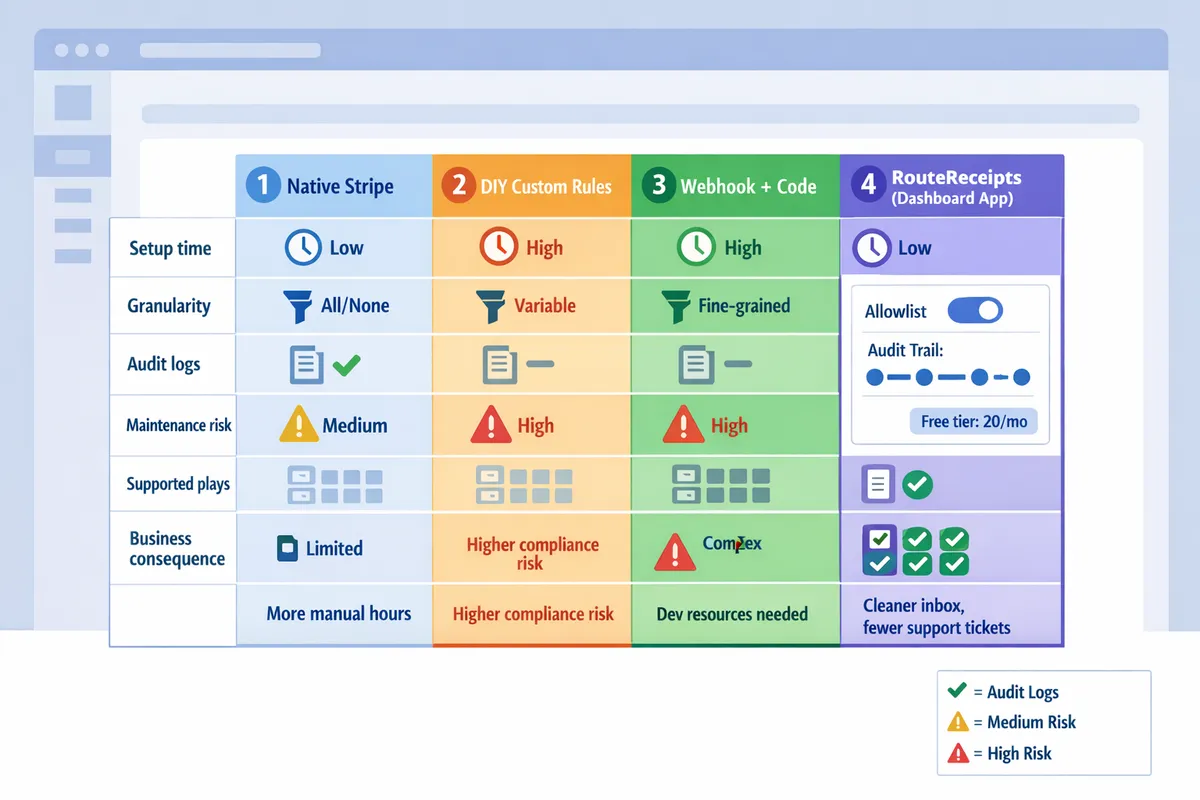
For templates, implementation examples, and step-by-step setup, refer to How to Limit Stripe Receipts to Chosen Customers and The No‑Code Way to Route Customer Receipts in Stripe: Beginner’s Guide to Selective Delivery.
2) How do you implement the highest-impact RouteReceipts plays from the Stripe dashboard in minutes?
Install Route Receipts from the Stripe Marketplace, disable Stripe's automatic receipt sends, then apply allowlists and routing rules in the Route Receipts dashboard to control who receives receipts. This setup keeps routing decisions inside Stripe's UI so non-engineering teams can run allowlist changes, tests, and audits. Follow the five quick steps below to build, verify, and operate targeted receipt delivery in Stripe without code.
🔧 Quick setup and installation
Install Route Receipts from the Stripe Marketplace and disable Stripe's automatic receipt emails to avoid duplicate sends. 1) Open the Stripe Marketplace and install Route Receipts. 2) Follow the on-screen OAuth flow to connect the app to your Stripe account. 3) In Stripe Settings, set Automated Receipt Emails to off (this prevents doubles). 4) Confirm the Route Receipts app appears in your Stripe Dashboard and that the app can read customer and invoice metadata. See the Route Receipts setup guide for screenshots and a checklist.
📝 Create and manage allowlists from the dashboard
Add allowlist entries in Route Receipts by email, Stripe customer ID, or CSV import and mark entries temporary or permanent to control send windows. Use CSV import for bulk onboarding (include columns: customer_id, email, reason, expires_at). For mixed workflows, create a permanent entry for enterprise accounts and temporary entries for trial customers who request receipts. Route Receipts keeps all entries and their source notes in the decision audit log so finance teams can answer "why did this customer get a receipt" without asking engineering. For a full walkthrough of allowlist patterns, consult the Beginner's guide to selective delivery.
⚙️ Configure routing rules and segmentation inside RouteReceipts
Combine metadata, invoice amount, subscription tier, and manual flags in Route Receipts to build routing rules that send receipts only when required. Example rules: send receipts when invoice.metadata.requires_receipt = true; send for subscription.tier = enterprise; or send for invoices above a dollar threshold set by finance. Order rules with a clear fall-through: explicit allowlist entries first, then metadata rules, then invoice-value rules. Route Receipts evaluates rules in the dashboard and shows the matched condition in the audit log so you can tune rules by observing real traffic patterns.
✅ Test routing decisions and edge cases
Run controlled test invoices and inspect the Route Receipts decision audit log to confirm who receives receipts and why. Create a staging Stripe account or use test mode, then simulate invoices for: allowlisted customers, non-allowlisted customers, invoices with conflicting metadata, and large-value purchases. After each test invoice, open the decision audit log to read the exact rule match and the rationale field. If a test reveals an unexpected send, edit the rule and re-run that test invoice; Route Receipts' logs show timestamped decisions for compliance and troubleshooting. For detailed test scripts and rollback steps, see How to Limit Stripe Receipts (Step‑by‑Step, No Code).
⚠️ Warning: Turn off Stripe's automatic receipt emails before enabling Route Receipts to prevent duplicate messages and customer confusion.
⚠️ Troubleshooting common issues and usage limits
Use Route Receipts' logs and plan dashboard to resolve duplicate or missing receipts and to track plan usage before you hit limits. Common fixes: ensure email addresses in the allowlist match the Stripe customer record exactly; check for trailing spaces in CSV imports; and confirm that the account is not still sending Stripe-native receipts. If receipts appear missing, inspect the audit log entry for the invoice to see the evaluated rule and the decision reason. If you hit a free-tier or plan limit, the app shows usage and a one-click upgrade path in the dashboard so operations teams can expand capacity without engineering. Consult the FAQ for answers to common account and data questions.
Related reading: the Beginner's guide to selective delivery explains allowlist rules and audit-log considerations, and the Frequently Asked Questions page covers installation and plan details.
3) How should finance teams measure impact, protect deliverability, and keep audit-ready records?
Finance teams should track a focused set of KPIs, monitor deliverability signals, enforce retention and consent rules, and keep an exportable decision log to prove ROI and satisfy auditors. These four pillars show the business value of a no-code solution for stripe receipt distribution and reduce the manual work finance teams face when receipts are misrouted. Use Route Receipts to capture routing decisions, simplify allowlist management, and export evidence for audits without engineering help.
📊 KPIs to track and how to measure ROI
Track receipt volume reduction, time saved for finance staff, decline in customer support tickets about receipts, and routing error rate to build a tight ROI snapshot. Measure receipt volume reduction as a percentage change from baseline (for example, receipts sent per month before vs after), and capture time saved by sampling staff tasks: measure average minutes spent per receipt-related support case and multiply by cases avoided. Use support-ticket exports and Route Receipts' allowlist change timestamps to correlate drops in queries with routing rule changes. Calculate net monthly savings as (hours saved * fully loaded hourly rate) minus Route Receipts subscription cost. For targeted receipt delivery in stripe without code, these metrics prove whether the no-code approach reduced finance overhead.
📬 Deliverability benchmarks and monitoring
Monitor delivery rate, bounce rate, and spam-folder placement while validating sending domains and email authentication to preserve inbox placement. Track delivery rate as delivered messages divided by attempted sends using your email provider's reports after disabling Stripe's automatic receipts per our setup guide. Validate SPF and DKIM for your sending domain and run a small seeded test list (10–20 addresses across Gmail, Outlook, and corporate mail) after each major allowlist change. Route Receipts reduces unnecessary sends, which can improve sender reputation; use periodic inbox-placement checks and watch for sudden spikes in hard bounces after rule updates. See our step-by-step installation and testing instructions in the Route Receipts documentation for recommended validation checks.
💡 Tip: Test deliverability before and after disabling Stripe's automatic receipts to avoid duplicate sends and to confirm metrics are reporting from the correct sender.
🔒 Retention, privacy, and compliance checks
Audit consent flags, retention periods, and data minimization rules tied to receipt records to meet privacy and compliance requirements. Map which customer attributes Route Receipts pulls from Stripe and confirm those fields are covered by your privacy notice and retention policy; refer to the RouteReceipts privacy policy for details on data collection and storage. Define retention windows for exported logs and delivered receipts (for example, retain audit exports for seven years for ERP reconciliation or shorter where permitted) and purge ephemeral test data. Avoid including sensitive health, biometric, or genetic data in receipt line items. Keep a simple table that links each receipt field to its legal basis and retention schedule for easy auditor review.
⚠️ Warning: Do not include protected health information or other sensitive personal data on receipts unless you have explicit consent and a documented legal requirement.
📜 Decision audit log and reporting for auditors
Record who changed allowlist rules, when they changed them, and why, and export those records as evidence for audits. Route Receipts' decision audit log captures the actor, timestamp, and rationale for each allowlist edit; export the log as CSV for finance, internal audit, or external auditors. Maintain an index file that ties audit-log excerpts to supporting artifacts: ticket numbers, change requests, and deployment notes. Keep a rolling three-year audit bundle per fiscal year that includes baseline receipt volume, key routing-rule snapshots, and reconciled charge-to-receipt mappings to shorten auditor evidence requests.
📈 Lightweight reporting templates for stakeholders
Provide a one-page monthly report that combines delivery KPIs, cost savings, and an allowlist change timeline so finance, RevOps, and security can review impact quickly. Use these sections: 1) Executive summary (one-sentence impact), 2) Delivery KPIs (delivery rate, bounce rate, spam placement), 3) Operational impact (receipts avoided, support tickets reduced, hours saved, net savings), 4) Allowlist changes (who, when, why), and 5) Open items or risks. Populate the report from Route Receipts exports, your email-sender reports, and support-ticket exports. For templates and a walkthrough of creating the monthly package without engineering support, see our beginner's guide to selective delivery in Stripe and the step-by-step no-code setup article.
Frequently Asked Questions
This FAQ answers the most common operational, compliance, and product questions finance teams ask about a no-code solution for stripe receipt distribution. Use these Q&A items to evaluate Route Receipts, test routing rules, and prepare audit evidence before rolling changes into production. For step-by-step setup and troubleshooting, see the RouteReceipts setup documentation and our Beginner’s Guide to Selective Delivery.
How does Route Receipts prevent Stripe from sending receipts to everyone? 🚫
Route Receipts prevents Stripe from sending receipts to everyone by intercepting Stripe's receipt decision and suppressing sends for customers not on the allowlist. Route Receipts installs from the Stripe Marketplace and instructs you to disable Stripe's automatic receipts during setup so the app becomes the single routing authority. In practice, the app evaluates each invoice against your allowlist and only forwards receipt sends for entries that match by email or customer ID; unmatched invoices are suppressed to avoid duplicate or unwanted emails.
Can I import a customer allowlist from CSV or my CRM? 📁
Yes. Route Receipts supports CSV import and mapping by email or customer ID so teams can manage allowlist entries without coding. The import flow accepts standard CSV columns and validates duplicates during upload; large imports show a preview and error rows for quick correction. If you maintain allowlists in a CRM, export a CSV from the CRM and use the same import path in Route Receipts to keep everything synced without building integrations.
What privacy and data retention practices should I expect? 🔒
Route Receipts reads only the Stripe account data necessary to evaluate receipt routing and stores decision logs and allowlist entries per its privacy policy. The privacy policy details which Stripe objects the app accesses, how long decision logs and uploaded allowlists are retained, and the third-party services used for hosting and analytics. Review the Route Receipts privacy policy before install to ensure retention windows and data-handling practices meet your internal privacy controls and legal requirements.
Will selective routing affect delivery rates or spam placement? 📬
Selective routing can improve sender reputation by reducing volume, but proper domain validation and bounce monitoring remain essential. Route Receipts reduces unnecessary sends, which typically helps delivery metrics; however, you should still verify your sending domain (SPF/DKIM), monitor bounces and complaints, and run test sends for new templates. If you use a third-party ESP, confirm how suppressed sends and sent receipts appear in that provider's reporting so you can track deliverability trends accurately.
How do auditors review receipt routing decisions? 🧾
Auditors review routing decisions by examining the Route Receipts decision audit log export that includes timestamps, user actions, and the allowlist rules that produced each routing outcome. The app provides downloadable CSV exports of the audit log and a change history for allowlist edits so you can demonstrate who changed rules, when, and why. Always export the audit log snapshot before sweeping allowlist updates to preserve a point-in-time record for compliance reviews.
💡 Tip: Export the decision audit log before bulk allowlist edits or plan changes so auditors receive an immutable snapshot tied to your review period.
What happens if I hit the free-plan limit of 20 receipts per month? 💳
If you exceed the free-plan limit, Route Receipts shows upgrade options and detailed usage in the app so you can pick a plan or archive low-value receipts to stay within limits. The usage screen lists receipts counted toward the limit and suggests simple actions—such as archiving recurring low-value transactions or narrowing allowlist scope—to reduce consumption. For pricing and plan details, check the Route Receipts FAQ and consider running a 30-day usage test to estimate monthly volume before committing to a paid tier.
For implementation walkthroughs, see the Beginner’s Guide to Selective Delivery and the step-by-step article on How to Limit Stripe Receipts to Chosen Customers (Step‑by‑Step, No Code) for testing and rollback templates.
When planning a cosplay look, it is worth considering how details related to short cosplay wigs will affect the complete look. As fans study the source material, a comparison of details related to men's cosplay costumes can clarify differences in colour and construction. To organise preparations involving details related to character costumes, cosplay costume sets with matching wigs offers a useful starting point for practical preparation. Before the preparation is complete, it is useful to check details related to women's cosplay costumes against the wearer's own needs.
Apply one or two no-code plays now to cut receipt noise and start measuring audit-ready KPIs.
RouteReceipts is a specialized application designed to enhance the way businesses manage their Stripe receipt distribution. This app addresses a significant limitation within Stripe's native functionality, which traditionally forces businesses to either send receipts to all customers or none at all. RouteReceipts empowers businesses with the flexibility to selectively send receipts to specific customers, thereby preventing unnecessary email clutter for those who do not require them. This is particularly beneficial for businesses with diverse customer bases, such as enterprise clients who need receipts for expense tracking and others who prefer not to receive them. By integrating directly into the Stripe dashboard, RouteReceipts allows users to manage an allowlist of customers effortlessly, without the need for complex coding or custom webhook integrations. The application features a dashboard-native user interface, a decision audit log for transparency, and a straightforward setup process via the Stripe Marketplace. RouteReceipts offers a tiered pricing model, starting with a free plan that includes 20 receipts per month, with the option to upgrade for higher volume needs.
Implement this no-code solution for stripe receipt distribution by following the RouteReceipts Stripe setup in our docs. For examples and allowlist templates, see the beginner's guide to selective delivery and the step-by-step how-to guide. Start with the getting-started guide to enable selective routing in your Stripe dashboard. Subscribe to our newsletter for implementation tips and updates.