
Manage Stripe Receipt Emails Without Coding: Definitive 2026 Pillar Guide to Selective Sends, Allowlists, and Audit Trails
Sending invoices to every Stripe customer can produce hundreds of unnecessary receipt emails a month, creating support noise and bloated accounting inboxes. Manage Stripe receipts without coding is a no-code method that uses allowlists and Stripe dashboard controls to selectively send invoice emails. Our RouteReceipts app is a Stripe Marketplace tool that adds an allowlist, a dashboard-native interface, and a decision audit log so finance teams can control which customers receive receipts without developer time or custom webhooks. Doing this manually often costs engineering hours and risks duplicate or missing receipts, which slows reconciliation. RouteReceipts offers a free plan that includes 20 receipts per month and tiered upgrades. Which customers should be on an allowlist, and how much time could selective sends save your team?
How does RouteReceipts enable selective receipt sends in Stripe?
RouteReceipts is a Stripe Marketplace app that intercepts Stripe's automatic receipt flow and applies an allowlist check to decide whether to send an email. This section shows how RouteReceipts plugs into your Stripe account, how routing decisions are evaluated and logged, and how to set it up step by step without writing webhooks or custom code.
What is RouteReceipts and how does it work? 🔁
RouteReceipts is a Stripe Marketplace app that sits inside the Stripe dashboard and evaluates an allowlist before letting a receipt email go out. RouteReceipts hooks into Stripe's receipt flow so it does not require separate servers or custom webhooks. The decision flow is simple: Stripe generates the receipt event, RouteReceipts looks up the customer/invoice against your allowlist rules, then RouteReceipts either forwards the receipt to Stripe to send or suppresses it and records the outcome. See the RouteReceipts documentation for the detailed decision diagram and rule examples.
💡 Tip: Test allowlist rules with a Stripe test account and a sample invoice before disabling Stripe's automatic receipts in live mode.
How do I install RouteReceipts via the Stripe Marketplace? 🛒
Install RouteReceipts from the Stripe Marketplace by authorizing the app with standard dashboard permissions. In Stripe, go to Developers > Marketplace or Apps, search for RouteReceipts, select Connect or Install, review the permissions requested, and authorize the connection. After install, RouteReceipts shows a dashboard-native setup guide that walks you through toggling Stripe automatic receipts off (if you want RouteReceipts to fully control sends), creating your first allowlist, and running a quick test invoice; see the step-by-step install instructions in the RouteReceipts documentation. The app requests minimal permissions to read customer and invoice metadata and to mark or forward receipt events; the install screen lists these explicitly before you authorize.
How are routing decisions made and recorded? 🧾
Routing decisions are made by matching an invoice or customer to your allowlist rules and then logging the outcome in a decision audit log. Each record includes the invoice ID, matched rule, decision outcome (allowed or blocked), the timestamp, and the user or system action that changed the rule. The audit view in the RouteReceipts dashboard shows a chronological feed so finance and compliance teams can answer who changed a rule and why a receipt was suppressed. For troubleshooting or compliance reviews, use the audit filters to show only blocked receipts, specific rule matches, or changes made by a given team member.
What data does RouteReceipts read from Stripe and how is it handled? 🔒
RouteReceipts reads only the customer and invoice metadata required to evaluate allowlist rules and stores compact audit records separate from full Stripe payment data. Typical fields used are customer.metadata entries, invoice.metadata, invoice.amount, customer.email, and subscription identifiers when present. RouteReceipts does not store full card or payment instrument details; audit entries record the invoice ID, rule matched, outcome, and actor. For full details on what is collected, how long audit records are retained, and third-party subprocessors involved, consult the RouteReceipts privacy policy and the documentation pages that explain retention and access controls.
Example: selectively send stripe receipts for enterprise vs consumer customers 👥
Use a metadata-based allowlist that permits receipts for enterprise customers while blocking consumer customers who prefer fewer emails. A workable rule set is: allow when customer.metadata.customer_type equals enterprise, or when customer.email domain matches your approved corporate domains, and block otherwise. Implementation steps: (1) add customer.metadata.customer_type=enterprise during onboarding, (2) create an allowlist rule in the RouteReceipts dashboard that checks that metadata key, (3) run several test invoices for enterprise and consumer profiles, and (4) monitor the audit log to confirm allowed receipts and blocked receipts. This approach keeps receipts available for expense reporting while reducing unnecessary customer emails and support noise; see the no-code beginner's guide to selective delivery for a template use case and the documentation for test procedures.
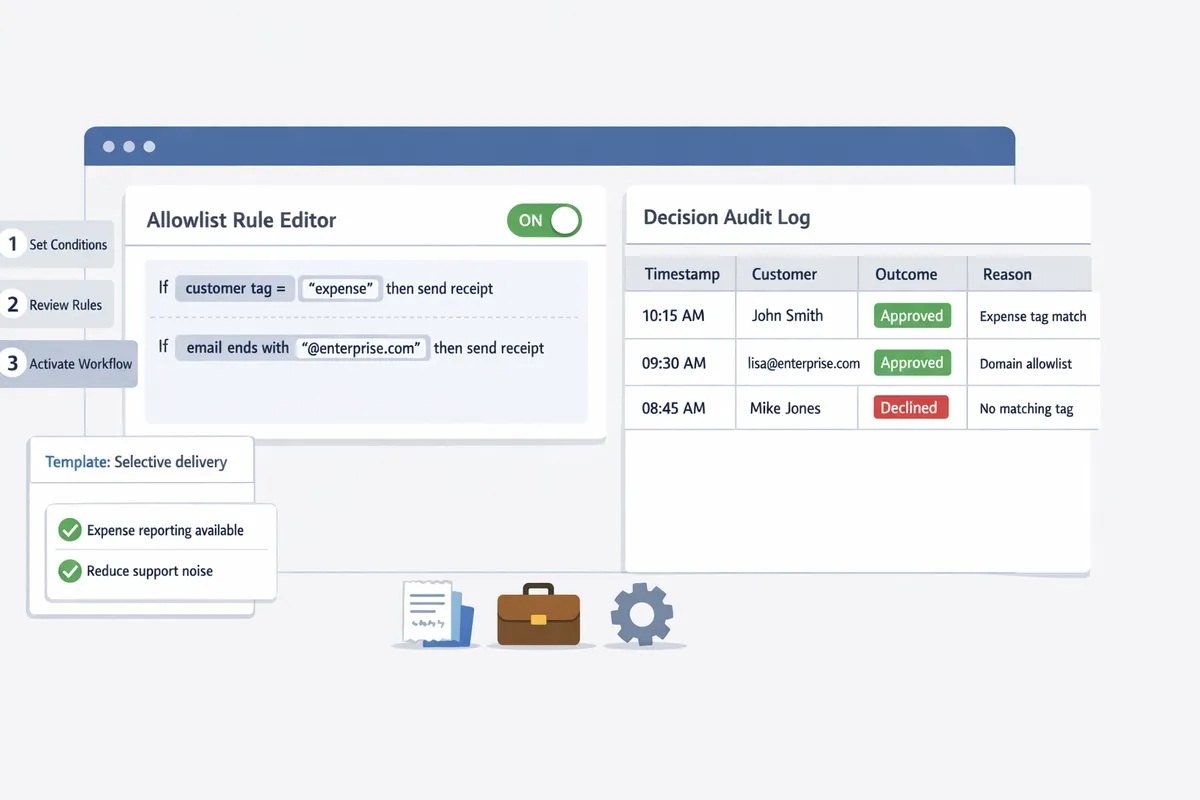
For more background on the product rationale and operational templates, read Why Did We Build Route Receipts and the no-code beginner's guide to selective delivery. For installation and troubleshooting, consult the RouteReceipts documentation and the FAQ.
What proven practices ensure reliable allowlist management and selective sends?
Use structured allowlist rules, strict naming, staged testing, and an audit trail to keep selective sends predictable and auditable. These controls reduce support overhead, cut accidental emails, and make it practical for finance teams to manage stripe receipts without coding.
How to design an allowlist workflow that scales 🛠️
Design an allowlist that uses customer-type tags, billing contact email fields, and stable metadata so routing decisions remain deterministic as volume grows. Allowlist is a rule set that matches customer attributes to a send outcome so decisions do not require manual lookup. Start with three template rules: (A) enterprise_billing = true routes receipts to billing_contact_email; (B) receipt_opt_in = yes routes receipts for one-off purchases; (C) deny-by-default for all others. Recommended metadata fields: enterprise_billing (boolean), billing_contact_email (email), receipt_opt_in (enum), account_owner_id (internal ID). Institute a change control process where only finance owners propose edits, each change requires a peer review and a timestamped entry in the audit log, and changes are staged in a test Stripe account before production.
Route Receipts reads standard Stripe metadata and presents these fields in a dashboard-native allowlist so teams can apply the templates above without custom webhooks. For setup patterns and field mappings, see our beginner's guide to selective delivery and the step-by-step installation in our documentation.
What rules should control selective sends (example rule set)? 📝
Use a prioritized, deny-by-default rule set where specific allow rules override general denials. Example priority order:
- Allow if enterprise_billing = true and billing_contact_email is present. This ensures large customers get receipts for expense tracking.
- Allow if receipt_opt_in = yes for one-off customers who explicitly requested receipts. This prevents surprise emails to casual buyers.
- Allow refund receipts only when finance_flag_refunds = true to avoid refund noise for low-value transactions.
- Deny by default for all other customers.
Apply rules at the invoice generation stage and again at the receipt-send stage to prevent cases where invoices are marked but receipts are later suppressed. Route Receipts implements prioritized rules in its dashboard so you can order these checks visually and avoid rule collisions. For rationale and implementation templates, see Why Did We Build Route Receipts? and our how-to guide on limiting receipts.
How to test receipt routing and verify content before production 🧪
Run staged tests in a dedicated Stripe test account and verify both routing decisions and receipt payload formatting before enabling production routing. Create a set of test cases that cover common and edge scenarios:
- Enterprise customer with billing contact and missing metadata.
- One-off buyer with receipt_opt_in = yes.
- Refunds and proration adjustments.
- Missing billing_contact_email to confirm deny-by-default behavior.
QA checklist: confirm routing decision recorded in the audit log, verify the correct billing_contact_email is in the receipt payload, check localized formatting and itemization on the rendered email, and validate unsubscribe or opt-out links if present. Re-test after any rule change, after major Stripe account updates, and quarterly for active accounts.
💡 Tip: Always run allowlist tests in a dedicated Stripe test account and replay decision logs in Route Receipts before flipping production routing.
Route Receipts records each routing decision in its decision audit log which speeds root-cause checks when a receipt goes missing or is sent to the wrong address. See our documentation for trouble‑shooting steps and common duplicate/missing receipt cases.
Side-by-side comparison: Stripe native tools vs Route Receipts vs third-party no-code automations 🔍
Route Receipts combines dashboard-native selective sends with a decision audit log and low setup complexity, while Stripe's native toggles only offer global on/off and third-party no-code platforms vary in auditability and setup effort.
| Solution | Selective send capability | Dashboard integration | Audit logging | Setup complexity | Compliance controls |
|---|---|---|---|---|---|
| Stripe native tools | Global on/off only, no per-customer allowlist | Native Stripe dashboard, no routing UI | Minimal; rely on Stripe events | Low; toggle in settings | Basic; account-level controls only |
| Route Receipts | Per-customer allowlist with prioritized rules and deny-by-default | Dashboard-native UI inside Stripe Marketplace | Decision audit log with timestamped entries | Low to moderate; install via Marketplace and map metadata | Role-based editing, change log, privacy controls per account |
| Representative no-code automation | Varies; some support conditional routing but often require connectors | External dashboard; may not embed in Stripe | Varies; many lack immutable decision logs | Moderate to high; connectors and auth flows needed | Depends on vendor; may require custom exports and masking |
This table helps teams decide whether to selectively send stripe receipts using Stripe's built-in controls, Route Receipts, or a broader automation platform. For a step‑by‑step no-code setup, see our beginner's guide to selective delivery.
Compliance and privacy controls you should enforce 🔒
Restrict allowlist editing to finance owners, log every change, and limit exported receipt data to maintain compliance and privacy. Enforce role-based access so only designated finance staff can modify allowlist rules or export customer emails. Retention choices: keep decision logs for a defined window aligned with your compliance policy and mask or truncate exported email fields unless exports are strictly necessary. Handle customer emails safely by minimizing visibility in support views and using billing_contact_email only when required for tax or expense reporting.
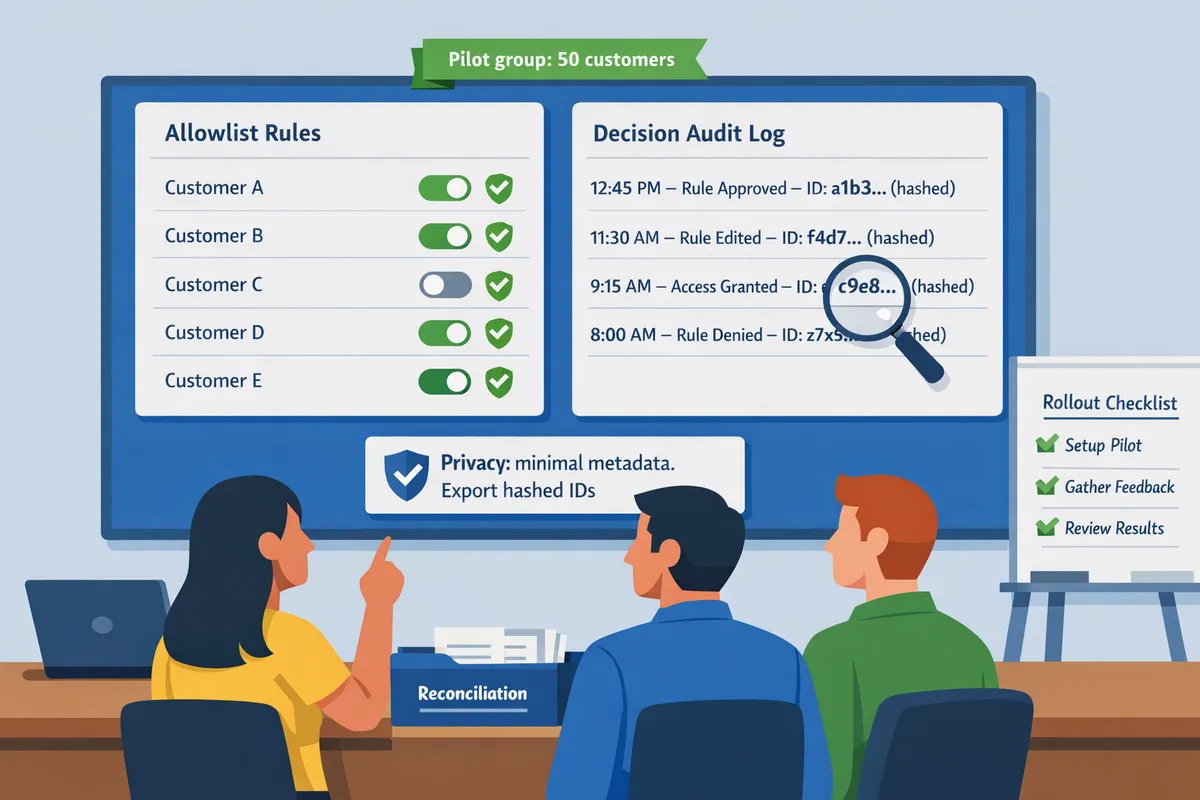
Route Receipts supports role-based controls and a decision audit log to satisfy common compliance requirements; review our privacy policy for details on data handling. If your business needs stricter retention or masking, configure Stripe and Route Receipts to store minimal metadata and export only hashed identifiers.
How do you implement, monitor, and measure a no-code receipt routing workflow?
A safe no-code rollout uses a narrow pilot, active audit-log monitoring, and a small set of KPIs to prove reduced support load and faster reconciliation. Start small, watch the decision audit log closely, and expand rules only after you hit predefined go/no-go thresholds.
✅ Step-by-step rollout checklist for a safe production launch
Start with a pilot allowlist, monitor routing for 7–14 days, then expand rules only after verifying behavior. Follow this checklist in order.
- Pre-launch tasks
- Install our RouteReceipts app from the Stripe Marketplace and confirm dashboard access. See our documentation for exact install steps.
- Disable Stripe automatic receipts only if your pilot plan requires RouteReceipts to be the single sender.
- Create a conservative pilot allowlist with 5–20 known customer IDs (enterprise accounts or finance contacts).
- Record baseline metrics: weekly receipts sent, average reconciliation time, and current support ticket volume.
- Pilot monitoring (7–14 days)
- Monitor the decision audit log hourly on day one, then daily.
- Flag any unexpected blocked sends or duplicates and record root cause.
- Use a go/no-go threshold: fewer than 2 unexpected routing errors per 100 pilot transactions and no high-severity finance disputes.
- Expansion and production rollout
- Add customer groups incrementally by 10–25% of weekly volume.
- Increase monitoring cadence to weekly and automate alerts for sudden spikes in blocked receipts.
- Update internal docs and train finance or customer-success staff on how to query the audit log.
- Fallback actions if routing errors occur
- Temporarily revert allowlist changes, re-enable Stripe automatic receipts if necessary, and submit the affected transactions for manual resend via the Stripe dashboard.
For setup examples and UI screenshots, see our beginner guide to selective delivery and our docs.
📊 Which KPIs show RouteReceipts is saving time and reducing errors?
Track the count of blocked receipts, support tickets tied to receipt issues, and average reconciliation time to measure RouteReceipts value. These three KPIs provide a clear line of sight from routing decisions to business impact.
- Blocked receipts. Definition: number of events in the decision audit log where RouteReceipts prevented an email. How to collect: export the audit log CSV weekly and count "no-send" decisions. Why it matters: shows how much inbox noise you removed.
- Receipt-related support tickets. Definition: tickets tagged "receipt" or "missing invoice." How to collect: integrate or export from your helpdesk and correlate to transaction dates. Why it matters: ties routing to support cost savings.
- Reconciliation time. Definition: average minutes finance spends reconciling a batch of transactions. How to collect: time-box reconciliation runs for a week before and after pilot. Why it matters: quantifies time saved.
Reporting cadence recommendation: daily alerts during pilot, weekly summary for the first month after expansion, then monthly executive reports. Use our documentation to map audit-log fields to KPI exports.
🧾 How to use the decision audit log for troubleshooting and audits
The decision audit log records each routing event with timestamp, applied allowlist snapshot, and decision reason. Use the log as the single source of truth for investigations and compliance evidence.
- Common audit queries
- Query by transaction ID to retrieve the routing decision and allowlist rule name.
- Query by customer ID to list all receipt outcomes for that customer over a period.
- Query by rule name to verify when a rule was active and which transactions it affected.
- Exporting for finance audits
- Export the audit log as CSV from our RouteReceipts dashboard and attach the CSV to the finance audit package. Include transaction ID, timestamp, rule name, and decision reason.
- Evidence to include for client inquiries
- Provide the transaction ID, audit-log entry screenshot, allowlist snapshot timestamp, and any manual resend action recorded in Stripe.
See our docs and the beginner guide for example queries and sample CSV column mappings.
🔍 Common troubleshooting steps for duplicate or missing receipts
Check allowlist rule precedence, verify Stripe automatic receipts settings, and inspect audit-log entries to pinpoint duplicates or missing sends. Follow this diagnostic flow before contacting engineering.
- Confirm rule configuration. Verify the rule that should have matched the transaction exists and that its matching fields (customer ID, email, or metadata) are exact.
- Inspect the audit log. Find the transaction ID and check the decision reason. Look for entries where two different rules matched the same transaction.
- Check Stripe automatic receipts. If Stripe automatic receipts remain enabled while RouteReceipts is also sending, duplicates can occur.
- Apply fixes and test. Correct rule precedence or disable Stripe automatic receipts, then reprocess a test transaction.
- Manual resend if required. Use the Stripe dashboard to resend receipts for impacted customers while you resolve rule logic.
⚠️ Warning: Disabling Stripe automatic receipts without verifying RouteReceipts behavior can cause customers to miss receipts. Always run a short pilot and confirm audit-log decisions before full disablement.
If issues persist after these steps, our docs include troubleshooting examples and the FAQ explains common causes.
📈 How to scale allowlist management and plan for higher volume
Scale allowlist operations using role-based access, automated tagging, and scheduled rule reviews tied to volume thresholds. These controls prevent mistakes as transaction volume grows.
- Role-based access. Assign separate roles for rule authors, reviewers, and approvers in our RouteReceipts dashboard to reduce accidental rule changes.
- Automated tagging. Tag incoming transactions by customer type (enterprise, retail, marketplace) so you can create rules that target groups instead of individual IDs.
- Alert thresholds and usage monitoring. Configure alerts for sudden increases in blocked receipts or when you approach plan usage limits.
- Review cadence. Run a rules review monthly for high-growth shops and quarterly for stable volumes. Include examples of recently blocked transactions during each review.
When capacity limits approach, upgrade your plan or archive low-activity rules to maintain performance. For scaling playbooks and plan details, consult our documentation and the post explaining why we built RouteReceipts.
Frequently Asked Questions
This FAQ answers the operational, privacy, and setup questions most teams have when they manage stripe receipts without coding using RouteReceipts. Read each short answer for the immediate fix, then follow the linked docs for step-by-step steps.
How does RouteReceipts prevent duplicate or missing receipts?
RouteReceipts prevents duplicates and missing receipts by checking the allowlist and writing a decision entry to the audit log before any email is sent. The decision entry includes the invoice ID, the matching allowlist rule (if any), and the action taken so you can trace whether a receipt was sent or suppressed. If a customer reports a missing receipt, start with the audit log to find the exact decision history and then follow the troubleshooting checklist in the RouteReceipts documentation for resend steps and common causes. For a walkthrough of audit-log entries and example searches, see the RouteReceipts documentation.
Can I selectively send receipts for subscriptions but not one-time charges?
Yes. RouteReceipts supports allowlist rules based on invoice type, invoice metadata, or customer attributes so you can treat subscriptions and one-time charges differently. Create a rule that matches subscription invoices (for example, invoice.invoice_pdf exists and invoice.billing_reason equals subscription_cycle) and a separate rule for one-off payments; the dashboard UI lets you preview which customers match each rule before activating it. For setup examples and sample rule patterns, consult the beginner's guide on routing customer receipts.
Does RouteReceipts store customer payment data?
RouteReceipts stores minimal routing and audit metadata and does not store full payment credentials or card numbers. The app retains routing decisions, timestamps, and the allowlist identifiers needed to explain why a receipt was or was not sent; payment method details remain in Stripe. See the privacy policy for precise data fields collected, retention windows, and third-party services involved.
💡 Tip: Always check the audit log first when verifying whether a receipt was sent; the audit entry tells you whether RouteReceipts allowed, blocked, or deferred the send.
What should I do if receipts stop sending after installation?
First, verify that Stripe's automatic receipt settings match the recommended configuration in the docs and that RouteReceipts is active in your Stripe account. Next, inspect the audit log for blocked decisions and check your allowlist for recent changes that might exclude customers. If the audit log shows a send occurred but the customer did not receive an email, follow the troubleshooting steps in the RouteReceipts documentation to confirm the email address, resend the receipt, and review email delivery status.
How do I handle in-person receipts from Stripe Terminal or POS systems?
RouteReceipts routes in-person receipts when the invoice or customer metadata contains the identifiers you use in your allowlist rules. Tag Terminal or POS transactions with a metadata flag (for example, source_type=terminal) and create an allowlist rule that matches that metadata so in-person customers receive receipt behavior aligned with expectations. See the docs for examples that map Terminal invoice fields to allowlist conditions.
How can I test allowlist changes safely before applying them to all customers?
Run allowlist rule changes in a Stripe test account or a small pilot group and monitor the audit log entries for every test invoice. Create test cases that cover subscription renewals, one-off charges, and in-person transactions; verify both whether the decision matches expectations and that the receipt content looks correct. The RouteReceipts docs include a recommended QA checklist and sample test cases to follow before rolling rules out to production.
Is RouteReceipts suitable for large finance teams and enterprise customers?
Yes. RouteReceipts supports role-based workflows, a searchable audit log, and allowlist controls designed for finance and compliance teams. Large teams should plan governance: define who can edit allowlist rules, schedule staged rollouts, and use the audit log for change reviews. For guidance on plan options and usage limits, see the RouteReceipts documentation and contact support if you expect high monthly volume.
For a step-by-step no-code setup and additional examples, see The No‑Code Way to Route Customer Receipts in Stripe: Beginner’s Guide to Selective Delivery and How to Limit Stripe Receipts to Chosen Customers (Step‑by‑Step, No Code).
Take practical steps to manage Stripe receipts without coding.
Small finance teams and small accounting firms can stop sending receipts to everyone and regain control using dashboard controls and no-code apps. Our beginner guide on how to route customer receipts explains setup and audit-log considerations for a safe rollout (see The No‑Code Way to Route Customer Receipts?).
If your goal is to selectively send stripe receipts, start by defining simple allowlist rules and testing them on a handful of accounts before wider use.
RouteReceipts is a specialized application designed to enhance the way businesses manage their Stripe receipt distribution. This app addresses a significant limitation within Stripe's native functionality, which traditionally forces businesses to either send receipts to all customers or none at all. RouteReceipts empowers businesses with the flexibility to selectively send receipts to specific customers, thereby preventing unnecessary email clutter for those who do not require them. This is particularly beneficial for businesses with diverse customer bases, such as enterprise clients who need receipts for expense tracking and others who prefer not to receive them. By integrating directly into the Stripe dashboard, RouteReceipts allows users to manage an allowlist of customers effortlessly, without the need for complex coding or custom webhook integrations. The application features a dashboard-native user interface, a decision audit log for transparency, and a straightforward setup process via the Stripe Marketplace. RouteReceipts offers a tiered pricing model, starting with a free plan that includes 20 receipts per month, with the option to upgrade for higher volume needs. This solution is ideal for businesses seeking to streamline their financial communications and maintain a professional relationship with their clients by ensuring that only necessary communications are sent.
For anyone exploring a character design, it is worth considering how details related to character costumes will affect the complete look. When comparing costume options, reviewing details related to women's cosplay costumes also makes comfort and movement easier to judge. To compare practical details about details related to cosplay wigs, cosplay costumes for portrait photography can help narrow the options for a specific purpose. To preserve the character's visual identity, a balanced view of details related to women's cosplay costumes can support both detail and comfort.
Start by following the getting-started guide in our documentation to create your first allowlist and test decisions in minutes. For background on why this approach matters, read Why Did We Build Route Receipts?.
A shirt with a modern pattern can look fresh and contemporary. A shirt with a high-quality print is a sign of a well-made garment. Information about custom name football shirts is easier to compare when everyday wear, matchday use and collecting are presented as separate decision points. The weight of the fabric can indicate the shirt's suitability for different seasons.
💡 Tip: Test allowlist rules in a Stripe test mode account and review the decision audit log before enabling on live charges.
Subscribe to our newsletter for implementation tips and product updates.