
RouteReceipts for Stripe: Complete User Guide to a No-Code Stripe App for Receipts (2026 Edition)
A single Stripe account that invoices both enterprise and retail clients can send hundreds of unnecessary receipt emails each month, creating inbox clutter and avoidable support tickets. RouteReceipts is a no-code stripe app for receipts that adds an allowlist inside the Stripe dashboard and sends invoice emails only to selected customers. This feature deep-dive covers RouteReceipts setup, how receipt routing decisions are made, the dashboard-native decision audit log, and plan limits so you can implement selective receipt delivery without building custom webhooks. Follow the RouteReceipts setup guide in our docs to disable Stripe’s automatic receipts and configure your allowlist. Which billing scenario causes the most unexpected duplicates or misses?
How does Route Receipts solve selective receipt delivery for Stripe?
Route Receipts solves selective receipt delivery by providing a dashboard-native allowlist that controls which customers receive Stripe invoice receipts. This removes the need for custom webhook infrastructure and prevents accidental duplicate sends when you disable Stripe's default receipt flow. Read the setup steps in the documentation to match the app to your billing patterns.
What is Route Receipts and how does it work? 🧾
Route Receipts is a Stripe app that manages receipt distribution using a dashboard-native allowlist. Route Receipts is an app that reads invoice events inside your Stripe account and applies allowlist rules so only allowed customers get a receipt email. The app runs as a Stripe Marketplace integration, so the routing decision happens inside the Stripe dashboard rather than in an external service you must maintain. For example, a business that invoices both retail customers and corporate clients can add only corporate customer IDs to the allowlist so finance teams receive receipts without sending receipts to retail shoppers. See our post on why we built Route Receipts for the design rationale and common use cases.
How does the allowlist model decide who receives a receipt? ✅
The allowlist model sends receipts only to customers explicitly added to the allowlist and suppresses Stripe's default receipt flow for others. Route Receipts matches invoices against the allowlist using customer email or customer ID, then records the routing decision in an audit log with timestamps and the user who triggered the change. You can add customers one-by-one from the Stripe dashboard or import lists for bulk onboarding. When an invoice finalizes, the app checks the allowlist and either lets Stripe deliver the email or prevents the send to avoid unnecessary messages. The audit log lets finance and compliance teams review routing history and resolve disputes quickly.
⚠️ Warning: Disable Stripe's automatic receipts in your Stripe settings after installing Route Receipts to avoid duplicate emails.
Where to find Route Receipts setup and policy details 🔎
You can find step-by-step installation instructions, configuration steps, and policy details in Route Receipts' documentation and the app settings inside Stripe. The Documentation page walks through installation from the Stripe Marketplace, how to disable Stripe automatic receipts, how to create and import allowlists, and common troubleshooting steps for missing or duplicate receipts. The FAQ answers configuration questions and explains plan behavior, while the privacy policy in the app settings details what data Route Receipts reads from your Stripe account and how it is handled. If you want a beginner walkthrough, read our no-code guide to selective delivery for a quick implementation checklist.
What plan starts are available and basic limits? 💳
Route Receipts provides a free entry tier and paid plans that scale by monthly receipt volume and features. The free tier lets teams validate routing and audit logging without committing to paid volume; paid tiers add higher monthly allowances and additional admin tools useful for finance teams handling larger invoice volumes. Check the Documentation and FAQ for current plan features, upgrade paths, and any usage limits that matter for your billing cadence. Building an in-house routing system instead would consume developer hours, increase support tickets from duplicate or missing emails, and raise compliance risk; Route Receipts removes that operational burden so your finance team can focus on reconciliation.
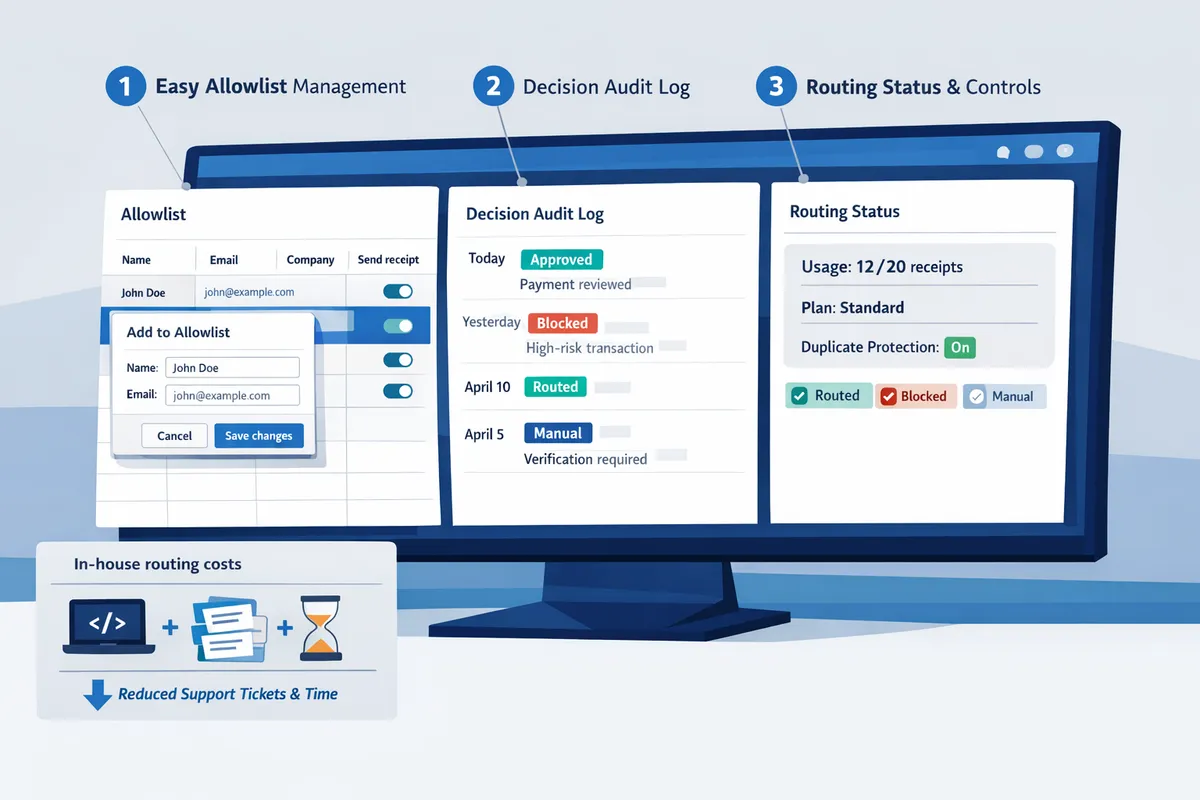
What are Route Receipts' core features and how do they compare to alternatives?
Route Receipts provides a dashboard-native allowlist, decision audit log, usage and plan controls, and duplicate protection so finance teams can selectively send receipts without building custom webhooks. These features reduce manual work for billing teams and create an auditable record of every routing decision. Read the step-by-step installation and configuration details in our Documentation.
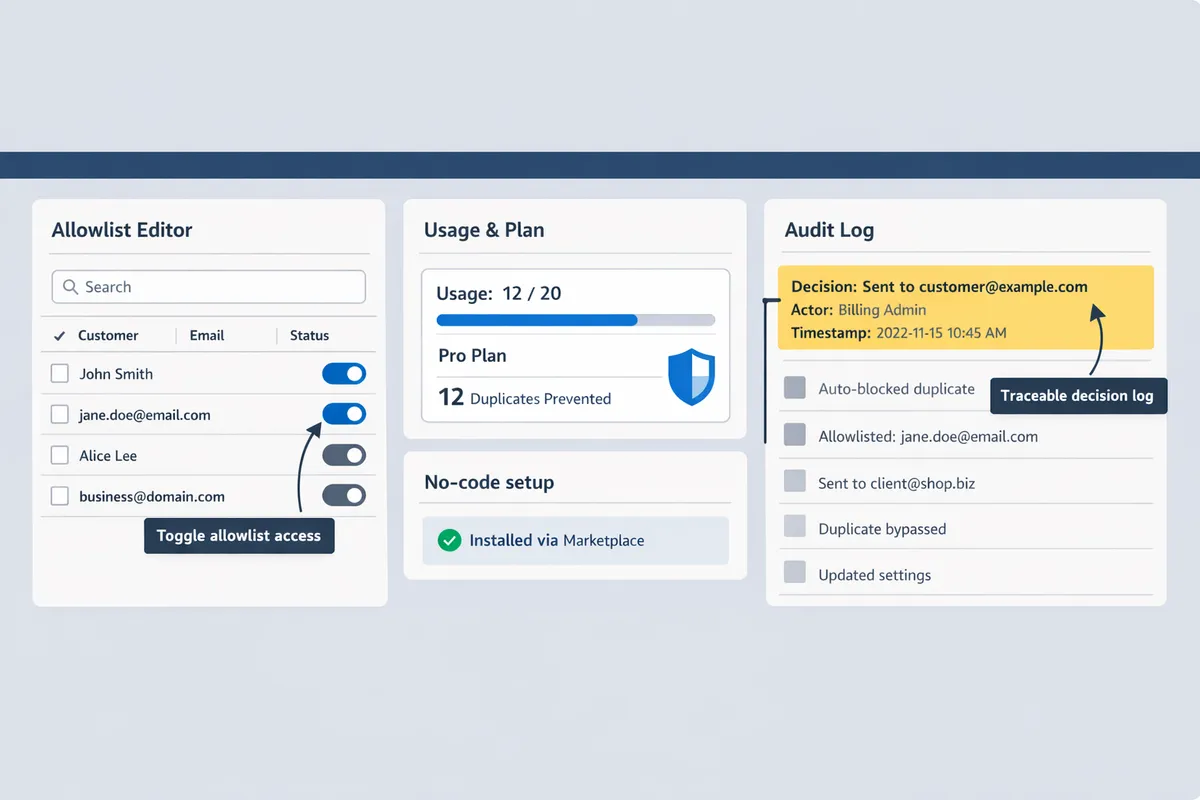
Which core features does Route Receipts include? 🔧
Route Receipts includes a dashboard-native allowlist editor, a decision audit log, plan and usage counters, duplicate-protection logic, and Stripe account-scoped permission controls. Allowlist is a list of customer IDs or emails that Route Receipts uses to decide who receives receipts; teams update it directly inside the Stripe dashboard without writing code. The decision audit log records who changed the allowlist and why, along with a timestamp and the routing outcome, which helps with expense audits and compliance reviews.
The usage counters show monthly consumption against your plan and prevent unexpected bill shock. Duplicate protection checks whether Stripe already sent a receipt and blocks a second send to avoid confusing customers. For setup steps and examples, see the install walkthrough in our Documentation and common questions in the FAQ.
💡 Tip: Disable Stripe's automatic invoice receipts before enabling Route Receipts to prevent duplicate emails.
How does Route Receipts compare side-by-side with Stripe native and DIY solutions? 📊
Route Receipts reduces setup time and ongoing maintenance compared with DIY webhook implementations while providing selective delivery and an audit trail that Stripe native receipts do not provide. The table below highlights where each approach wins and where it creates pain for non-technical finance teams.
| Feature | Route Receipts | Stripe native receipts | DIY webhook implementation |
|---|---|---|---|
| Setup time | Minutes via Stripe Marketplace install | Minutes for default enablement | Days to weeks; developer resources required |
| Allowlist / selective delivery | Yes; dashboard-native allowlist editor | No; receipts are all-or-none | Yes; requires custom code and storage |
| Audit trail | Built-in decision audit log | Minimal; relies on Stripe events | Possible but requires extra engineering |
| Duplicate protections | Built-in checks before sending | No; risk of duplicates if toggled | Custom logic required to avoid duplicates |
| Maintenance burden | Low; managed app updates | Very low; limited functionality | High; you own updates and monitoring |
| Common failure modes | Misconfigured plan limits, not disabling Stripe receipts | Unwanted receipts to all customers | Broken webhooks, drifted business rules |
Route Receipts is best for teams that need selective delivery with minimal engineering overhead. If your team prefers a fully developer-run path, a DIY webhook gives maximum flexibility but increases operational risk. For a non-technical guide to choosing a no-code path, see our beginner’s guide to selective delivery in the No‑Code Way to Route Customer Receipts.
What security and data-handling controls are in place? 🔒
Route Receipts operates with Stripe account-scoped permissions and stores only the minimal metadata required to route receipts and record decisions. Invoice and payment data remain in your Stripe account; Route Receipts stores routing metadata such as customer IDs, the allowlist status, and the routing decision for audit purposes, as described in our Privacy Policy.
Access to the allowlist and audit log is restricted by Stripe-scoped permissions so finance users do not get broader account-level keys. Route Receipts also includes controls to limit data retention of routing logs on request and supports the standard rights described in our privacy documentation. Compared with a DIY webhook that copies invoice payloads to multiple services, Route Receipts reduces the surface area for data exposure by minimizing stored fields and keeping primary invoice data inside Stripe.
For operational security guidance and recommended permission settings, see the security and setup sections in our Documentation.
How do you set up and configure Route Receipts on Stripe (step-by-step)?
Install Route Receipts from the Stripe Marketplace and configure it in the Stripe dashboard without writing code. This section gives a compact checklist and concrete steps for installation, disabling Stripe automatic receipts, building an allowlist, and testing routing decisions. Follow the steps below to avoid duplicate emails and to keep an audit trail of routing decisions.
How do you install Route Receipts from the Stripe Marketplace? ➕
Install Route Receipts directly from the Stripe Marketplace and grant the requested account permissions. 1) Sign into your Stripe account and open the Stripe Marketplace. 2) Search for Route Receipts and click Install. 3) Review the permission prompts (the app requests access to read customers and view invoice events so it can make routing decisions). 4) Approve the app and return to the Route Receipts dashboard in your Stripe account.
- Example: during install you will see scopes that allow Route Receipts to read customer records and to receive invoice event notifications. Granting these scopes enables allowlist management inside your Stripe dashboard without webhooks.
See the step-by-step install checklist in our Documentation for screenshots and exact permission names.
How do you disable Stripe's automatic receipts to avoid duplicates? ⚠️
Disable Stripe's automatic receipt emails in your Stripe settings before enabling Route Receipts to prevent duplicate messages. In your Stripe dashboard go to Settings > Email receipts and turn off automatic emails for invoices and payments in both test and live modes. After disabling, Route Receipts becomes the single point that decides whether a customer receives a receipt.
⚠️ Warning: If you forget to toggle both test and live modes you may see duplicates during testing or after going live. Verify the setting in each mode.
If duplicates appear, consult our troubleshooting steps in the FAQ to identify whether the duplicate came from Stripe settings or a second integration.
How do you create and manage an allowlist with practical examples? 📋
An allowlist is a control list that specifies which customers receive receipts, and you create it in the Route Receipts dashboard by adding customer IDs, emails, or importing a CSV. To add a single customer, paste the Stripe customer ID into the add-customer field and save. To bulk-add, upload a CSV with a customer_id or email column and map columns during the import step.
- Example: add enterprise clients who require receipts for expense reporting and exclude low-touch retail customers who prefer no email. Use descriptive metadata in the CSV (company name, account manager) so finance can audit entries later. Route Receipts writes each decision to a decision audit log so your finance team can trace why a receipt was sent or suppressed.
For practical examples of allowlist rules and audit-log usage see our beginner guide to selective delivery and the Documentation entry on allowlist management.
How do you test routing and handle common errors? 🛠️
Test routing in Stripe test mode by issuing sample invoices to allowlisted and non-allowlisted customers to verify expected behavior. 1) Switch your Stripe account to test mode. 2) Create two test customers (one added to the Route Receipts allowlist, one not). 3) Issue identical test invoices to both customers and observe if only the allowlisted customer receives a receipt. 4) Check the Route Receipts decision audit log to confirm the routing reason and timestamp.
- Common error: "no receipt sent" usually means either Stripe automatic receipts are still enabled or Route Receipts lacks permission to read invoice events. Verify both settings, then re-run the test.
💡 Tip: Test both invoice-generated receipts and one-off payment receipts. Some accounts use different flows for subscriptions and one-time charges, so testing both avoids surprises.
If you see permission errors, visit the Documentation for a permissions checklist or consult the FAQ for step-by-step diagnostics.
For more conceptual background on selective delivery and why a dashboard-native allowlist matters, read Why Did We Build Route Receipts and The No‑Code Way to Route Customer Receipts in Stripe: Beginner’s Guide to Selective Delivery.
How should finance teams govern receipt routing and measure ROI?
Finance teams should use audit logs, role-based dashboard controls, compliance checkpoints, and a simple TCO framework to govern routing and measure the return on a no-code Stripe app for receipts. Route Receipts provides a decision audit log and admin controls that make routing decisions auditable and repeatable. Use a short review cadence after launch to verify rules, reduce support tickets, and quantify time savings.
What governance and audit controls should be used? 🔍
Use Route Receipts' decision audit log and role-restricted dashboard access to create a tamper-evident trail of every routing decision. The audit log records who changed allowlists, which rule evaluated true, and the timestamp for each routed invoice, giving finance teams evidence for internal reviews and external audits. Restrict allowlist edits to a small set of finance admins and use read-only roles for broader teams so accidental changes are rare. Our documentation shows how to export audit entries and match them to invoice IDs when investigating a disputed email delivery. For operational hygiene, review recent audit entries weekly for the first 30 days, then monthly once rules stabilize.
💡 Tip: Disable Stripe's automatic receipts in your account to prevent duplicate emails when using Route Receipts. See our setup checklist in the documentation for the exact steps.
What compliance and privacy checks should finance teams run? 📑
Confirm where routing metadata is stored, who can access it, and that those controls meet your data-retention and privacy policies. Route Receipts' privacy policy describes the data we read from Stripe and third-party processing; document that flow and align it with your internal retention schedule. Ask legal or compliance to sign off on retention periods for allowlist metadata and on procedures for subject access or deletion requests. Keep a short access-control matrix listing which roles can view or edit routing metadata and where backups live. If you use regional data controls, verify whether metadata storage locations match your residency requirements and log that verification in your compliance binder.
See our privacy policy and FAQ for specific fields Route Receipts reads and stores.
How can teams measure ROI and TCO for switching to Route Receipts? 📈
Measure ROI by comparing hours spent on manual routing and webhook maintenance against Route Receipts' subscription and the time to operate it. Create a simple spreadsheet with these rows: (1) baseline monthly hours for manual routing and webhook debugging, (2) hourly cost of those staff, (3) monthly Route Receipts plan cost, and (4) estimated monthly admin time to manage allowlists. Calculate monthly savings as baseline labor cost minus plan plus admin time cost. For example, a finance team processing 200 receipts monthly can estimate the time to manually route, investigate missed receipts, and respond to related tickets, then show hours saved after switching. Also track qualitative benefits: fewer duplicate emails, lower support friction, and reduced engineering dependency. Use our documentation on plan management and usage to plug accurate plan costs into your TCO sheet.
Numbered ROI checklist:
- Record baseline monthly hours and ticket counts for receipts.
- Assign blended hourly cost for staff and engineers handling receipts.
- Add Route Receipts monthly subscription and expected admin hours.
- Calculate payback period and annualized savings.
What are recommended next steps after deployment? 🔁
Run a 30-day operational review that checks routing accuracy, invoice-related support tickets, and usage versus your plan limits. During the review, pull the audit log to verify that allowlist rules matched intended customers and reconcile any exceptions with invoice IDs. Track support ticket volume and categorize tickets (missing receipt, duplicate, wrong recipient) to measure improvement. Update internal documentation and training for billing and support teams, then adjust allowlist rules or escalate plan tiers if usage grows. Finally, schedule quarterly governance reviews to ensure rules still match business segmentation and compliance needs.
For a step-by-step install and post-launch checklist, see our beginner's guide to selective delivery and the Route Receipts installation docs.
Frequently Asked Questions
This FAQ answers the most common operational and implementation questions finance teams ask about Route Receipts and no-code receipt routing for Stripe. Our answers reference the installation and troubleshooting steps in our documentation and link to privacy specifics so teams can act immediately.
Does Route Receipts require custom code or webhooks? 🤔
No. Route Receipts runs as a no-code Stripe app inside the Stripe dashboard and does not require custom webhooks or development. Our Marketplace install places the app directly in your Stripe account so finance teams can manage the allowlist and routing rules from the UI. This removes the need to build and maintain webhook infrastructure, which otherwise consumes engineering time and creates ongoing maintenance and compliance risk. See our step-by-step install guide in the documentation for exact setup steps and the beginner's guide to selective delivery for examples.
How do I stop Stripe from sending automatic receipts when using Route Receipts? 🛑
You must disable Stripe's automatic receipt emails in your Stripe settings before enabling Route Receipts to prevent duplicate messages. In practice that means turning off the invoice/receipt toggles in Stripe Billing and then testing a routed invoice in test mode to confirm only Route Receipts sends the message. Our documentation shows the toggle locations and verification steps you should run after install.
⚠️ Warning: Disable Stripe automatic receipts only after you have at least one allowlist entry and have tested a routed invoice. Disabling receipts without testing can cause missed customer communications.
Can I restrict receipts to only enterprise or expense-policy customers? 🏢
Yes. Route Receipts uses an allowlist so finance teams can target receipts to enterprise customers or those who need receipts for expense policies. You can add individual customer IDs or import batches of customers via CSV to the allowlist. For reliability, prefer Stripe customer IDs over email addresses when building the allowlist; that avoids missed receipts when customers change emails. Our Beginner's Guide to Selective Delivery describes common allowlist patterns and examples for enterprise vs retail segmentation.
Where does Route Receipts store routing data and what about privacy? 🔍
Route Receipts stores minimal routing metadata and audit logs required to make routing decisions; full details appear in our privacy policy. Specifically, we record allowlist entries, the decision outcome for each invoice, timestamps, and the admin who made changes. Our privacy policy documents retention periods, any third-party processors used, and how you can request exports or deletions. Review our privacy policy and the documentation for data export and retention controls before rolling the app into production.
What happens if a receipt goes missing or duplicates appear? 🧭
Missing receipts typically indicate a configuration or permission issue, while duplicates most often happen when Stripe's automatic receipts remain enabled. To troubleshoot, first confirm Stripe automatic receipts are disabled, then check the allowlist for the customer and inspect Route Receipts' decision audit log to see whether the invoice was routed and why. The documentation’s troubleshooting section lists the common permission and allowlist checks that resolve most incidents within minutes. Example: a missing enterprise receipt often traces to an allowlist that used email instead of customer ID; switching to customer IDs fixes repeat occurrences.
How do plan limits work and when should I upgrade? 💼
Plan limits for Route Receipts are based on monthly routed receipts and the features included in each tier; upgrade when your routed volume or admin needs exceed your current plan. The app’s plan management screen shows current usage, remaining routed receipts for the billing period, and available upgrade paths. Consider upgrading when you need advanced admin controls, additional seats, or when routed volume routinely exceeds your plan’s allowance. See the documentation for plan details and how to change tiers.
For a step-by-step install and governance checklist, follow our installation and governance guide in the documentation and read why we built Route Receipts to understand the operational trade-offs when replacing a webhook-based approach.
Next steps to deploy selective receipt routing
RouteReceipts lets teams selectively send Stripe receipts from the dashboard without writing code. RouteReceipts is a specialized application designed to enhance the way businesses manage their Stripe receipt distribution. This app addresses a significant limitation within Stripe's native functionality, which traditionally forces businesses to either send receipts to all customers or none at all. RouteReceipts empowers businesses with the flexibility to selectively send receipts to specific customers, thereby preventing unnecessary email clutter for those who do not require them. This is particularly beneficial for businesses with diverse customer bases, such as enterprise clients who need receipts for expense tracking and others who prefer not to receive them. By integrating directly into the Stripe dashboard, RouteReceipts allows users to manage an allowlist of customers effortlessly, without the need for complex coding or custom webhook integrations. The application features a dashboard-native user interface, a decision audit log for transparency, and a straightforward setup process via the Stripe Marketplace. RouteReceipts offers a tiered pricing model, starting with a free plan that includes 20 receipts per month, with the option to upgrade for higher volume needs. This solution is ideal for businesses seeking to streamline their financial communications and maintain a professional relationship with their clients by ensuring that only necessary communications are sent.
Start your implementation by following the RouteReceipts Stripe setup in our documentation and test allowlist rules with a few customer IDs. For a practical walkthrough of selective delivery, see The No‑Code Way to Route Customer Receipts in Stripe: Beginner’s Guide to Selective Delivery. If you need a no-code stripe app for receipts, create your allowlist and verify routing in minutes using the getting-started guide.
Subscribe to our newsletter for implementation tips and updates.