
Selective Receipt Routing for Stripe: Architecture, Governance, and Real‑World Patterns
Sending every Stripe receipt to all customers creates inbox clutter and adds reconciliation work for finance teams. Selective receipt routing for Stripe is a routing pattern that sends receipts only to chosen customers, using allowlists and policy rules instead of Stripe's global on/off setting. This feature-deep-dive explains how to implement selective receipt routing for Stripe, compares Stripe's native options with RouteReceipts, and outlines governance and operational patterns for scaling. RouteReceipts integrates into the Stripe dashboard to manage allowlists, provide a decision audit log, and remove the need for custom webhook coding. For technical buyers, the guide maps architecture choices, failure modes, and runbook patterns so teams can compare DIY costs to using RouteReceipts. Which architecture keeps receipts auditable without ballooning operational overhead?
How does selective receipt routing for Stripe fix Stripe's all-or-none receipt behavior?
Selective receipt routing for Stripe prevents sending every receipt to every customer by applying business rules that decide delivery per event. This reduces inbox clutter, cuts finance reconciliation work, and stops support noise caused by unnecessary receipts.
What is selective receipt routing? 🎯
Selective receipt routing is a routing pattern that filters receipt delivery based on customer attributes, subscription type, or allowlist membership. For example, you might only send receipts when the customer email domain matches a corporate domain, when the subscription is a billable enterprise plan, or when a metadata flag like "needs_receipt" is true. Typical decision points include customer email domain, plan tier, invoice metadata, and allowlist membership. A common rule set for a SaaS company looks like this:
- If customer.metadata.needs_receipt == true, send receipt.
- Else if customer.email ends with "@bigcorp.com", send receipt and tag for accounting.
- Else do not send automated receipt and surface invoice link in the portal.
Route Receipts implements these rules in the Stripe UI so teams can operate without building per-event webhook logic.
Why Stripe's native receipts only provide global toggles ⚙️
Stripe's native receipts provide global on/off toggles and templating, not per-customer allowlists or a rules engine for selective delivery. That design forces teams to either send receipts to all customers or turn receipts off entirely. The operational consequence is predictable: engineering teams build custom webhook pipelines to filter receipts, which introduces development cost, ongoing maintenance, and risk of duplicate or missing emails. Finance and support teams lose visibility unless the webhook system posts decision logs back to Stripe or a shared dashboard. Reference your internal billing docs to call out this limitation and consult Stripe's receipts documentation for the native behavior.
How Route Receipts adds allowlists, dashboard controls, and an audit log ✅
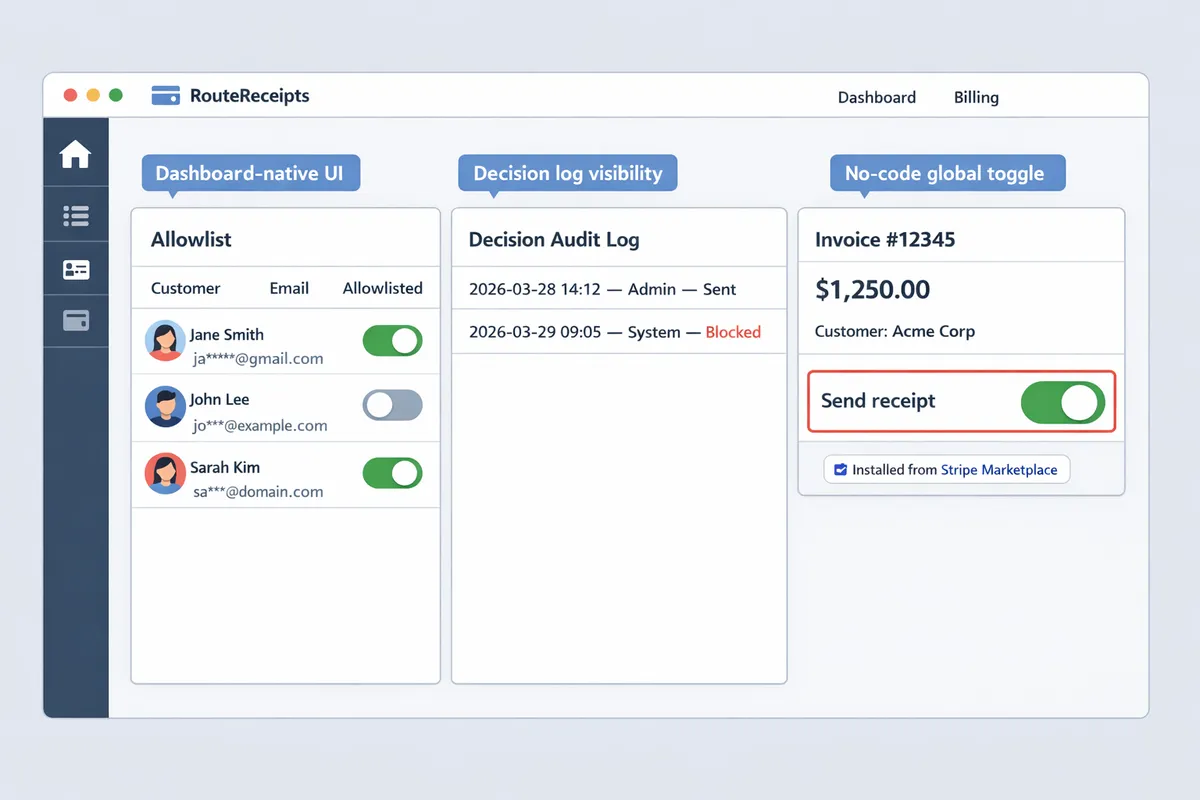
Route Receipts integrates directly with Stripe to add allowlists, a decision audit log, and per-event routing controls inside the Stripe dashboard. The app provides a dashboard-native allowlist UI so non-developers can add or remove customers by email or customer ID. Route Receipts records a Stripe receipt audit log entry for every invoice event that shows the rule evaluated, the decision made, and the outbound action taken. That audit trail reduces support escalations because finance can confirm whether a receipt was intentionally suppressed or sent.
Route Receipts also includes controls to disable Stripe's automatic receipt email for specific flows to prevent duplicates, plus a testing mode so teams can validate rules against sample events before going live. See the Route Receipts documentation for step-by-step setup and the no-code guide for common configurations. For installation and marketplace details, consult the Route Receipts FAQ and the dashboard setup guide.
⚠️ Warning: Disable Stripe's automatic receipt emails for the same events you route with Route Receipts to avoid duplicate messages. See the Frequently Asked Questions for exact steps.
Capability comparison
| Feature | Stripe native receipts | DIY webhook filter | Route Receipts |
|---|---|---|---|
| Per-customer allowlist | No | Yes (custom) | Yes (dashboard UI) |
| Rules engine (multi-criteria) | No | Yes (code required) | Yes (no-code and advanced rules) |
| Dashboard controls for non-devs | No | Limited | Yes |
| Stripe receipt audit log | Limited (global events only) | Depends on implementation | Yes (per-event decision log) |
| Duplicate prevention (Stripe + routing) | Manual | Manual and error-prone | Built-in guidance and toggles |
| Setup time | Minutes | Weeks (engineering) | Minutes to hours (install + configure) |
| Maintenance overhead | Low (global) | High (keep webhooks and rules updated) | Low (managed, dashboard-driven) |
| Visibility for finance | Low | Varies | High (audit log + UI) |
| No-code installation | Yes (global toggle) | No | Yes (Stripe Marketplace app) |
Related reading: our article on why we built Route Receipts explains the product rationale and operational trade-offs, and the no-code beginner's guide shows a step-by-step setup for common cases.
What feature set and architecture does RouteReceipts provide for selective receipt routing?
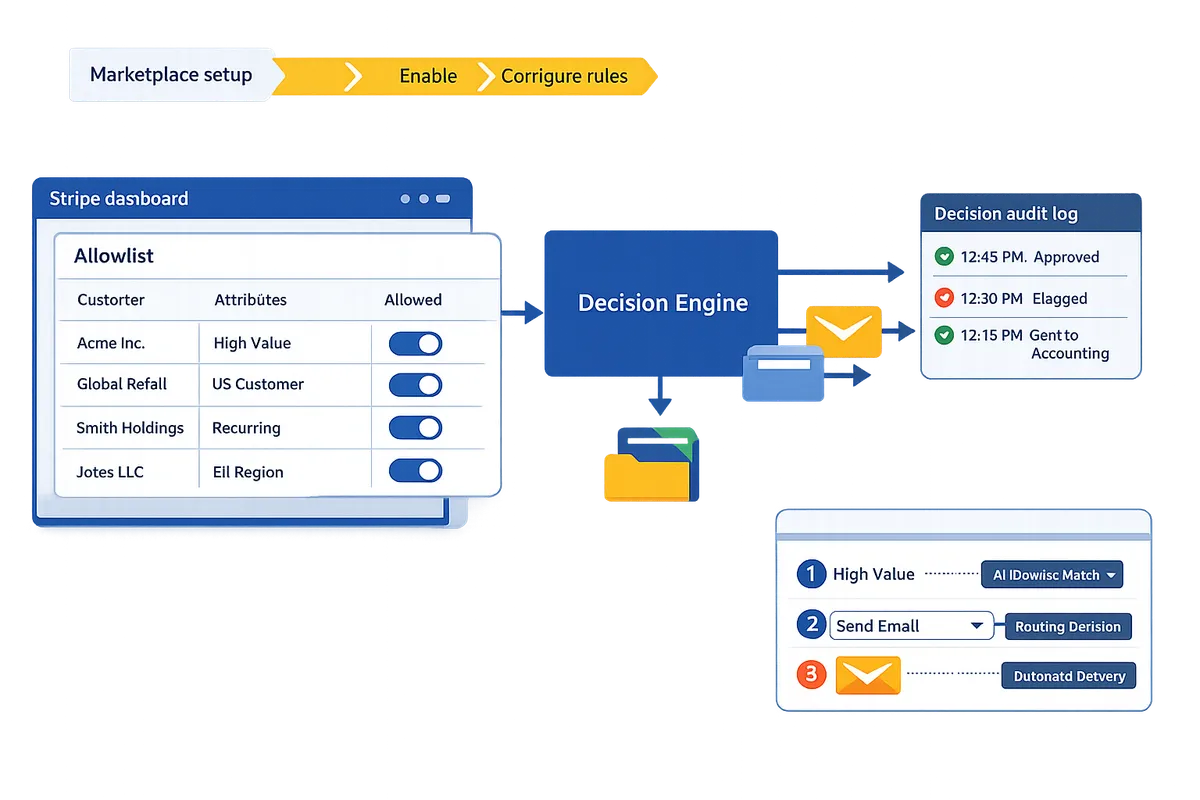
RouteReceipts provides a dashboard-native allowlist, configurable routing rules, and an auditable decision log that run alongside Stripe receipts and make selective delivery practical for production use. This section explains each capability, two common integration patterns, and the governance controls to test before turning selective routing on for your customers.
Receipt routing rules allowlist 🧾
Receipt routing rules allowlist is a configuration object that maps customer identifiers or attributes to receipt delivery decisions. RouteReceipts stores the allowlist inside the Stripe dashboard so teams can create and edit rules without writing webhook code. Common rule dimensions include:
- Customer ID (stripe customer object).
- Customer email domain (example: @enterprise.com to capture corporate accounts).
- Subscription plan or price ID (useful for billing tiers that always require receipts).
- Metadata tags placed on charges or invoices (e.g., expense_account:true).
- Manual overrides set by finance or support staff from the UI.
Example rule: allow receipts for customers where email domain = @company.com OR metadata.expense_account = true, but block receipts for plan = "trial". Our website exposes these rules next to the invoice and customer pages so finance and support can verify routing before contacting engineering. For a step-by-step setup using our no-code flow, see The No‑Code Way to Route Customer Receipts in Stripe: Beginner’s Guide to Selective Delivery.
Decision audit log 📋
The decision audit log provides an immutable event trail for each routing decision. RouteReceipts records which rule matched, the invoice or payment ID, who edited the allowlist, and an ISO timestamp for every routed receipt so audits and disputes are easy to trace. That same log shows whether RouteReceipts suppressed Stripe's automatic receipt to avoid duplicates, which simplifies reconciliation when finance asks why a receipt never arrived. Teams can export the log as CSV or query it from the RouteReceipts dashboard for a date range, which helps when preparing monthly reconciliation packets or responding to compliance requests. See our Documentation for instructions on exporting logs and connecting exports to your accounting workflow.
💡 Tip: Export audit entries for any month before your retention cutoff so audits remain reproducible across teams.
Integration architecture and delivery patterns 🔗
RouteReceipts integrates with Stripe via the Stripe Marketplace and applies routing decisions at the event level without custom webhook code in most cases. Choose between two architecture patterns depending on complexity and branding needs:
- Stripe-native receipts plus RouteReceipts decisioning (simple cases).
- Flow: Stripe generates invoice events. RouteReceipts evaluates the allowlist, suppresses or permits Stripe's automatic receipt, and records the decision.
- Best for businesses that need selective delivery without changing how receipts look or where they are sent.
- RouteReceipts as an orchestration layer for multi-brand or multi-channel needs.
- Flow: Stripe emits events. RouteReceipts evaluates rules, then routes the receipt payload to channel handlers (branded sender, different email templates, SMS, or in-app notifications).
- Best for marketplaces, multi-brand merchants, or teams that need brand-specific sender addresses and multi-channel delivery.
Role-based access control lives in the Stripe dashboard so admins can restrict who edits allowlist rules. For companies with data residency requirements, our website documents how RouteReceipts handles event storage and where logs are held. Test both patterns in Stripe test mode before enabling in production to validate rule coverage and avoid duplicate deliveries.
💡 Tip: Start by mirroring a small production subset in test mode to validate suppressed receipts and UI overrides before you flip the switch.
Limits, SLAs, and pricing considerations
Understanding volume limits, feature tiers, and operational SLAs prevents surprises when you enable selective routing in production. RouteReceipts offers tiered plans that differ by monthly routing volume, audit log retention, and support SLA. Our website's free plan includes 20 receipts per month, which is useful for small pilots or dev testing. Use this checklist when choosing a plan:
- Monthly routing volume and expected growth.
- Audit log retention period required by your finance or compliance team.
- Multi-team access and role-based controls.
- Per-transaction latency and whether an SLA covers peak billing windows.
- Support response times and escalation paths for billing incidents.
For a full pricing breakdown and plan comparison, review our Documentation and the Frequently Asked Questions page to match business needs to plan features.
Why Did We Build Route Receipts? | How to Limit Stripe Receipts to Chosen Customers (Step‑by‑Step, No Code) | Documentation
How do teams implement selective receipt routing in real-world scenarios and validate outcomes?
Teams implement selective receipt routing in production by defining clear business rules, running targeted tests against receipt audit logs, and rolling out changes in phases to limit customer impact. This approach reduces duplicate messages, shortens finance reconciliation cycles, and gives operations an auditable trail for each routing decision. Use Route Receipts to manage the allowlist and decision log inside the Stripe dashboard instead of building and maintaining custom webhook infrastructure.
SaaS subscriptions: route receipts to finance contacts and skip end-user noise. 🎯
For B2B SaaS, send receipts to a company's billing contact and suppress customer-facing receipts when appropriate. For example, create a rule that checks customer.metadata.billing_contact and routes invoice emails to that address while disabling the customer-facing receipt. Route Receipts makes this practical through a dashboard-native receipt routing rules allowlist that accepts customer IDs or billing emails and prevents duplicate messages.
Test plan:
- Add three test customers with billing_contact populated.
- Trigger invoices and confirm receipts appear only at billing_contact addresses in the Route Receipts decision audit log.
- Verify Stripe's automatic receipt is suppressed for those customers. Sample allowlist entries: customer_001 -> billing@acme.com, customer_002 -> expense@client.org.
See our step-by-step guide on How to Limit Stripe Receipts to Chosen Customers (Step‑by‑Step, No Code) for a no-code rule template and troubleshooting tips.
Marketplaces and platforms: apply per-seller branding and selective delivery. 🏷️
Platforms route receipts by connected account so each merchant receives merchant-specific receipts and branding. For platforms, define rules that match invoice.connected_account or customer.metadata.connected_account_id and route the invoice to the connected account's billing email while applying the merchant's logo and reply-to address. Route Receipts supports per-merchant routing without custom webhooks by letting you author per-connected-account rules in the dashboard and recording each decision in the audit log.
Pilot path. Start with 10 merchants representing high, medium, and low volume. Collect a sample of 200 routed receipts from the audit log, check branding and delivery accuracy, then scale to 50 merchants before full rollout. For background on why Route Receipts exists and the operational trade-offs, see Why Did We Build Route Receipts?.
Retail and POS: choose email, SMS, or in-app receipts based on customer preference. 📲
Retail teams select delivery channel per customer preference and consent, sending email for corporate accounts and SMS or in-app for walk-up customers who opt in. Implement channel selection rules that read customer.metadata.preferred_channel and routing rules that map values to email, sms, or in_app actions. Use Route Receipts' channel-mapping features in the Documentation to keep channel assignments auditable and editable by non-engineering teams.
Consent and compliance. Track opt-ins on the customer record and use double opt-in for SMS.
💡 Tip: Always use double opt-in for SMS signups.
For compliance details and carrier requirements, consult Frequently Asked Questions and the Route Receipts documentation before enabling SMS delivery.
Migration checklist and step-by-step rollout
Follow a staged migration to move from blanket receipts to selective receipt routing in Stripe: inventory flows, define allowlist rules, enable audit logging, pilot, then roll out with rollback procedures. Use Route Receipts to manage rules, monitor decisions, and prevent duplicate deliveries while you migrate.
- Inventory current receipt flows. List events (invoice.paid, charge.succeeded), recipients, and channels. Note which customer segments need receipts.
- Define allowlist rules for five critical segments. Examples: enterprise billing contacts, marketplace sellers by connected_account_id, retail walk-ups opting into SMS.
- Enable audit logging in Route Receipts and capture 100 sample events for each segment.
- Run a 2-week pilot with monitoring on a small user set (10–50 accounts). Review the audit log, delivery rates, and branding accuracy daily.
- Full rollout with rollback procedures and a single-step disable for selective rules if issues arise.
Monitoring dashboard template. Track these metrics daily: delivery rate by channel, failed delivery rate, decision audit log mismatches (expected vs actual), average time-to-delivery, and support tickets related to receipts. Correlate spikes in support tickets with recent rule changes.
⚠️ Warning: Disable Stripe's automatic receipt delivery only after you confirm Route Receipts routes and suppresses duplicates in the audit log; otherwise customers may receive duplicate receipts.
How should teams govern, monitor, and scale selective receipt routing at enterprise scale?
Governance prevents accidental customer communications, keeps finance reconciliation predictable, and limits legal risk as rules proliferate. Strong controls pair role-based approvals with automated synthetic testing and KPI dashboards so teams can spot regressions before customers notice.
Policy and role-based controls for allowlist management. 🔐
Allowlist is a configuration that lists customer IDs or emails authorized to receive receipts and must be treated as a controlled change. Define who can propose, approve, and deploy allowlist changes. Product or finance should own change proposals. Legal or compliance must approve any rule that alters customer-facing text or delivery method. Engineering should only apply changes when a compliance sign-off exists for high-risk edits. Create an access control matrix stored in your governance docs and link each change to a ticket ID and approval artifact. Use RouteReceipts' dashboard-native allowlist and decision audit log to capture who changed what and when. Cross-check entries against the Stripe receipt audit log during reviews to ensure webhook behavior matches dashboard decisions.
💡 Tip: Require an approval annotation for any allowlist change that affects more than 5% of active customers or updates receipt language.
Automated validation, sampling tests, and synthetic events for monitoring. ⚙️
Run daily synthetic Stripe events and sampling tests to verify that routing rules still match expected customers and that the Stripe receipt audit log records decisions. Create three lightweight test cases and run them automatically: a valid allowlist hit, an allowlist miss, and a manual override. Schedule synthetic events in a test Stripe account or sandbox environment; RouteReceipts supports dashboard testing so you can confirm routing decisions without emailing real customers. Capture routing decisions in both RouteReceipts' decision audit log and the Stripe receipt audit log for cross-reference. Set alert thresholds for unexpected changes: for example, raise an alert if rule mismatches exceed 1% of daily routed receipts or if routed volume drops by 30% hour-over-hour. Send alerts to an on-call rotation and create a short triage checklist so responders can confirm whether a ruleset rollback is required.
⚠️ Warning: Run synthetic events against test customers only. Sending synthetic events to production customers risks confusion and duplicate records.
KPIs and ROI to measure success (support tickets, billing reconciliation, time saved). 💹
Track support ticket volume, finance reconciliation hours, and the number of routed receipts to quantify ROI from selective receipt routing for Stripe. Report these metrics on a weekly dashboard: total routed receipts, routed receipts as a share of total invoices, weekly support tickets mentioning "receipt" or "email spam," and finance hours spent reconciling receipts. Use a before-and-after comparison anchored on the change date. For example, compare the four weeks before a rule rollout to the four weeks after and present absolute ticket reductions and hours saved. Recommended dashboard metric set (weekly):
- Routed receipts (count)
- Routed receipts as % of invoices
- Receipt-related support tickets (count)
- Finance reconciliation time (hours)
- Time-to-detect routing anomalies (minutes) Estimate business impact with simple math. For example: if finance spends 20 hours/month on receipt reconciliation and selective routing reduces that by 60% in your sample, that equals 12 hours saved per month. Use this calculation to justify additional engineering or RouteReceipts subscription tiers.
Operational runbook: incident response, rollbacks, and communication templates. 🛠️
Create a runbook that lists rollback steps, notification templates, and escalation paths for receipt routing incidents. Use a numbered incident flow so responders act consistently:
- Detect: Alert triggers to on-call and records event in incident tracker. Log relevant entries from RouteReceipts and the Stripe receipt audit log.
- Contain: Temporarily disable the offending rule in RouteReceipts or revert to a safe allowlist snapshot. If necessary, re-enable Stripe's automatic receipts to prevent missed communications.
- Remediate: Apply a corrected rule, run synthetic tests, and sample real transactions to confirm expected behavior.
- Communicate: Use short, role-targeted templates and record which customers received incorrect emails. Sample customer notification template: "We sent an extra receipt to your account in error. No financial changes occurred. Reply if you need a corrected invoice." Sample internal finance template: "Issue: [summary]. Impact: [count]. Action taken: [rollback ID]. Next steps: [owner, ETA]." Maintain a compact post-incident checklist: root cause, time-to-detect, time-to-remediate, preventive action, and who signed off on closure. Store runbook steps alongside your governance matrix and link to RouteReceipts' decision audit log for post-incident audits.
Related reading: review Why Did We Build Route Receipts? for product rationale and see Documentation for integration and troubleshooting steps. For a no-code setup walkthrough, consult The No‑Code Way to Route Customer Receipts in Stripe: Beginner’s Guide to Selective Delivery.
Follow these next steps to implement selective receipt routing for Stripe.
RouteReceipts is a specialized application designed to enhance the way businesses manage their Stripe receipt distribution. This app addresses a significant limitation within Stripe's native functionality, which traditionally forces businesses to either send receipts to all customers or none at all. RouteReceipts empowers businesses with the flexibility to selectively send receipts to specific customers, thereby preventing unnecessary email clutter for those who do not require them. This is particularly beneficial for businesses with diverse customer bases, such as enterprise clients who need receipts for expense tracking and others who prefer not to receive them. By integrating directly into the Stripe dashboard, RouteReceipts allows users to manage an allowlist of customers effortlessly, without the need for complex coding or custom webhook integrations. The application features a dashboard-native user interface, a decision audit log for transparency, and a straightforward setup process via the Stripe Marketplace. RouteReceipts offers a tiered pricing model, starting with a free plan that includes 20 receipts per month, with the option to upgrade for higher volume needs. This solution is ideal for businesses seeking to streamline their financial communications and maintain a professional relationship with their clients by ensuring that only necessary communications are sent.
For a practical next step, install RouteReceipts from the Stripe Marketplace and follow the getting-started guide in our Documentation to configure rules and audit logging. For background on architecture and governance decisions, read Why Did We Build Route Receipts?. If you prefer operational how-to steps, see the no-code walkthrough in our beginner's guide.
Subscribe to our newsletter for implementation tips and updates.