Selective Receipt Sending in Stripe: Best Practices for Policies, Allowlists, and Audit Logs
One-size-fits-all Stripe receipts force finance teams to email receipts to 100% of customers, creating inbox clutter and extra reconciliation work. Selective receipt sending lets Stripe admins decide who receives a receipt and when. This best-practices guide for Stripe admins and finance leads explains policy design, allowlist management, and audit-log requirements using Route Receipts and fits into our Selective Receipt Routing resources. Our Route Receipts dashboard integrates into the Stripe dashboard, avoids custom webhook plumbing, and provides a dashboard-native UI plus a decision audit log for transparency. Building the same behavior yourself requires credential management, token refresh, webhook retries, rate-limit handling, and durable audit trails. We also outline audit log checks that catch edge cases many teams miss.
Core principles and fundamentals
Selective receipt sending requires clear policy rules, mapped event triggers, and an auditable retention plan so finance teams can apply the same decision every time. This section defines the receipt types you should control, the decision criteria for allowlists, and the minimum metadata and consent records to capture for compliance and troubleshooting.
Define receipt types and triggers ⚙️
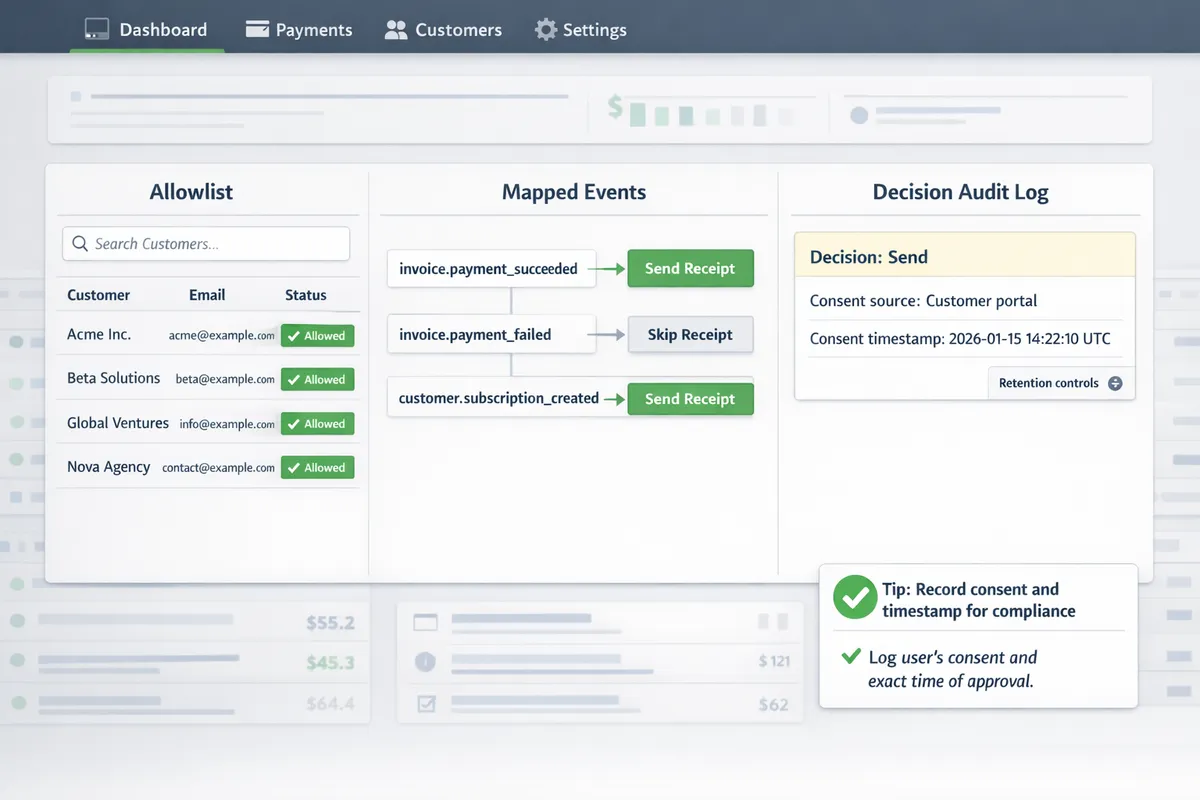
List the receipts you issue and attach exact Stripe events to each so the billing workflow never guesses which communication fires. Typical mappings we enforce: payment receipts -> payment_intent.succeeded; invoice emails -> invoice.finalized and invoice.payment_succeeded; refund receipts -> charge.refunded or refund.updated. Add a single-line rule for each channel (email, webhook-forward, or portal notice) and record the event-to-channel mapping in your audit log.
Define eligible customers by concrete attributes, not vague categories. Use billing contact email, company billing role, presence of a tax ID, and contract clause that requires receipts. Example: include customers with billing_role = "finance" OR contract_receipt_required = true. For mapping triggers to allowlist rules, see our dashboard guide to mapping triggers and allowlist rules in our Documentation and the no-code walkthrough for selective delivery.
If you consider a DIY webhook router, expect to handle auth header validation, idempotency checks, retry with exponential backoff, and duplicate suppression. Sample minimal webhook handler illustrating auth + retry logic:
// verify signature, then
if (!validSignature(req)) throw 401;
try {
 processEvent(req.body); // check idempotency, map event->customer
} catch (err) {
 scheduleRetry(err); // backoff, logging, dead-letter
}
Route Receipts removes most of this operational burden by hosting the allowlist UI inside Stripe and writing a decision audit log for each routed event.
Design a selective receipt policy 📜
Policy (one-sentence): Only send automated receipts to customers who require them for billing reconciliation, tax reporting, or contractual obligations, as recorded in the allowlist. Follow with criteria that are simple to apply and fast to audit.
Decision matrix billing teams can follow when adding or removing customers from the allowlist:
- Does the contract explicitly require receipts? Yes -> Allowlist. No -> Continue.
- Is the billing contact tagged as Finance or Accounts Payable? Yes -> Allowlist. No -> Continue.
- Is the customer on an invoiced cadence (monthly/annual) rather than metered card charges? Yes -> Allowlist. No -> Deny.
- Is a tax ID or VAT number present and required by law? Yes -> Allowlist.
Document the approver role (billing manager or finance lead), the justification, and the timestamp for each change. Building this yourself requires systems for credential rotation, token refresh, quota monitoring, concurrent-write handling for allowlist updates, cache invalidation across services, and observability for retries and failures. Route Receipts centralizes the allowlist management in the Stripe dashboard, enforces the approval metadata, and writes an auditable entry for each decision so you avoid building that infra in-house.
Privacy, consent, and retention 🔒
Capture clear consent and store the consent record with every allowlist decision; the consent record must include who consented, method (contract clause, explicit opt-in), and timestamp. Example opt-in language for contracts and billing portals: "We will send automated receipts to the designated billing contact for tax and reconciliation purposes. To opt out, contact billing@example.com." Place that text in contracts and the billing settings UI and record the method in the decision log.
Limit personal data on receipts to the minimum required: customer or company name, billing address when legally required, invoice ID, date, and payment method summary (last four digits only). Retain decision logs and receipt metadata according to your legal obligations and internal policies, and include an internal escalation path for privacy questions (privacy@ourwebsite.com -> Billing Lead -> Legal). For implementation details on how Route Receipts stores decision logs and integrates retention controls, see our Documentation and the FAQ.
💡 Tip: Always record the consent source and timestamp in the decision audit log so you can respond to access or deletion requests without searching email threads.
Proven strategies and techniques
Scaling selective receipt sending requires clear, machine-readable rules and delivery logic that survives retries, duplicates, and account changes. The patterns below give finance and engineering teams concrete allowlist templates, resilient webhook handling, and practical customer messaging you can apply immediately. Route Receipts ties these pieces together with a dashboard-native allowlist and a decision audit log so teams avoid building brittle webhook flows from scratch.
Allowlist patterns and rule examples 🧾
Use a small, consistent set of allowlist patterns so policies stay auditable and easy to reason about. Common patterns include:
- Per-customer. Key: customer_id (e.g., customer_id=cus_ABC123). Use this for one-off vendor or enterprise customers.
- Per-subscription or plan. Key: subscription_id or price_id. Apply when only billed subscriptions require receipts.
- Domain-based. Key: customer.email_domain = example.com. Useful for corporate domains where every contact needs receipts.
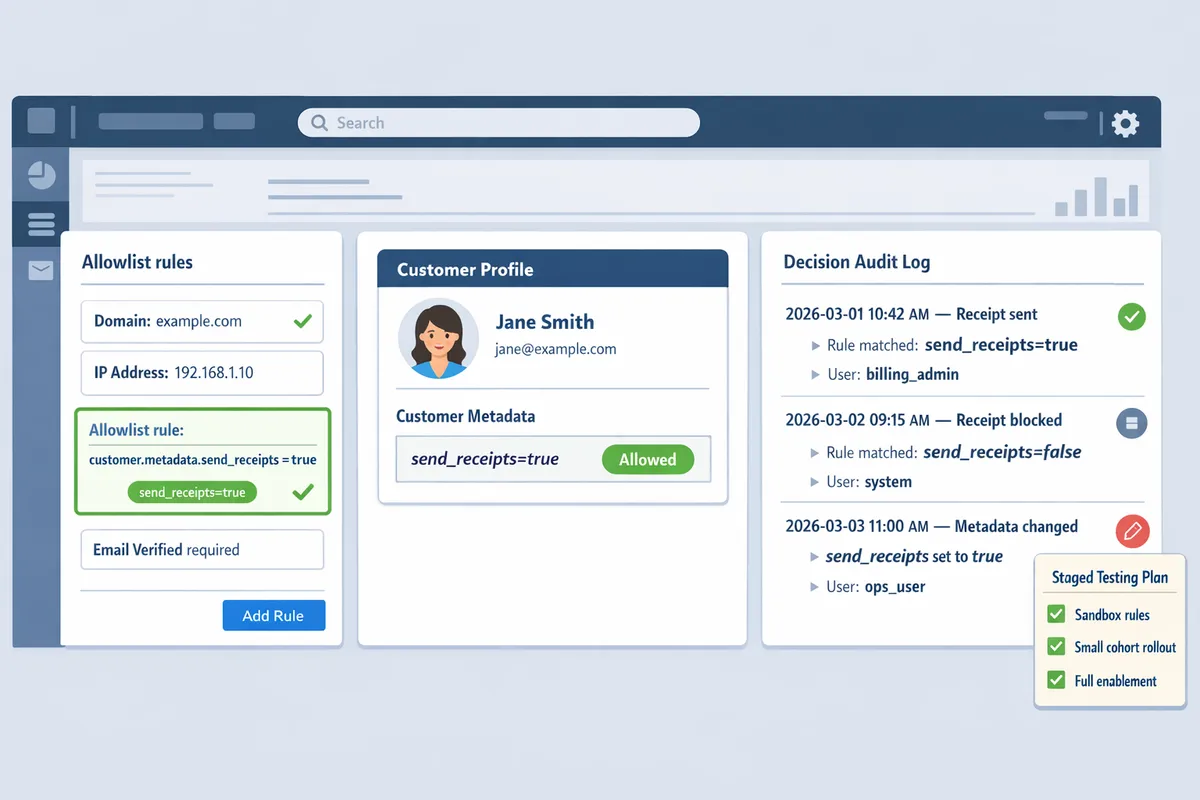
- Tag-based. Key: customer.metadata.send_receipts = "true". Best for programmatic toggles and bulk updates.
Rule templates billing teams can paste into an allowlist entry: customer.metadata.send_receipts=true, customer.email_domain=finance.example.com, subscription_id=sub_123. For natural-language entry wording use: "Send receipts to any contact with metadata key send_receipts=true and to all @enterprise.com emails."
⚠️ Warning: If you disable Stripe's automatic receipts to prevent duplicates, document that change and test refunds and retries. Refer to our FAQ for guidance on avoiding duplicate messages.
For context on why a dashboard-native allowlist reduces engineering work, see Why Did We Build Route Receipts? for the product rationale and design trade-offs.
Handling webhooks, race conditions, and retries 🧩
Webhooks commonly arrive duplicated, out of order, or during transient Stripe incidents; handling that requires deduplication, ordering logic, and durable state. Building this in-house means you must implement idempotency-key handling, a durable dedupe store, token refresh and credential rotation, quota monitoring, exponential backoff with jitter, and observability for failed webhook deliveries.
Operational burdens you would own if you DIY: credential rotation, token refresh, quota limits and rate-limiting backoff, retry logic with exponential backoff, idempotency key generation and storage, concurrent update race conditions when customer metadata changes, cache invalidation after metadata edits, monitoring/alerting for missed events, and deployment/versioning to roll out fixes safely.
Short illustrative pseudocode for an idempotent webhook handler (conceptual, not production-ready):
if seen(event.id) return 200
decision = evaluate_allowlist(event.customer_id)
persist_decision(event.id, decision)
acknowledge_to_stripe
💡 Tip: Always store a durable mapping of event.id to decision before sending outbound emails. That prevents double-sends after retries.
Route Receipts removes most of this operational work by integrating with Stripe, applying allowlist decisions consistently, and keeping a searchable decision audit log. See the Documentation for how Route Receipts wires into Stripe webhooks and preserves decision consistency. If you need quick answers about installation or duplicate handling, consult our Frequently Asked Questions.
Customer-facing language and templates ✉️
Be explicit about what customers will receive and how they can change preferences; clear language reduces support tickets and opt-out friction. Use short, actionable copy in opt-in requests and on invoices:
- Opt-in email subject: "Receipt preferences for payments from [Your Company]". Body: "We can send PDF receipts for every successful payment to this email. Reply or update your preferences in your billing portal if you prefer not to receive them."
- Preference confirmation: "You will receive a PDF receipt for future payments. Change this at any time in your billing settings."
- Invoice footer: "Receipt preference: receive a PDF for each payment. Manage receipt settings in your billing portal."
Place a clear preference link in both the invoice footer and the customer portal. For a no-code implementation path and copy suggestions that plug into a dashboard workflow, see The No‑Code Way to Route Customer Receipts in Stripe: Beginner’s Guide to Selective Delivery and our Documentation for exact locations to surface preference links in invoices and the portal.
Suggested short portal copy: "Receive receipts for every payment. Toggle on to get a PDF after each successful charge." Store the user's explicit choice in customer.metadata (for example `send_receipts=true`) so your allowlist rules can read it directly. Route Receipts reads these metadata flags and shows the decision and change history in the audit log, reducing manual lookups for billing teams.
Implementation and measurement tips
A safe deployment plan reduces operational risk and protects customer communications while you validate business rules. Below are step-by-step setup instructions for Route Receipts, a staged testing plan with a migration checklist for teams moving from "send to all" or custom webhooks, and the KPIs and audit-log practices that show whether your selective receipt sending policy works.
Install and configure Route Receipts from Stripe Marketplace 🛠️
- Install and grant access. From the Stripe Marketplace, install Route Receipts and approve the scopes it requests. This gives the app permission to read invoice events and write routing decisions into your account without building a custom auth flow. See our article on why we built Route Receipts for design background and the marketplace rationale.
- Map triggers to allowlist rules. In the Route Receipts dashboard, create rules that match invoice events to customer IDs, email domains, or metadata flags. Define explicit fallback behavior for unmatched events (for example: send by default, or suppress and log).
- Turn off duplicate sends. If you previously relied on Stripe automatic receipts, disable them per the installation documentation to avoid double delivery.
DIY comparison (operational items you would need to build and maintain):
- Credential rotation and token refresh. You must store secrets, rotate keys, and refresh tokens securely.
- Quota handling and rate limits. Monitor API quotas and implement backoff and retry strategies to avoid throttling.
- Webhook orchestration. Build idempotency, signature verification, duplicate detection, and retry-aware logic.
- Monitoring, alerting, and logging. Collect delivery metrics, surface failed decisions, and export logs for compliance.
Short illustrative DIY snippet (conceptual, not production-ready):
// pseudocode: refresh token + retry
if (token.expired) token = refreshToken;
try { postRoutingDecision(event, token); }
catch (e) { retryWithBackoff; }
Route Receipts removes this operational burden by providing a dashboard-native allowlist editor, built-in webhook handling, and a decision audit log that records who changed what and why. For step-by-step installation and scope details, consult the Route Receipts documentation.
Testing, QA, and staged rollout 🧪
Run these tests in Stripe test mode before any production change:
- Sandbox event replay. Replay historical invoice.created and invoice.finalized events to validate rule matches. Confirm suppressed and sent events in the audit log. Use a representative sample that includes enterprise customers, one-off invoices, and subscription renewals.
- Idempotency and duplicate checks. Send the same event twice with the same idempotency key to ensure Route Receipts records one decision and does not trigger duplicate emails.
- Failure mode simulation. Simulate webhook retries and network failures to confirm your fallback behavior triggers (for example, default to send if Route Receipts is unreachable).
- Human audit review. Have finance and legal reviewers inspect the decision audit log entries for a random sample of routed and suppressed receipts.
Staged rollout by customer segment limits blast radius. Example rollout steps:
- 1% of transactions (internal test accounts only).
- 10% of low-risk customers (no enterprise billing).
- 50% including a mix of subscription tiers.
- 100% after two weeks with stable metrics.
Migration checklist for teams moving from send-to-all or custom webhooks to Route Receipts:
- Inventory current flows. Export current webhook endpoints, filters, and any custom routing logic.
- Map allowlist criteria. Convert existing rules and metadata flags into Route Receipts allowlist entries.
- Configure fallbacks. Decide default behavior for unmatched events and document it.
- Disable Stripe automatic receipts only after successful sandbox tests.
- Run staged rollout and monitor the audit log for anomalies.
- Reconcile a sample set of invoices between old and new systems to confirm parity.
💡 Tip: During the first two weeks of rollout, review daily audit-log exports and require at least one human verification per 500 routed decisions.
Monitoring, audit logs, and KPIs 📊
Track these KPIs to evaluate selective receipt sending effectiveness and operational health:
- Percentage of receipts suppressed versus total invoiced. Use this to measure inbox reduction impact.
- Number of allowlist changes per week. Sudden spikes indicate policy churn or misconfiguration.
- Audit-log anomalies. Count entries with unexpected decision reasons or missing actor IDs.
- Routing error rate and webhook failure rate. Alert on sustained increases above baseline.
- Dispute-reconciliation time. Measure how long it takes finance to resolve a customer receipt dispute using audit logs.
Use the Route Receipts decision audit log to answer compliance queries and disputes. The audit log stores timestamped decisions, the acting user or service, the matching rule, and the rationale. Export CSVs for external compliance systems or legal review. For long-running retention requirements, align Route Receipts export schedules with your records retention policy.
Operational alerts to implement:
- Alert if suppressed rate changes by more than X percentage points in 24 hours.
- Alert on allowlist modification by non-admin accounts.
- Daily job to validate that disabled Stripe automatic receipts remain off.
⚠️ Warning: Do not delete decision audit logs before your legal retention window closes; missing logs will impede dispute resolution and compliance audits.
For detailed API examples, export formats, and retention controls, see the Route Receipts documentation and the no-code implementation guide for selective delivery.
Frequently Asked Questions
Selective receipt sending raises operational, technical, and compliance questions that appear during planning, rollout, and audits. These answers focus on practical steps, what logs to keep, and how Route Receipts reduces operational burden.
How do I set up a Stripe receipt allowlist? 🧾
Create an allowlist entry in Route Receipts and attach it to customer records or billing workflows. Start by adding a named allowlist rule in the Route Receipts dashboard, then reference that rule from your invoice send path so the app decides per-event whether to send a receipt. Steps to implement: 1) Open Route Receipts in the Stripe Marketplace and create an allowlist entry (customer ID, email, rule name); 2) Add recommended metadata on the Stripe customer object (receipt_route, billing_contact, reason); 3) Update invoice creation or webhook handling to check the allowlist before sending; 4) Test with a sandbox customer and review the decision audit log. For copy-and-paste allowlist policy templates and a no-code walkthrough, see the beginner's guide to selective delivery and our installation documentation.
Can I use customer metadata or subscription tags to decide who gets receipts? 🏷️
Yes. Use metadata keys and subscription tags as inputs to Route Receipts rules so decisions evaluate fields you already maintain in Stripe. Useful examples include receipt_opt_in:true, expense_reporting:true, or account_type:enterprise; Route Receipts evaluates these keys in rule order and falls back to a default deny or allow setting you configure. If metadata is missing or inconsistent, schedule a backfill job and add a reconciliation webhook that writes a canonical key (for example receipt_route) to the customer object; storing a single canonical key reduces rule complexity and speeds audits.
What should my Stripe receipt allowlist policy and audit log capture? 📚
At minimum record customer ID, rule applied, actor who changed or applied the rule, timestamp, and reason for the decision. Capture these fields as structured values in the Route Receipts decision log so every entry is searchable and machine-parseable. Also include the original Stripe event_id, invoice_id, decision outcome (sent, suppressed), and an optional free-text reason; these fields support dispute resolution, regulatory requests, and internal audits.
💡 Tip: Include a short, structured reason code (for example EXP-REPORT or NO-EMAIL) on each audit entry to speed filtering during compliance reviews.
What happens to receipts when a webhook fails or Stripe retries events? 🔁
When a webhook fails, Route Receipts uses idempotency and the decision audit log to prevent duplicate or missing receipts. Typical failure modes include transient network errors, 5xx responses, or event reordering; Stripe retries events for a window and Route Receipts marks each retry in the audit log so you can trace attempts. To diagnose failures, log the webhook status, HTTP response codes, idempotency keys, and the Route Receipts decision_id; consult the app's dashboard and your Stripe event delivery log to reconcile retries against final delivery outcomes.
Is selective receipt sending compliant with data protection rules? ⚖️
Selective sending can comply with privacy rules when you obtain lawful basis for communications, minimize PII on receipts, and retain decision logs according to your retention policy. Use explicit consent or a documented business purpose, redact unnecessary personal or payment data from receipts, and store decision logs with access controls and exportability for subject access requests. Route Receipts stores structured decision logs and supports configurable retention; consult your legal counsel for jurisdiction-specific requirements and document your consent language in privacy policy and billing terms.
If I build this in-house, what operational complexity should I expect? 🏗️
Building an in-house selective routing system requires ongoing engineering work across credential rotation, token refresh, quota handling, retry logic, race-condition handling, cache invalidation, and monitoring. You must implement robust webhook listeners with idempotency, exponential backoff and retry windows, secure key rotation, and dashboards for alerting and reconciliation; missing any of these leads to duplicates or lost receipts. A short illustrative snippet showing auth and a guarded send (not production-ready):
# pseudocode: auth, idempotency, basic retry
token = rotate_token_if_needed
resp = post(\"/route-receipt\", headers={\"Auth\": token, \"Idempotency-Key\": invoice_id})
if resp.status >= 500:
 retry_with_backoff
else
 log_decision(invoice_id, resp.status)
Route Receipts removes most of these ongoing tasks by providing a dashboard-native allowlist, webhook-driven routing, and a decision audit log so engineering teams avoid building and operating the full stack.
⚠️ Warning: Underestimating monitoring and race-condition handling is a common reason DIY projects incur maintenance debt; plan for SRE commitments if you build internally.
How do I audit which customers received receipts last quarter? 📅
Query the Route Receipts decision audit log for your date range, export the results as CSV, and reconcile those entries against Stripe invoice delivery records. Practical steps: 1) Filter Route Receipts by event type (invoice.created or invoice.finalized) and date range; 2) Export decision entries including customer_id, invoice_id, outcome, and reason; 3) Join the CSV with Stripe's invoice.delivery or email provider logs to confirm actual delivery; 4) Flag mismatches and check webhook retry entries in the Route Receipts audit log. Adding structured reasons and actor identifiers to each audit entry dramatically shortens this reconciliation work; see the documentation for export formats and API access.
Final steps for secure, auditable receipt policies
Selective receipt sending works when policy, allowlist, and audit logs work together to reduce noise and preserve auditability for finance teams. Implementing a clear allowlist rule and turning on decision logging yields immediate benefits: fewer support requests, cleaner inboxes for customers who opt out, and a reliable trail for compliance reviews. For practical setup patterns, see our post on why we built Route Receipts and the no-code guide to selective delivery.
RouteReceipts is a specialized application designed to enhance the way businesses manage their Stripe receipt distribution. It integrates into the Stripe dashboard so teams can maintain an allowlist without custom webhooks, record decision audit logs, and set up from the Stripe Marketplace with minimal engineering overhead. Try RouteReceipts now by creating your first endpoint in the getting-started guide in our documentation. Subscribe to our newsletter for implementation tips and policy templates that support Selective Receipt Routing.