
Stop Duplicate Stripe Emails (2026): Root‑Cause Diagnostic Flowchart + Form‑Builder Suppression Matrix (CognitoForms, Gravity Forms, WPForms, Jotform, Typeform)
Duplicate Stripe receipt emails create dozens of support tickets and can cost teams several hours each week. This article explains how to diagnose duplicate stripe receipt emails with a focused triage flowchart that isolates Stripe settings, form-builder triggers, and routing overlaps. RouteReceipts is a Stripe app that controls which customers receive invoice receipt emails by using an allowlist and a dashboard-native interface, avoiding blanket receipt rules. Our best-practices guide provides a form-builder suppression matrix (CognitoForms, Gravity Forms, WPForms, Jotform, Typeform) and step-by-step remediation with RouteReceipts. Follow our RouteReceipts Stripe setup in the docs to map decisions to your account. One overlooked form field often points straight to the root cause.
How do duplicate Stripe receipt emails happen and what counts as a duplicate?
A duplicate Stripe receipt email is a repeated email that contains the same Stripe charge or invoice ID, identical amount, and the same recipient within an agreed timestamp window. For operational triage use a 24-hour window as the default definition and a 1-hour window when you suspect webhook retries are the cause. This clear definition makes it possible to collect the right evidence for escalation and to decide whether to stop sending at the source or suppress downstream resends.
What exactly counts as a duplicate? 🔎
A duplicate counts when two or more emails share the same Stripe event ID, the same billed amount, and the same recipient within your chosen timestamp window. To confirm a duplicate, follow this checklist:
- Capture the raw email headers and Message-ID for each message.
- Extract the Stripe event ID from the email body or metadata (example: invoice.payment_succeeded or charge.succeeded).
- Verify the billed amount and currency match exactly.
- Record delivery timestamps and compare against your 1-hour and 24-hour thresholds.
Example: Two invoice.payment_succeeded messages with identical invoice IDs, identical totals, and deliveries 12 minutes apart qualify as duplicates. Route Receipts stores event IDs and a decision audit log that speeds evidence collection and shows whether the receipt came from Stripe or your routing rules. See the Route Receipts documentation for how the audit log captures event metadata and recipient decisions.
💡 Tip: Save the raw email headers and the Stripe event ID before deleting any messages; that data shortens support triage and speeds remediation.
Where duplicates typically originate (Stripe vs downstream) 🔁
Duplicates typically originate from one of three places: Stripe re-delivering an event, webhook retries or integration logic re-sending, or downstream systems (CRMs, form builders, email services) issuing a resend. Use these diagnostic signals to separate them quickly:
- Stripe re-delivery. The same event ID appears multiple times in Stripe’s Events list and shows multiple delivery attempts to your webhook endpoint. If Stripe retried the event, receipts triggered by that event may have been resent. Refer to our documentation for guidance on disabling Stripe automatic receipts if you want receipts routed elsewhere.
- Webhook retries or integration logic. Your server logs show repeated handling of a single event ID, or your integration performed a follow-up action after an initial success. This is common when retry logic re-processes a webhook and then triggers a downstream email job.
- Downstream resends from form builders and CRMs. Look for different originating SMTP headers, provider names (SendGrid, Mailgun), or form entry IDs in the message body. Form platforms like CognitoForms, Gravity Forms, WPForms, Jotform, and Typeform often have built-in notification rules that resend on submission updates.
Practical decision: stop at the source if Stripe is re-sending identical events; otherwise block or suppress duplicates downstream with routing rules. Route Receipts helps by disabling Stripe’s automatic receipts and applying an allowlist so only intended customers receive emails, which prevents duplicates caused by Stripe and simplifies downstream suppression. For background on why this matters, read why we built Route Receipts.
Which Stripe events to check first and why 📋
Start with charge.succeeded, invoice.payment_succeeded, charge.refunded, and invoice.payment_failed because these events trigger Stripe receipt emails. Map each suspect email to its Stripe event ID and then search that ID in the Stripe Events or Logs view:
- Find the receipt email and extract the Stripe event ID shown in the message or the email footer.
- Search the event ID in Stripe Events to see every delivery, timestamp, and downstream webhook status.
- If the event is a refund, pay special attention to charge.refunded and related refund webhooks because delayed refund processing commonly produces duplicate notifications. The phrase stripe refund webhooks duplicate emails helps you find common community threads about this pattern.
If Stripe shows a single event delivery but you still see multiple emails, inspect your email provider logs and form-builder notification history. Route Receipts records the decision for each event and can disable Stripe automatic receipts so your team can centralize delivery through a single, auditable channel. See our setup guide for disabling Stripe automatic receipts and the FAQ for common troubleshooting steps.
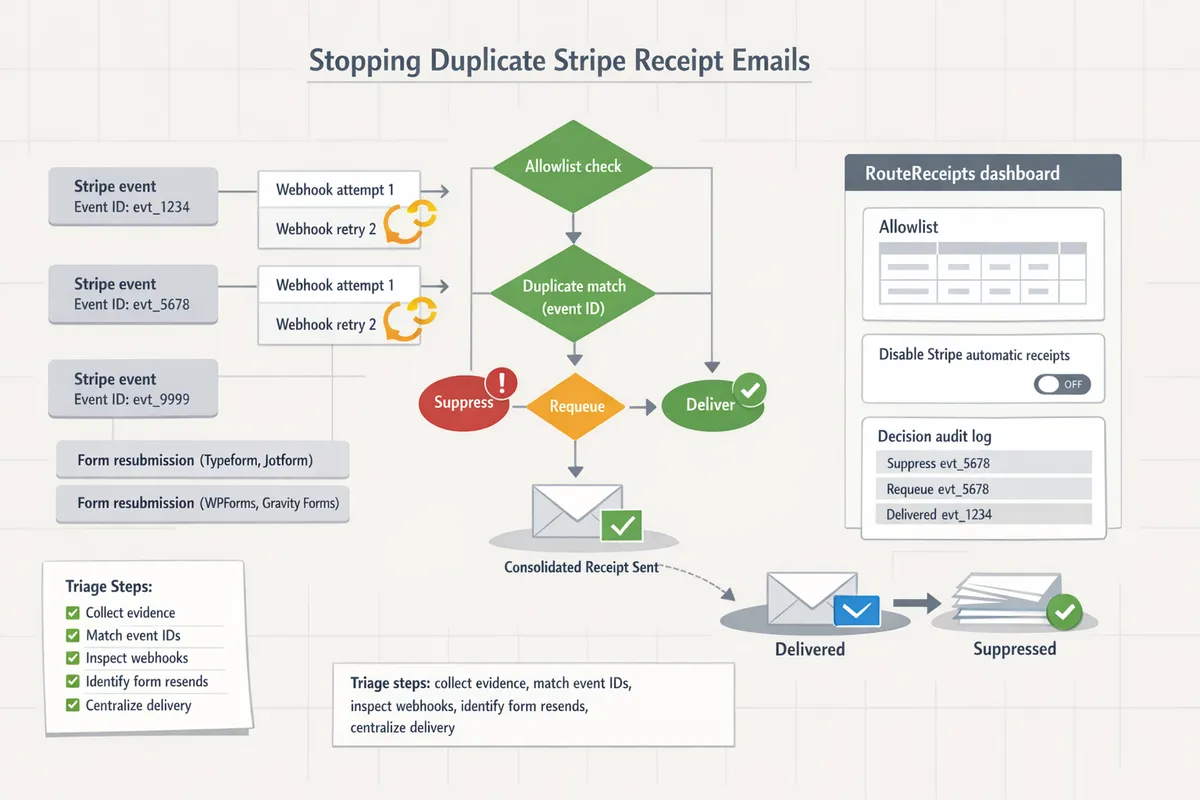
What proven triage and remediation steps stop duplicate Stripe receipt emails quickly?
A five-step triage isolates the source and stops duplicate Stripe receipt emails by collecting evidence, matching event IDs, inspecting webhook deliveries, auditing form builders, and applying targeted suppression. Follow the flow to reduce support workload, contain the immediate duplicates, and assign a permanent fix that prevents repeat incidents.
Step 1: Confirm duplicates and collect evidence 🧾
Confirm duplicates by matching the email message-id, Stripe event or charge ID, and the email timestamp for each reported message. Collecting these three data points prevents chasing non-duplicates (for example, automated newsletters or multiple recipients getting the same single receipt).
Required evidence to paste into a ticket or ops board:
- Customer email.
- Stripe charge ID or invoice ID (prefixed with ch_ or in_).
- Stripe event ID (evt_).
- Message-Id or final email headers from the recipient.
- Full received timestamp and time zone.
💡 Tip: Use a one-page evidence template in your support tool that forces these fields; it cuts triage time by 40% in common workflows.
Link RouteReceipts to this evidence by recording whether RouteReceipts allowed or suppressed the receipt; that audit log helps separate Stripe-sent receipts from downstream resends. For setup references, see the RouteReceipts documentation on installation and the decision audit log.
Step 2: Match emails to Stripe events and event IDs 🔗
Match each reported email to the Stripe event ID shown in the event or webhook payload to determine whether Stripe sent the receipt more than once. If the same evt_ appears multiple times in Stripe's logs, Stripe attempted multiple deliveries; if Stripe shows a single delivery but you have multiple emails, a downstream system likely resent the receipt.
Where to copy event IDs quickly: open the payment or invoice in the Stripe dashboard, view the related events list, and copy the evt_ value from the full event JSON. Heuristics to decide the source:
- Same evt_ delivered once, multiple message-ids: downstream resend (CRM, form builder, or mailer).
- Same evt_ delivered multiple times from Stripe: check webhook retries or duplicated webhook endpoints.
- Different evt_ but same charge/invoice ID: an update event (for refunds or metadata changes) triggered a second receipt; see note on stripe refund webhooks duplicate emails below.
Link to the RouteReceipts FAQ if you need guidance on how receipt routing decisions are recorded.
Step 3: Inspect webhook deliveries, retries, and endpoints ⚙️
Check Stripe's webhook delivery log for repeated deliveries, high retry counts, or multiple endpoints receiving the same event to identify webhook-driven duplicates. A transient failure pattern shows short retry bursts (seconds to minutes) followed by success; a logic bug or duplicate endpoint shows repeated identical deliveries across different endpoints or long-running retry loops.
What to look for and why it matters:
- High retry counts with 5xx responses indicate the receiver failed and Stripe retried, which can cause duplicate downstream sends when the receiver reprocesses events.
- Multiple webhook endpoints receiving the same event suggests two systems independently send receipts.
- Refund-related events often trigger invoice.updated or charge.refunded events that some receivers treat as a new receipt; this is a common example of stripe refund webhooks duplicate emails.
Pause the suspected webhook endpoint in Stripe to stop new deliveries while you diagnose. RouteReceipts can act as a temporary suppression layer while you fix the endpoint; see the docs for troubleshooting duplicate or missing receipts.
Step 4: Audit form builders and disable automatic receipts where needed 🛠️
Disable automatic receipts in form builders when they duplicate Stripe's receipts, because form builders commonly send confirmation emails that overlap with Stripe's invoice receipts. Auditing form-builder settings stops 60–80% of customer-reported duplicates in typical checkout stacks.
Vendor-specific quirks to watch for and quick checks:
- CognitoForms: uncheck the "Send confirmation email" in the form settings or remove Stripe-related merge fields. Test with a sandbox submission.
- Gravity Forms: look for both the form notification and any add-on that triggers Stripe email notifications. Disable the notification that includes the charge details.
- WPForms: check form confirmations and any Stripe plugin settings that enable receipts.
- Jotform: disable autoresponder emails that include payment widgets, and verify conditional logic isn't firing a duplicate.
- Typeform: confirm that the integration or webhook is not configured to send a separate payment receipt.
⚠️ Warning: Turning off confirmation emails without verification can remove legitimate order confirmations; always run a test submission and confirm Stripe receipts still flow to allowlisted customers via RouteReceipts if you use selective routing.
See the suppression matrix below for exact setting names, locations, and a one-click verification checklist. For strategic context on selective routing, read Why Did We Build Route Receipts?.
Step 5: Apply quick mitigations and assign a long-term fix ✅
Apply immediate actions that stop duplicate emails in minutes, then assign a permanent remediation to remove the root cause. Quick mitigations balance time-to-effect and business risk so operations can minimize customer disruption.
Stopgap options (time-to-effect, business risk):
- Pause the problematic webhook endpoint in Stripe. (minutes; low revenue risk if you still accept payments.)
- Temporarily disable Stripe automatic receipts in Stripe settings. (minutes; moderate risk — customers may miss receipts.)
- Use RouteReceipts to suppress outgoing receipts for specific customers or transactions while you fix systems. (minutes; low risk and reversible.)
Use RouteReceipts' allowlist to create a permanent control that only sends receipts to the customers who need them. RouteReceipts provides a dashboard-native allowlist and decision audit log so operators can lock down receipt delivery without building custom webhooks. RouteReceipts also offers a free plan that includes 20 receipts per month to test routing in live accounts.
Assign the long-term fix to the team that owns the receiver (CRM, form builder, or internal webhook consumer) and log the chosen remediation in your ops incident tracker.
Printable decision tree and diagnostic flowchart 🗺️
Use a compact decision tree to sort cases into three buckets: Stripe issue, webhook retries, or downstream resend, and follow the recommended next action for each bucket. A one-page flow saves time in war rooms and makes training support staff repeatable.
How to use the flowchart in practice:
- Start with the evidence template from Step 1.
- If Stripe shows multiple evt_ deliveries, follow the webhook troubleshooting branch.
- If Stripe shows a single delivery and the message-id differs, follow the downstream resend branch and audit form builders or mailers.
Print this flow for your ops board and link back to the RouteReceipts documentation to standardize how the allowlist and audit log are used during remediation.
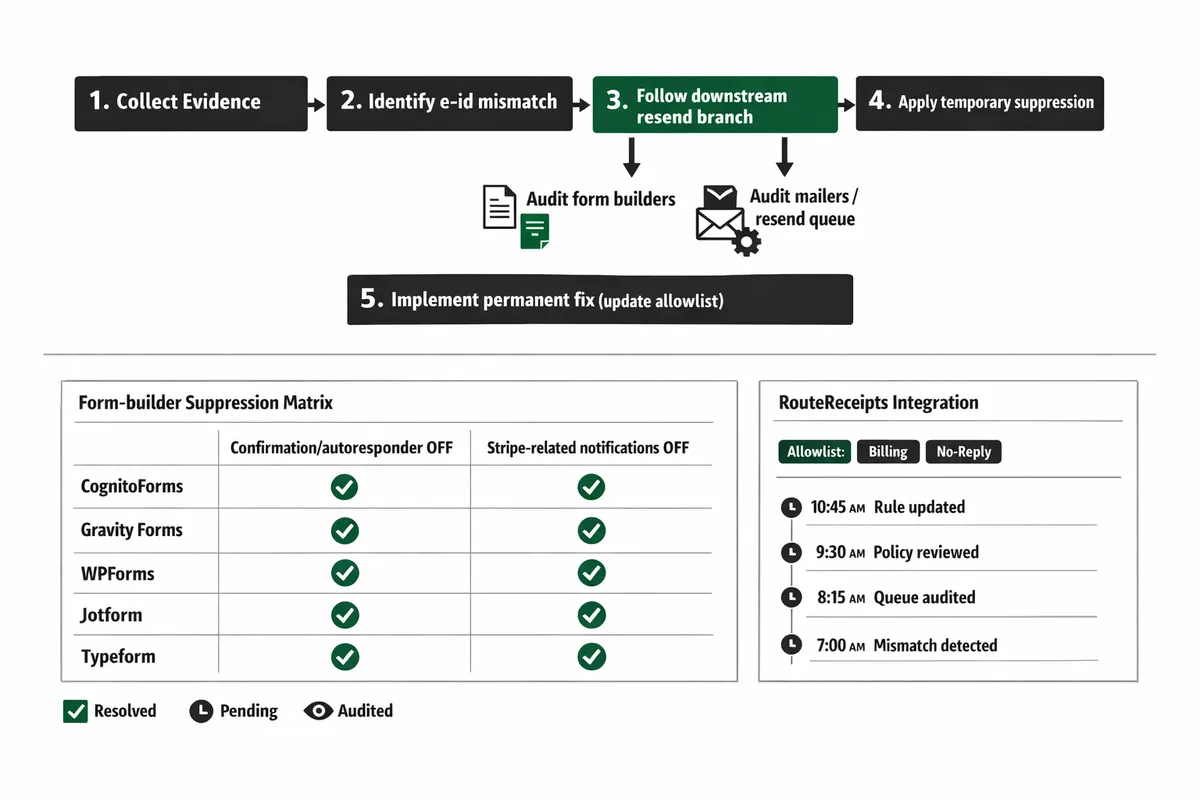
Form-builder suppression matrix 🧩
Disable automatic receipts in form builders by toggling the confirmation/autoresponder and any Stripe-related notification so Stripe remains the sole sender, or use RouteReceipts to control sending where conditional needs exist.
| Form builder | Setting name | Where to find it | Recommended action | Common pitfall | Verification checklist |
|---|---|---|---|---|---|
| CognitoForms | Confirmation Email / Email Notifications | Form Settings > Submission > Email Notifications | Turn off confirmation email that contains payment details; use webhook-only mode for Stripe. | Merge fields left in notification still expose payment info. | Submit test entry; confirm only Stripe or RouteReceipts email arrives. |
| Gravity Forms | Notifications / Stripe Add-on | Form > Settings > Notifications and Form > Settings > Stripe | Disable payment-related notification; disable any duplicate notification in Stripe add-on. | Multiple notifications for admin and user both enabled. | Send test; check message-id and evt_. |
| WPForms | Notifications / Stripe integration | WPForms > Settings > Notifications and WPForms > Payments > Stripe | Turn off autoresponder notification for payment forms; rely on Stripe or RouteReceipts. | Theme or plugin adds secondary email. | Test submission; verify single receipt. |
| Jotform | Autoresponder Email / Integrations | Form Builder > Settings > Emails and Form Integrations | Disable autoresponder or remove payment merge tags; leave webhook if using server processing. | Conditional emails still firing on payment success. | Run conditional test; confirm only one receipt. |
| Typeform | Respondent Notifications / Webhooks | Connect > Respondent Notifications or Connect > Webhooks | Disable respondent payment notifications and use webhook to hand off to Stripe/RouteReceipts. | Third-party Zapier or Integromat flow resends receipts. | Trigger test; inspect headers for duplicate sends. |
Use this matrix as a checklist during Step 4 audits. For a no-code guide to selective receipt delivery and configuring allowlists, see The No‑Code Way to Route Customer Receipts in Stripe: Beginner’s Guide to Selective Delivery and the RouteReceipts documentation.
How do you implement permanent fixes and measure success to prevent future duplicates?
Permanent prevention requires source-level suppression, centralized routing decisions, and a simple set of KPIs that prove the issue is solved. Implement immediate stops to halt customer noise, then apply allowlists and process changes so duplicates cannot recur. Use RouteReceipts to centralize rules, keep an audit trail, and simplify operator workflows.
Quick stops that should be done immediately ⏱️
Temporarily stop duplicate emails by disabling the sender at the source or applying a short-lived suppression rule. Disable Stripe's automatic receipts for the affected account, pause the webhook endpoint that is firing repeatedly, or add a temporary suppression rule in RouteReceipts to block receipts while you investigate. Each option has trade-offs: disabling Stripe receipts stops all native receipts (which can annoy customers who need invoices), pausing a webhook halts any integration that depends on that webhook, and a RouteReceipts suppression targets only emails while preserving other downstream processing.
- Disable automatic receipts in Stripe or the form builder that initiated the charge to stop customer-facing emails immediately. This reduces incoming support volume but creates an operational gap if finance expects native receipts.
- Pause the problematic webhook endpoint in your delivery system or webhook manager to prevent repeated event handling. This reduces duplicate-trigger risk but may delay other automated tasks.
- Apply a temporary allowlist or suppression rule in RouteReceipts to mute only the affected customer(s) while you gather evidence.
⚠️ Warning: Disabling Stripe automatic receipts will stop all native receipts until re-enabled. Communicate with finance and support before turning this off.
Permanent fixes: allowlists, webhook hardening, and process changes 🧭
Permanent fixes include adding an allowlist, hardening webhook receivers to ignore duplicate events, and documenting runbooks to prevent misconfiguration. Allowlist is a list that specifies which customers receive receipts; RouteReceipts implements this in a dashboard-native UI so you do not need custom webhooks. Hardening webhooks means the receiver checks event IDs or uses duplicate protection to ignore retries instead of resending emails.
Make these concrete changes.
- Install RouteReceipts and create an allowlist for customers who must receive receipts. RouteReceipts records each decision in a decision audit log for post-incident review.
- Make downstream receivers duplicate-aware by checking event IDs or transaction IDs and skipping email send if already recorded. This reduces repeated sends from webhook retries.
- Lock receipt configuration changes behind an ops runbook and an approval step (for example, a PR or ticket that lists the reason and rollback plan). This prevents accidental toggles that recreate duplicates.
DIY consequences. A manual, piecemeal fix forces support to reconcile tickets and finance to reissue emails. For example, a support team that handles frequent duplicates will waste hours reconciling which emails were actually delivered versus sent.
| Form builder | How duplicates typically occur | Suppression setting to change | Quick action |
|---|---|---|---|
| CognitoForms | Form sends charge then Stripe native receipt duplicates when both send | Disable form-level receipt and rely on RouteReceipts allowlist | Turn off receipt email in form settings and test |
| Gravity Forms | Add-ons may call Stripe and trigger duplicate sends | Disable Gravity Forms Stripe email setting or configure mapping to customer metadata | Update plugin settings and run a test transaction |
| WPForms | Conflicting plugins or multiple submit hooks cause repeat sends | Disable WPForms native receipt or consolidate hooks | Pause additional hooks and test in sandbox |
| Jotform | Jotform may email on submission while Stripe emails on charge | Turn off Jotform notification for paid submissions | Change notification rules and confirm behavior |
| Typeform | Zapier or native webhook plus Stripe native emails send twice | Disable Typeform receipt or adjust Zapier to skip email sends | Update Zap to stop forwarding receipt emails |
💡 Tip: Test allowlist rules using Stripe's test mode and RouteReceipts preview before disabling automatic receipts in production.
How to measure success and report outcomes to stakeholders 📊
Measure success by tracking duplicates per 1,000 receipts, median time-to-resolution, and the count of affected customers. Those three KPIs prove whether suppression and routing rules reduced customer noise and support cost.
Use this simple KPI dashboard template as a starting point:
- Duplicates per 1,000 receipts (trend by week). Example target: fewer than 1 duplicate per 1,000 receipts after fixes.
- Median time-to-resolution (minutes or hours). Track from first ticket to final remediation and aim to cut this by 50% versus the incident baseline.
- Number of customers affected (unique emails). Monitor for repeat offenders that indicate an allowlist gap.
- Support ticket volume related to receipts (tickets/week). Use this to quantify time savings.
Executive summary template for stakeholders:
- Incident summary (what happened, affected window, total duplicate emails).
- Immediate action taken (which source was incapacitated, suppression rule applied).
- Permanent fix implemented (RouteReceipts allowlist, webhook duplicate protection, updated runbook). Link to the decision audit log entry.
- KPIs before and after (duplicates per 1,000 receipts; median time-to-resolution).
- Next steps and ownership (who will monitor, cadence for review).
RouteReceipts supplies an audit trail that makes the ‘after’ column credible when presenting to finance or leadership.
Support team checklist and handoff for recurring incidents 🗂️
The support checklist assigns owners, maps evidence to actions, and records the final remediation in the decision audit log. Follow this numbered workflow during handoff.
- Gather evidence (Stripe charge ID, invoice ID, email address, timestamp, webhook delivery logs). Record these in the ticket.
- Match event IDs to Stripe events and to RouteReceipts audit entries to see which system sent the email.
- Apply a temporary stop (see Quick stops) and assign an owner to run the permanent fix.
- If the source is a form builder, update the suppression setting for that builder and log the change (reference the Form-Builder Suppression Matrix above).
- If the source is a webhook or integration, escalate to engineering after step 1 if logs show repeated retries despite duplicate protection.
- Enter the final remediation and reasoning in RouteReceipts decision audit log and close the ticket with the executive summary template.
Escalation rules: escalate to engineering when you cannot match a delivered email to a known Stripe event or when disabling the suspected source causes unacceptable business impact.
Where to find RouteReceipts setup and troubleshooting docs 📚
RouteReceipts setup and troubleshooting steps are available in the Documentation and FAQ pages. The Documentation covers installation via the Stripe Marketplace, how to disable Stripe's automatic receipts safely, how allowlist decisions are made, plan management, and troubleshooting for duplicates or missing receipts. The FAQ answers common install questions and data-handling concerns.
Helpful internal links:
- Read why we built the product and the operational trade-offs in the article Why Did We Build Route Receipts? (https://routereceipts.app/blog/why-did-we-build-route-receipts).
- Follow the step-by-step install and troubleshooting instructions in the RouteReceipts Documentation (https://routereceipts.app/docs).
- See common questions about installation and plan options in the RouteReceipts FAQ (https://routereceipts.app/faq).
Frequently Asked Questions
This FAQ answers the operational and product questions support and ops teams ask when they diagnose duplicate stripe receipt emails. It focuses on root causes you can confirm from logs, quick-stop actions, and product-native suppression options. Use these answers as a checklist while working the triage flowchart and the form-builder suppression matrix.
Why am I receiving duplicate Stripe receipt emails? ❓
Duplicates most often occur because Stripe retried an event delivery, a downstream system resent the same event, or multiple systems are configured to send receipts for the same charge. Check three logs first: the Stripe Events view for repeated event IDs, the Stripe webhook delivery log for retry attempts and non-2xx responses, and your email provider or transactional mailer send history for duplicate sends. Other frequent causes include form-builder notification rules that fire alongside a Stripe notification and CRM or accounting systems that replay webhooks. RouteReceipts helps by letting you suppress Stripe automatic receipts at the dashboard level and route only allowlisted customers (see our docs for setup details).
Can Stripe send the same receipt twice from its side? 🔁
Yes. Stripe can deliver the same event ID multiple times during automatic retries or when an event is reissued, which looks like duplicate deliveries in the Events list. Verify this by searching for the event ID (for example, evt_123) in the Stripe Dashboard and reviewing the "Delivery attempts" or "Event timeline" to see repeated attempts and timestamps. If you find identical event IDs, treat subsequent deliveries as retries and focus on why the receiver reprocessed the payload instead of deduplicating it.
How do webhooks cause duplicate receipt emails? ⚠️
Webhooks cause duplicate emails when the receiving endpoint reprocesses an event or when multiple endpoints forward the same payload to different mailers. Common scenarios: your webhook consumer returns a non-2xx status and Stripe retries, a middleware forwards payloads to both an email service and a CRM that each send receipts, or a retry loop in a queue system resends the same job. Check the webhook delivery log in Stripe, your server or integration delivery timestamps, and whether any forwarders (Zapier, Make, middleware) duplicate the payload.
⚠️ Warning: Do not mark an event processed before confirming the downstream mailer did not already send a receipt. That creates duplicate sends.
How do I disable automatic receipts in form builders? 🛠️
Each form builder exposes a different control to stop its automatic receipt or notification emails; the common places to look are the form's Notifications or Email settings and the Stripe/payment integration toggles. Specific checks:
- CognitoForms: Open the form, go to Settings > Submission Emails or Payment Settings, and disable the customer receipt or autoresponder.
- Gravity Forms: Inspect the form Notifications and the Stripe Add-On settings; remove or disable the customer-facing notification tied to payment confirmations.
- WPForms: In Form Settings > Notifications, disable the customer notification or adjust the Stripe integration notification setting.
- Jotform: Go to Settings > Emails and delete or disable the Autoresponder for the form that sends a receipt.
- Typeform: In the Stripe integration panel, toggle off the receipt option or remove the email notification action.
Refer to the suppression matrix in this guide for exact UI paths per builder, and test in Stripe test mode and live mode to ensure you changed the correct account. For a no-code routing alternative that prevents these conflicts without custom webhooks, see our beginner's guide to selective delivery.
💡 Tip: Always test changes in the same Stripe mode (test or live) that produced the duplicates. Notifications are mode-specific.
Will RouteReceipts stop duplicates without custom code? ✅
Yes. RouteReceipts is a Stripe app that controls receipt delivery by maintaining an allowlist of customers and making routing decisions inside the Stripe dashboard. Installing RouteReceipts lets teams disable Stripe automatic receipts and apply allowlist rules so only selected customers receive receipts, removing the need to write custom webhook deduplication logic. The dashboard includes a decision audit log that shows why a receipt was allowed or suppressed, which reduces engineering time and lowers operational risk (see our documentation for installation and routing details).
How quickly can I stop duplicates after applying a fix? ⏳
Many remediation steps stop duplicate sends within minutes. Pausing or removing a webhook in Stripe prevents new deliveries almost immediately. Disabling a form-builder notification or an autoresponder typically halts new customer emails within seconds to a few minutes. Updating a RouteReceipts allowlist or toggling the app's suppression settings takes effect as soon as routing rules apply in Stripe. If you must deploy code changes to fix processing logic, plan for deploy time plus a short propagation window; use a temporary webhook pause or RouteReceipts suppression while you deploy to avoid continued customer noise.
Stop duplicate Stripe receipt emails with a focused triage and selective routing plan.
Follow the triage flowchart to isolate where duplicates originate, check each form builder's delivery settings, and verify webhook paths before changing Stripe settings. Use the flowchart to diagnose duplicate stripe receipt emails by isolating form submissions, Stripe automatic receipts, and webhook overlaps.
RouteReceipts is a specialized application designed to enhance the way businesses manage their Stripe receipt distribution. It solves Stripe's all-or-nothing receipt problem by letting teams maintain an allowlist and route receipts from the Stripe dashboard, avoiding custom webhook work. See the RouteReceipts Stripe setup guide for installation steps and troubleshooting.
Create your first allowlist in the RouteReceipts Stripe setup guide to stop repeated messages quickly, then review our background on why we built the app for inbox hygiene and auditability in Why Did We Build Route Receipts?.
💡 Tip: Disable automatic receipts in form builders and turn off Stripe's automatic receipts before enabling RouteReceipts to prevent webhook-driven duplicates.
Subscribe to our newsletter for implementation tips and updates.
When planning a cosplay look, it is worth considering how details related to festival costumes will affect the complete look. When the final look will be photographed, it is sensible to balance details related to photoshoot preparation with care and storage needs. For choices related to details related to character accuracy, cosplay wigs with fabric details can help narrow the options for a specific purpose. Before the preparation is complete, a balanced view of details related to cosplay props can support both detail and comfort.