Stripe Payment Links Receipts (2026): Event Sequencing, Success URLs, API Metadata for Allowlists, and ROI Calculator for Selective Sending
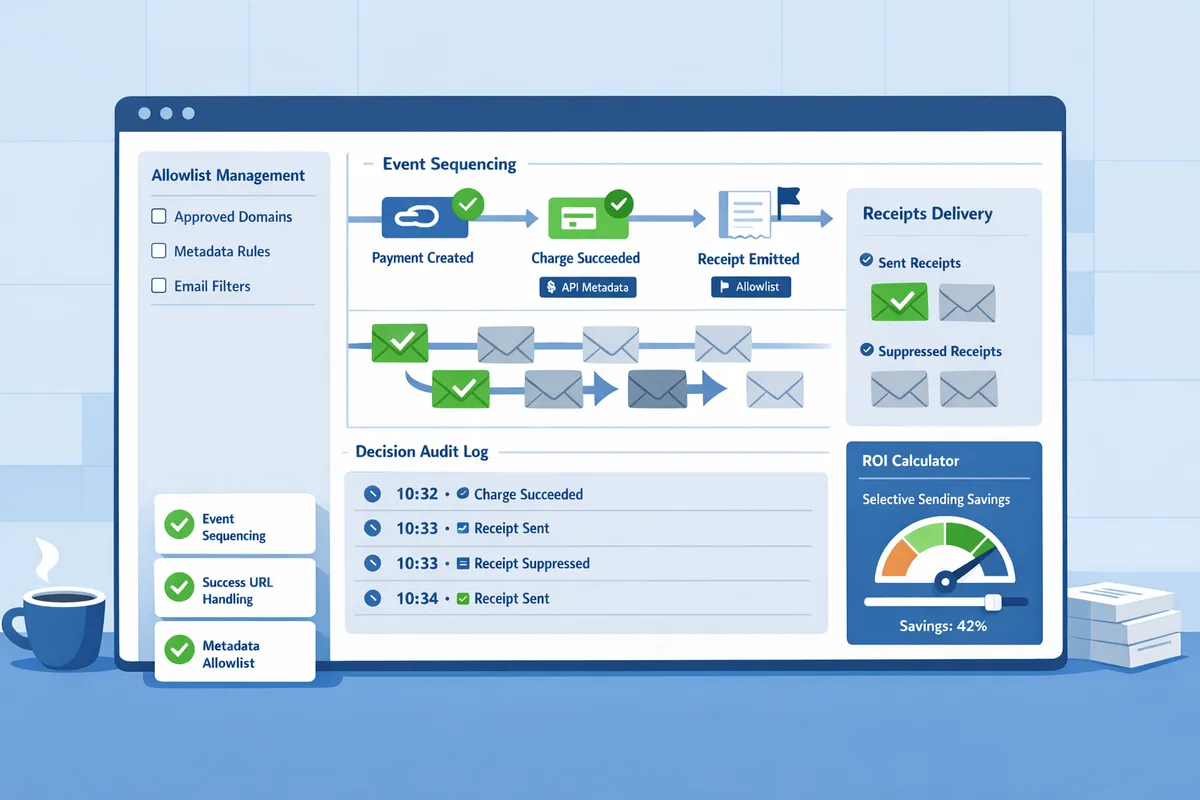
A single misordered webhook can cause Stripe Payment Links receipts event sequencing to send duplicate or missing receipts for dozens of customers. RouteReceipts is a specialized application that lets businesses selectively send Stripe receipt emails by managing an allowlist directly inside the Stripe dashboard. This best-practices guide explains event sequencing, Success URLs, API metadata for allowlists, and an ROI calculator for selective sending. RouteReceipts's dashboard-native UI, decision audit log, and Stripe Marketplace install reduce hours spent on manual rules, audit headaches, and mistaken deliveries. Follow the RouteReceipts homepage for setup instructions and plan details, and use the documentation and FAQ for step-by-step no-code setup. Which sequencing and metadata choices yield the highest ROI for your customer mix is a question this guide helps you test.
How do Stripe Payment Links generate receipts and which events control timing?
Stripe Payment Links produce receipts when Stripe creates or finalizes a charge or invoice object; the webhook events for those objects determine whether an on-platform receipt, an email receipt, or both get sent. Understanding the exact event sequence prevents duplicate emails and missed receipts after redirects to a success_url.
checkout.session.completed vs payment_intent.succeeded receipts timing 🕒
checkout.session.completed is a session-level event that represents the Checkout flow finishing; payment_intent.succeeded is a payment-level event that represents the underlying payment succeeding. Use checkout.session.completed when you need session metadata (line items, success_url) and use payment_intent.succeeded when you need a final payment confirmation that accounts for 3DS or delayed capture.
checkout.session.completed fires after a customer completes a Checkout or Payment Link flow and includes session fields such as customer, payment_intent id, and the success_url the user will be redirected to. payment_intent.succeeded fires when the payment intent reaches a final succeeded state; that can occur before, during, or after checkout.session.completed depending on the payment method and authentication flow. For example, a card that requires 3DS will usually delay payment_intent.succeeded until authentication completes, so relying solely on payment_intent.succeeded gives you finality but may delay customer-facing actions.
Use the following table to decide which event to monitor for deduplication and reliable receipt delivery.
| Event | When it fires | Common receipt implications |
|---|---|---|
| checkout.session.completed | After Checkout or Payment Link completes and session is created. | Good for tying receipts to success_url redirects and session metadata; may arrive before final payment in auth flows. |
| payment_intent.succeeded | When the payment intent reaches succeeded (post-authentication). | Confirms final charge; preferred for avoiding false-positive receipts from auth failures. |
| charge.succeeded | When Stripe creates a charge object for a one-off payment. | Triggers charge-based email receipts if account settings allow; may lack session line items for Payment Links. |
RouteReceipts helps avoid duplicate emails by running routing logic against the event you choose to monitor and applying an allowlist before sending any receipt. For a step-by-step install and the recommended setup to disable Stripe automatic receipts, see the RouteReceipts documentation and the no-code guide to selective delivery.
💡 Tip: Disable Stripe's automatic receipts before activating RouteReceipts to prevent duplicate email sends when RouteReceipts posts a controlled receipt.
How does Stripe decide between Stripe receipts and email receipts? 📧
Stripe decides which email receipt to send based on the object type created (invoice vs charge) and your account-level receipt settings; success_url and redirect timing do not trigger or prevent email receipts. Stripe emits internal receipt objects and separate email receipts; which one the customer receives depends on whether the Payment Link produced an invoice or a one-off charge and whether invoice.finalized or charge.succeeded fired.
A Payment Link that creates an invoice (for subscriptions or invoice items) will send invoice-related emails when invoice.finalized or invoice.payment_succeeded fires and when account-level invoice emails are enabled. A Payment Link that immediately charges (one-off pay-now) triggers charge.succeeded and uses charge-level receipt rules. The success_url only controls the browser redirect and does not change which email Stripe sends or when webhooks are delivered.
The table below maps the key events to the Stripe object you should inspect and the most likely email outcome.
| Event | Object type to inspect | Likely email receipt sent | Common edge cases |
|---|---|---|---|
| checkout.session.completed | checkout.session (contains payment_intent id) | No direct email. Use to start orchestration (session metadata). | Session may precede final payment for 3DS, causing premature handling if used alone. |
| payment_intent.succeeded | payment_intent → inspect latest_charge.id | Charge-based receipt may follow via charge.succeeded rules. | Off-session or delayed capture flows can change timing. |
| invoice.finalized | invoice | Invoice-ready notification; not always a payment receipt until paid. | If invoice.finalized occurs but auto-collection is off, no immediate payment. |
| invoice.payment_succeeded | invoice | Invoice payment receipt email (if enabled) and accounting record. | Finalization may be delayed by proration or invoice auto-finalize settings. |
| charge.succeeded | charge | Charge receipt email (if enabled) and downloadable receipt URL in Stripe. | Some Payment Links create charges without session line items; customer-facing content can differ. |
Practical steps for teams that see missing or duplicate receipts:
- Verify your Stripe account email settings for invoice and charge emails.
- Check webhook delivery history for both checkout.session.completed and payment_intent.succeeded to see ordering.
- If you use RouteReceipts, follow the documentation to disable Stripe automatic receipts and configure the allowlist to ensure a single, audited send. See the troubleshooting section in RouteReceipts documentation for duplicate or missing receipt scenarios.
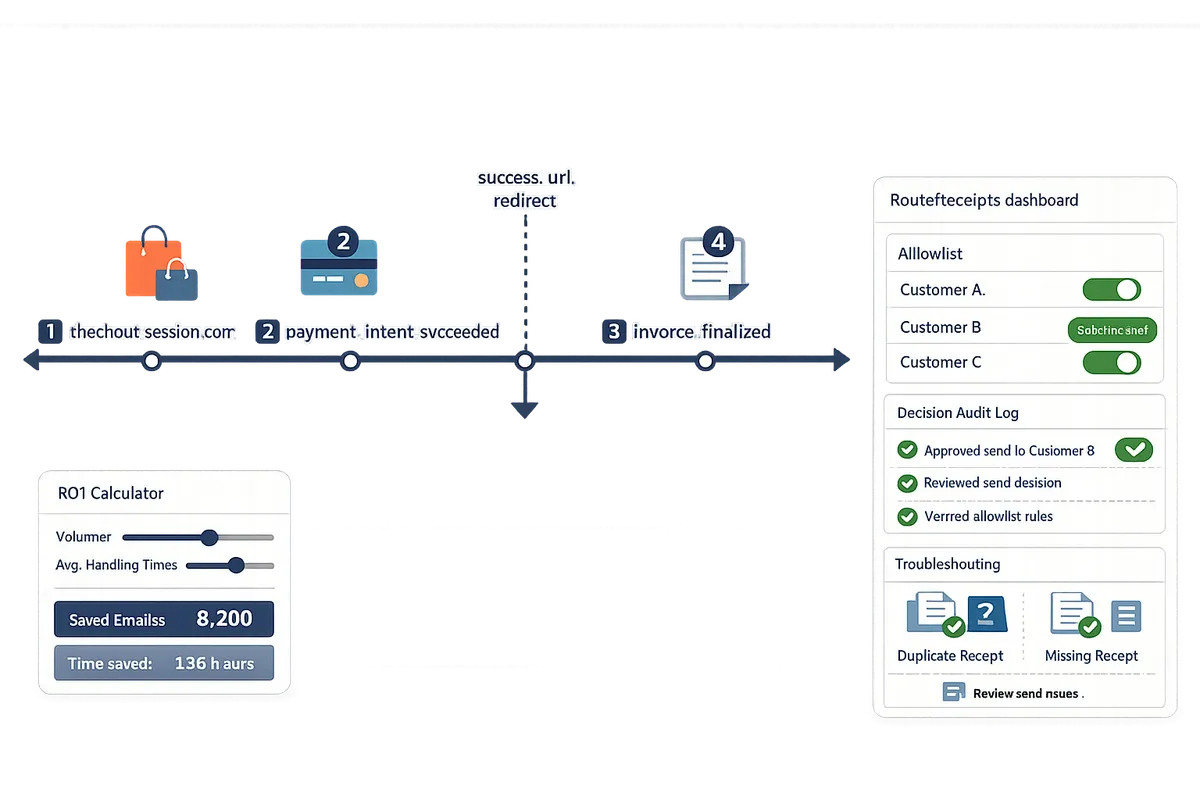
For background on why a dashboard-native allowlist matters for selective routing and how RouteReceipts makes selective delivery operational without custom webhooks, read Why Did We Build Route Receipts? and the beginner's no-code guide to selective delivery. For quick questions about installation and plan limits, consult the RouteReceipts FAQ.
How can RouteReceipts and no-code automations selectively send receipts for Payment Links?
Route Receipts selectively sends email receipts by applying an allowlist and dashboard-native rules to Stripe Payment Links events. This matters because Stripe's native behavior sends receipts to all customers or none, which creates inbox clutter and bookkeeping noise for teams processing many Payment Links; our solution reads Payment Links metadata and success_url parameters so downstream automations only act when you want them to.
What is RouteReceipts and how does it control receipt routing?
Route Receipts is a Stripe Marketplace app that decides whether an email receipt should be sent by matching invoice or charge events against a configurable allowlist and decision rules in our dashboard. Install the app from the Stripe Marketplace and follow the step-by-step setup in the Route Receipts documentation to connect your account, disable Stripe's automatic receipts if you plan to use Route Receipts for routing, and create your first allowlist. Our dashboard shows a decision audit log that records which rule matched and why, giving finance teams a clear trail when an expected receipt is blocked or allowed. Plan management and usage limits are visible in the dashboard so business users can see remaining monthly allowance and upgrade when needed. For background on why teams pick selective routing, see Why Did We Build Route Receipts?.
⚠️ Warning: Disable Stripe's automatic email receipts before enabling Route Receipts if you will send receipts from our app; otherwise you risk duplicate emails.
No-code workflows with Sequence and Zapier 🔁
Sequence and Zapier can read Route Receipts' routing decisions and apply them to CRM, support, and bookkeeping systems without writing custom webhooks. Use the following example workflows to automate selective delivery.
- Route receipts only for customers tagged "expense-eligible" in your CRM (Sequence).
- Add a metadata key expense_eligible=true to the Payment Link at creation or map a CRM tag to the Stripe Customer ID.
- Configure Route Receipts to allow emails when expense_eligible is true or when the customer ID appears on the allowlist.
- Create a Sequence workflow triggered by Route Receipts' decision event to post the receipt copy to your finance channel and mark the invoice as processed in the CRM.
- Test with a sandbox Payment Link and confirm the audit log shows the allowlist rule matched.
- Send a custom notification when Route Receipts blocks an email (Zapier).
- Configure Route Receipts to POST a decision webhook to a Zapier webhook URL when an email is blocked.
- In Zapier, filter on the decision payload and send a tailored receipt PDF to the customer, or create a support ticket with the transaction details.
- Use Zapier's built-in retries and logging to ensure the notification reaches the right team.
Each workflow reduces manual suppression and prevents finance from chasing missing receipts. See The No‑Code Way to Route Customer Receipts in Stripe for a beginner walkthrough and our Documentation for exact webhook fields and sample payloads.
💡 Tip: Test allowlist rules with sandbox transactions and verify the Route Receipts decision log before enabling a workflow in production.
How to use API metadata and success_url for allowlist decisions 📥
Attach structured metadata or a success_url parameter to a Payment Link so Route Receipts classifies the sale at creation time and applies the correct routing rule. Recommended metadata keys include expense_eligible, receipt_profile, and customer_type; keep values canonical (true/false or short strings like "enterprise") so dashboard rules match reliably. Set metadata either in the Payment Links dashboard under additional options or via the API when you create the link, and include a query parameter in success_url (for example ?receipt=expense) when you cannot add metadata directly.
Stripe Payment Links success_url vs email receipt: success_url only controls where the buyer lands after payment and does not replace an email receipt. Route Receipts reads metadata from the resulting checkout.session, charge, or invoice object and then applies allowlist logic. If metadata is missing, Route Receipts falls back to customer allowlist entries (email or customer ID), which increases manual mapping work and can cause missed receipts.
Practical setup steps:
- Choose stable metadata keys (expense_eligible, receipt_profile).
- Add those keys to Payment Links at creation time or append a success_url parameter that your automation parses.
- Create matching rules in the Route Receipts dashboard to allow or block email receipts.
- Hook a Sequence or Zapier workflow to the Route Receipts decision event for downstream bookkeeping or notifications.
Avoid storing sensitive personal data in metadata to reduce privacy risk; consult our Privacy Policy for data-handling details. For exact field names, payload examples, and troubleshooting tips for duplicate or missing receipts, see Route Receipts documentation and the FAQ.
How to implement, test, and measure selective receipt sending for Payment Links?
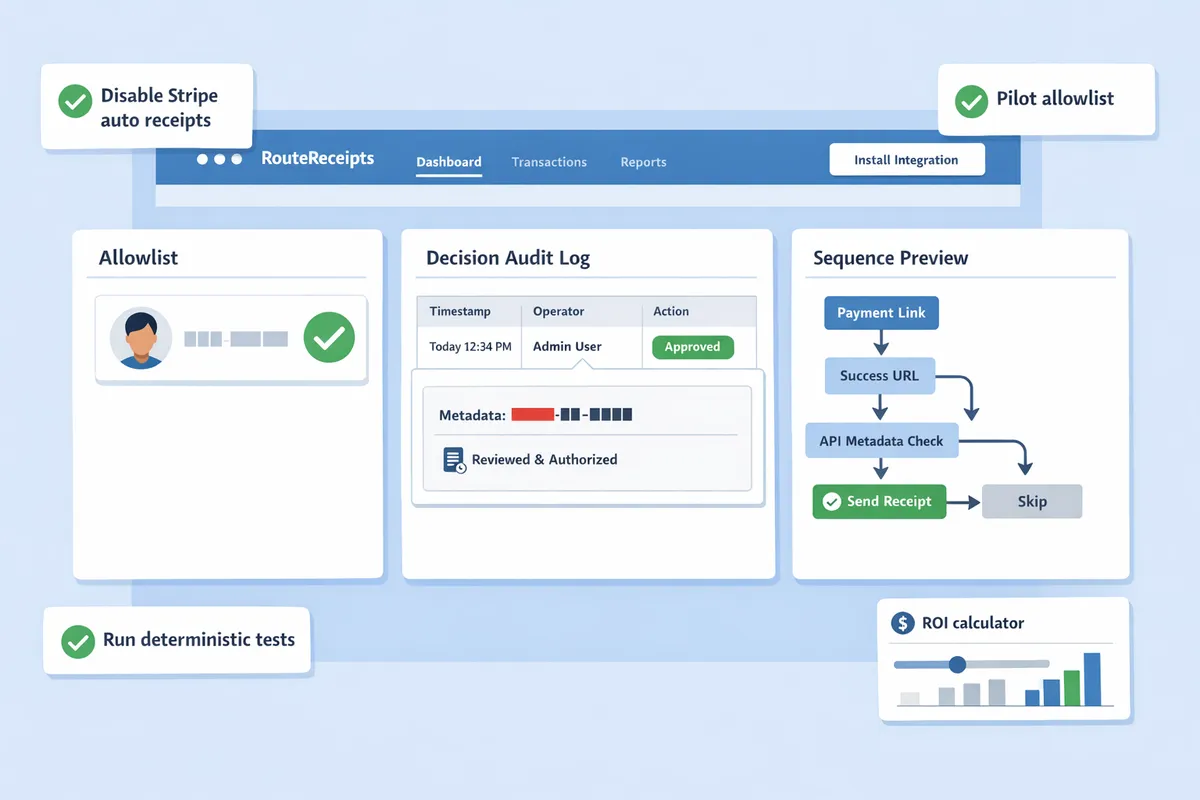
Start with a controlled rollout that installs RouteReceipts, disables Stripe automatic receipts where needed, pilots an allowlist, runs deterministic test cases, and measures outcomes with an ROI calculator. RouteReceipts is a Stripe app that routes receipt emails using a dashboard-native allowlist and a decision audit log. A staged approach prevents lost receipts, reduces duplicate sends, and produces the data you need to justify selective sending to finance and support leaders.
Step-by-step implementation checklist ✅
Follow this deterministic rollout sequence to implement selective receipt sending with RouteReceipts. Install our RouteReceipts app from the Stripe Marketplace and complete the OAuth setup in your Stripe account. Disable Stripe automatic receipts for the objects you plan to route (invoices or charges) or set a metadata flag so Stripe does not send its native email; our documentation explains the exact Dashboard toggles and metadata keys. Create a small allowlist pilot (start with 50–200 enterprise accounts) using customer email or customer ID and map Payment Link metadata and success_url rules to identify which purchases should receive receipts. Configure your automation (Sequence, Kit, or Zapier) to read RouteReceipts decisions rather than blindly sending emails. Run the four test purchases below and verify outcomes.
- Enterprise customer (allowlist entry): complete Payment Link purchase; expect an email receipt routed by RouteReceipts.
- Anonymous buyer (not allowlisted): complete Payment Link purchase; expect no receipt.
- Failed payment then retry: simulate card decline, then successful retry; expect a single final receipt after success.
- Invoice flow (subscription or billed invoice): create and finalize an invoice; expect invoice.finalized and invoice.payment_succeeded to trigger routing rules.
Verification steps for each test.
- Confirm Stripe event: check the event timeline for checkout.session.completed, payment_intent.succeeded, invoice.finalized, or invoice.payment_succeeded as applicable.
- Confirm RouteReceipts decision: open our RouteReceipts decision audit log and confirm the rule match and output (send or suppress).
- Confirm delivery: check your SMTP or ESP logs (SendGrid/SES/Postmark) and the recipient inbox.
💡 Tip: Start with a narrow pilot (50–200 customers) and measure both false positives (unwanted receipts sent) and false negatives (missing receipts) before scaling rules. This keeps support impact low while you tune metadata and success_url patterns.
See our RouteReceipts documentation for step-by-step setup and metadata examples.
Observability and troubleshooting for missing or duplicate receipts 🔍
Correlate Stripe events, RouteReceipts decision logs, and email provider records to diagnose missing or duplicate receipts. Use the following event checklist and verification steps to find timing gaps or duplicated sends.
| Event to check | What to inspect | Expected RouteReceipts action | Verification step |
|---|---|---|---|
| checkout.session.completed | Ensure session.payment_status and success_url metadata are present | RouteReceipts uses session metadata to decide send/suppress | Confirm RouteReceipts log shows session ID and rule match, then check ESP logs for message ID |
| payment_intent.succeeded | Confirm payment intent status and linked customer ID | Used for non-Checkout Payment Links; may arrive after session events | Correlate payment_intent timestamp with RouteReceipts decision and ESP delivery timestamp |
| invoice.finalized | Verify invoice.finalization and billing reason | RouteReceipts should apply allowlist rules on invoice.customer | Check invoice PDF link in Stripe and RouteReceipts log entry |
| invoice.payment_succeeded or charge.succeeded | Confirm final settlement recorded | RouteReceipts must only send one receipt after final settlement | Confirm single delivery record in ESP and single audit-log entry in RouteReceipts |
How to confirm webhook delivery. Check Stripe’s event delivery history for incoming webhook attempts and response codes. If Stripe shows retries, open the most recent event payload and compare its id and timestamp to the RouteReceipts audit log. Our documentation includes steps to replay events for debugging.
Deduplication steps for automations. Disable Stripe’s native receipts for routed objects or set a metadata flag that tells Stripe not to send emails. Configure your automations to ignore duplicate events by matching on Stripe object id (invoice or charge) and RouteReceipts decision id. If you find duplicates, use the RouteReceipts decision audit to identify whether the app or an external automation sent the extra message and then suppress the redundant path.
⚠️ Warning: If you disable Stripe automatic receipts without verifying RouteReceipts rules, customers may receive no receipts. Always validate with end-to-end tests before fully switching off Stripe emails.
For a practical troubleshooting flow and replay instructions, consult the RouteReceipts troubleshooting guide and our FAQ on installation quirks.
ROI calculator for selective sending and business impact 📊
Use this ROI template to estimate monthly time and cost savings from sending receipts only to customers who need them. Required inputs you must gather from finance and support: monthly Payment Links volume; percent of customers who actually need receipts; average support time spent per receipt-related query (hours); cost per support hour; average cost per sent email (ESP cost or marginal infrastructure cost). Optionally include the estimated reduction in customer churn or improved NPS if you can quantify it.
Copy these formulas into a spreadsheet. Replace variable names with cell references.
- Monthly_receipts_sent = Monthly_volume * Percent_customers_needing_receipts
- Monthly_support_hours_saved = Monthly_volume * (1 - Percent_customers_needing_receipts) * Avg_support_time_per_receipt_hours
- Monthly_support_cost_saved = Monthly_support_hours_saved * Cost_per_support_hour
- Monthly_email_cost_saved = Monthly_volume * (1 - Percent_customers_needing_receipts) * Cost_per_email
- Total_monthly_savings = Monthly_support_cost_saved + Monthly_email_cost_saved
Example (copy-ready).
- Monthly_volume = 5,000
- Percent_customers_needing_receipts = 0.20
- Avg_support_time_per_receipt_hours = 0.2 (12 minutes)
- Cost_per_support_hour = $40
- Cost_per_email = $0.002
Calculations:
- Monthly_receipts_sent = 5,000 * 0.20 = 1,000
- Monthly_support_hours_saved = 5,000 * 0.80 * 0.2 = 800 hours
- Monthly_support_cost_saved = 800 * $40 = $32,000
- Monthly_email_cost_saved = 5,000 * 0.80 * $0.002 = $8
- Total_monthly_savings = $32,008
Interpretation guidance. Compare Total_monthly_savings to the cost of RouteReceipts subscription and any integration time. Use conservative estimates for avg support time and conservative percent needing receipts to avoid overstating ROI. If you want a templated sheet, see our beginner’s guide to selective delivery for example spreadsheets and scenario analysis.
Frequently Asked Questions
This FAQ answers common operational and product questions about Stripe Payment Links receipts event sequencing and RouteReceipts' no-code routing approach. RouteReceipts is a Stripe app that controls which customers receive email receipts by applying an allowlist and recording each routing decision in a dashboard-native audit log.
How does RouteReceipts prevent duplicate receipts? 🧾
Route Receipts prevents duplicate receipts by logging routing decisions and suppressing email sends for customers not on the allowlist. RouteReceipts checks each incoming Stripe event, applies your allowlist rules, then either allows RouteReceipts to send the email or signals suppression so your second system does not resend. Check the decision audit log in the RouteReceipts dashboard to see the matched rule, Stripe event ID, timestamp, and action taken.
⚠️ Warning: Do not leave Stripe automatic receipts enabled when using RouteReceipts unless you explicitly want both systems to send emails. That configuration causes duplicates.
See the setup steps in the RouteReceipts documentation for how to disable Stripe automatic receipts and map events to routing rules: RouteReceipts documentation.
Which Stripe events should I listen to for reliable receipt triggering? 🔔
Listen to the Stripe event that finalizes the payment object your flow uses: checkout.session.completed for Checkout Payment Links, invoice.payment_succeeded for invoices and subscriptions, and payment_intent.succeeded for raw charges. According to RouteReceipts' documentation, each event ties to a different lifecycle: checkout.session.completed typically represents a completed Checkout flow, invoice.payment_succeeded corresponds to finalized invoice payments, and payment_intent.succeeded fires when a charge completes without an invoice.
Expect occasional retries or delivery lag from Stripe webhooks; map RouteReceipts decisions to the Stripe event ID to deduplicate and to avoid acting on retries. See the no-code guide for recommended events per flow: No‑Code Way to Route Customer Receipts.
Can I use success_url to control whether an email receipt is sent? ✅
No; success_url can indicate customer intent but it does not trigger Stripe's email receipt delivery, which depends on Stripe objects and your account receipt settings. Use success_url parameters or session metadata as signals that RouteReceipts can read, but do not rely on the URL alone to make a deterministic routing decision.
Best practice: add a metadata flag at Payment Link creation or append a stable query parameter to success_url that your RouteReceipts rule matches against. That combination ensures RouteReceipts treats the customer consistently while Stripe continues to base actual email delivery on the payment or invoice object. Full configuration examples are in the docs: RouteReceipts documentation.
How do I audit routing decisions and prove compliance? 📁
Route Receipts records every routing decision in a decision audit log you can export and map to Stripe events for compliance reviews. The audit entries include the Stripe event ID, the allowlist rule matched (or suppression reason), timestamp, and operator or automation that triggered the action.
Follow these steps to produce an audit trail:
- Export the decision audit log from the RouteReceipts dashboard filtered by date or payment link.
- Match each audit entry to its Stripe event ID and webhook delivery timestamp in the Stripe Dashboard.
- Store the combined export in your compliance system or attach it to the related customer record for retention requirements.
See the docs for export format and a sample compliance checklist: RouteReceipts documentation.
What should I do if a customer needs a receipt after it was suppressed? 🔁
You can reissue a suppressed receipt by either sending it manually from Stripe or triggering a one-off send via a no-code automation connected to RouteReceipts. First confirm the audit log entry that shows why the receipt was suppressed and capture the Stripe event ID to maintain an auditable trail.
Practical steps:
- Locate the decision in RouteReceipts and note the Stripe event ID.
- Use Stripe’s Dashboard Send Receipt action or create a one-off invoice if appropriate.
- If you prefer automation, trigger a RouteReceipts workflow or a Zapier/Sequence job to send the email and record that action.
Refer to the FAQ and docs for exact UI actions and examples: Frequently Asked Questions and RouteReceipts documentation.
How does RouteReceipts handle data privacy and retention? 🔒
Route Receipts stores only the minimal Stripe account data necessary to make routing decisions and follows the policies described in its privacy policy. Stored items typically include customer ID, Stripe event IDs, allowlist entries, and decision metadata needed to explain why a receipt was sent or suppressed.
You can request data exports or deletions per the procedures in RouteReceipts' privacy policy. For retention windows, third-party subprocessors, and user rights, consult the privacy policy directly: RouteReceipts privacy policy.
💡 Tip: Avoid placing unnecessary personal data inside Payment Link metadata or receipts. Minimizing PII reduces privacy risk and simplifies retention requests.
Next steps show how to test selective receipt routing with RouteReceipts.
RouteReceipts is a specialized application designed to enhance the way businesses manage their Stripe receipt distribution. This app addresses a significant limitation within Stripe's native functionality, which traditionally forces businesses to either send receipts to all customers or none at all. RouteReceipts empowers businesses with the flexibility to selectively send receipts to specific customers, thereby preventing unnecessary email clutter for those who do not require them. By integrating directly into the Stripe dashboard, RouteReceipts allows users to manage an allowlist of customers effortlessly, without the need for complex coding or custom webhook integrations. The application features a dashboard-native user interface, a decision audit log for transparency, and a straightforward setup process via the Stripe Marketplace. RouteReceipts offers a tiered pricing model, starting with a free plan that includes 20 receipts per month, with the option to upgrade for higher volume needs. This solution is ideal for businesses seeking to streamline their financial communications and maintain a professional relationship with their clients by ensuring that only necessary communications are sent.
Stripe Payment Links receipts event sequencing matters because timing determines whether a receipt triggers before the success_url redirect and therefore which routing rule applies. Start a free trial and follow the RouteReceipts Stripe setup in the docs to install the app, disable Stripe's automatic receipts, and create your allowlist. For background on design choices and no-code implementation, read Why Did We Build Route Receipts? and the No‑Code Way to Route Customer Receipts in Stripe: Beginner’s Guide to Selective Delivery.