
Stripe Receipt Configuration Recipes (2026): 18 Toggle Profiles for EU/UK Compliance, Refunds, and Credit Notes
A single Stripe account often sends hundreds of receipt emails per month to customers who do not need them, creating inbox clutter and extra support work. Stripe receipts control is a configuration pattern that lets small finance teams and Stripe admins selectively send Stripe receipt emails to chosen customers instead of using Stripe's all-or-nothing setting. This listicle-roundup in the Stripe Receipt Configuration cluster presents 18 toggle profiles and step-by-step implementation recipes for EU/UK compliance, refunds, and credit notes. We selected profiles for regulatory fit, refund handling, enterprise allowlists, and low-code setup so teams can implement quickly without custom code. Our website, RouteReceipts, integrates into the Stripe dashboard to manage allowlists and audit decisions; see the setup guide for details. Which profile matches your billing rules?
Receipt toggle recipes are preset configurations that control which customers receive receipts from Stripe.
A receipt toggle recipe is a preset configuration that decides when Stripe sends an email receipt by evaluating customer, transaction, and tax rules. Route Receipts is an application that manages an allowlist inside the Stripe dashboard to route receipts without code. Use these recipes to implement practical Stripe receipts control across EU/UK VAT workflows, refunds, and credit notes with minimal engineering overhead.
Profile definition and naming 🧾
A receipt toggle profile is a named set of rules that decides whether Stripe sends an email receipt. A profile is a reusable configuration that groups customer attributes, transaction types, and tax requirements so finance teams can apply the right rule set quickly. Example fields to include in each profile:
- Customer group (enterprise, consumer, reseller).
- Invoice type (paid invoice, pro forma, subscription invoice).
- Refund behavior (always send, send only on credit note, never send).
- Jurisdiction or VAT requirement (EU VAT-registered, UK VAT-registered, no VAT).
Name profiles so they read like policy: "EU-B2B-VAT-Invoice," "US-Consumers-No-Receipt," "Marketplace-Seller-Receipts." Our docs show how consistent naming reduces misapplied profiles during month-end reconciliations. For setup steps and field examples, see the Route Receipts documentation.
Allowlist routing with Route Receipts ✅
Allowlist-based routing sends receipts only to customers included on an allowlist. Route Receipts uses an allowlist that evaluates at payment success and then permits or suppresses Stripe's automated receipt email. Typical workflow: install Route Receipts from the Stripe Marketplace, build an allowlist of customer emails or customer IDs, and then disable Stripe's automatic receipts to avoid duplicates.
Example: add enterprise clients and expense-tracking vendors to the allowlist so they receive receipts for reconciliations, while consumer customers are suppressed to reduce inbox clutter. Our FAQ explains the install flow and common troubleshooting when receipts appear duplicated or missing.
💡 Tip: Disable Stripe's automatic receipts before you enable Route Receipts to prevent duplicate emails and simplify auditing.
Receipts and paid invoices for EU/UK VAT 📄
Receipts and paid invoices are different deliverables and require separate handling for VAT compliance in the EU and UK. Treat a receipt as an email confirmation of payment and treat a paid invoice as the VAT document; EU/UK VAT rules typically require supplying an invoice (or simplified VAT receipt) to VAT-registered buyers on request.
Practically, set profiles so paid invoices always go to customers who require tax documentation (B2B EU/UK VAT-registered customers). Use Route Receipts to suppress plain receipts for non-VAT consumers while letting Stripe still issue invoice PDFs where required. For step-by-step guidance on aligning profile rules with invoice delivery, consult our documentation and the guide explaining why we built Route Receipts.
Refunds, partial refunds, and credit notes handling 💸
Receipt profiles must include explicit rules for refunds and credit notes to keep accounting and support workflows clean. Route Receipts controls payment-receipt delivery at the time of payment success; credit notes and refund PDFs remain managed by Stripe invoices and should be issued when accounting requires a taxable correction.
Recipe examples:
- Always send credit notes and refund invoices to allowlisted VAT clients so their ledgers match the original paid invoice.
- For partial refunds, send the credit note PDF to any customer who requested tax documentation, and suppress the simple refund notice for consumers who declined receipts.
- For chargebacks, route the dispute notification to finance regardless of allowlist membership to preserve audit trails.
These rules reduce support tickets and reconciliation errors. Our blog post on the no-code way to route receipts shows real-world examples of refund and credit-note profiles you can copy into your Stripe account.
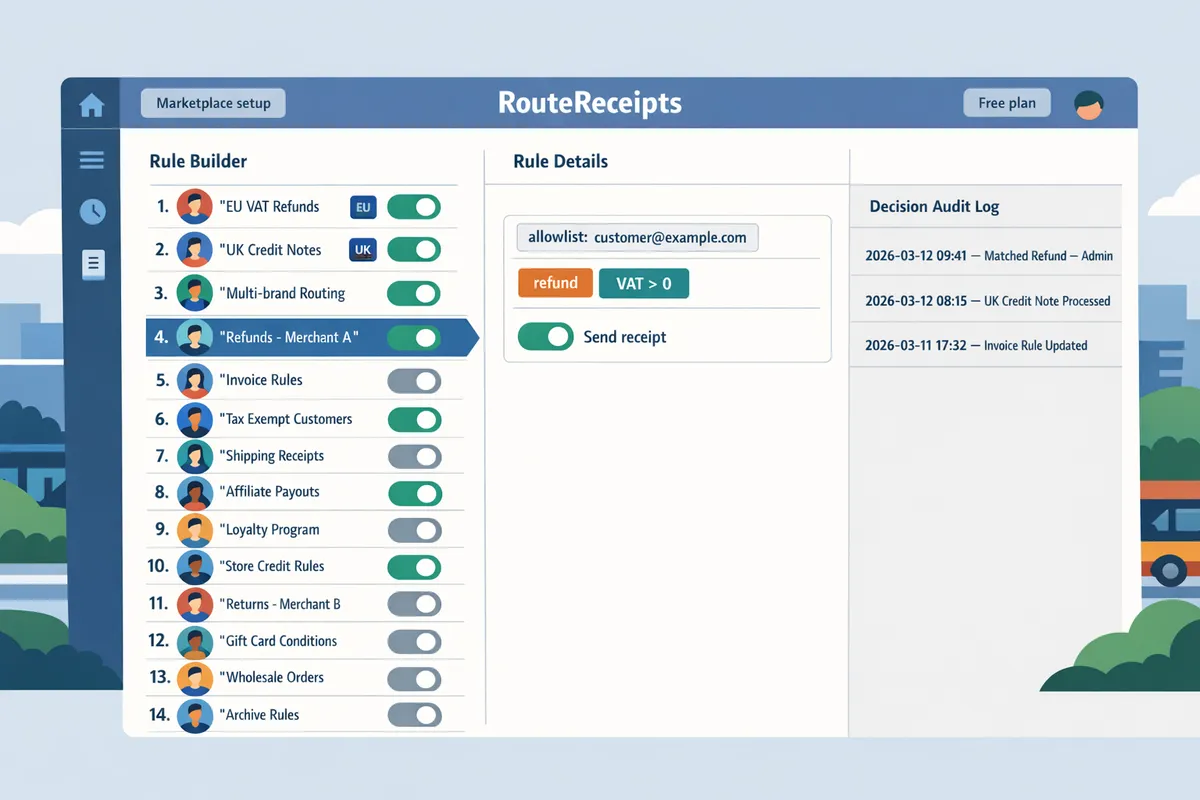
This list provides 18 practical toggle profiles for Stripe receipts control covering EU/UK VAT, refunds, credit notes, and multi-brand scenarios.
This collection maps business triggers to recommended toggles, step‑by‑step non-technical setup notes for Route Receipts and Stripe, and a single key test to validate each profile. Use the profile that most closely matches your operations, rename it for your teams, and run the listed test before rolling it into production.
1. Enterprise expense-only allowlist 🧾
This profile sends receipts only to enterprise clients who require expense records.
- Business trigger: customers flagged as enterprise by metadata or customer ID list.
- Recommended toggles: allow receipts only for allowlist; suppress automatic Stripe receipts for others.
- Route Receipts setup (non-technical): create an allowlist named "Enterprise Expenses" and add enterprise customer IDs or emails. Link the list to your account rule. See Route Receipts documentation for allowlist steps.
- Stripe setup: disable Stripe automatic receipts for invoice.payment_succeeded if you plan to route via Route Receipts.
- Key test: process a payment for an enterprise test customer and a non-enterprise customer; verify only the enterprise customer receives an emailed receipt.
2. VAT-registered EU customers receive paid invoices for VAT accounting 🇪🇺
This profile sends paid invoices and receipts to customers marked as VAT-registered so they have documentation for VAT returns.
- Business trigger: customer metadata includes VAT registration ID or EU VAT flag.
- Recommended toggles: send paid invoice PDF plus receipt; include VAT line items and tax breakdowns.
- Route Receipts setup (non-technical): create a rule matching VAT metadata, attach the paid-invoice template, and enable invoice attachment.
- Stripe setup: ensure invoices include tax amounts and VAT numbers in customer tax settings.
- Key test: simulate an EU transaction with VAT metadata; confirm the emailed paid invoice shows VAT lines, tax IDs, and totals.
💡 Tip: Confirm the invoice template includes separate VAT lines and the customer VAT number to satisfy tax auditors.
3. UK reverse-charge customers get a credit note flow that includes VAT notes 🇬🇧
This profile routes credit-note emails and includes reverse-charge explanatory text when the customer is flagged for reverse charge.
- Business trigger: customer metadata includes reverse-charge indicator or reverse-charge VAT status.
- Recommended toggles: route credit notes to the customer and BCC finance; include a reverse-charge explanatory paragraph in the email.
- Route Receipts setup (non-technical): create a rule for reverse-charge customers and map the credit-note template that contains the extra explanatory text.
- Stripe setup: issue a refund with credit_note creation; ensure credit_note metadata matches Route Receipts rule.
- Key test: issue a small credit note to a reverse-charge test customer; verify the email contains reverse-charge wording and correct recipients.
4. Tax-exempt/non-VAT customers suppress paid invoices but keep receipts 🚫📄
This profile sends minimal receipts for records while suppressing full paid-invoice attachments to avoid unnecessary tax details.
- Business trigger: customer flagged as tax-exempt in metadata.
- Recommended toggles: send short receipt email, suppress PDF invoice attachments and VAT fields.
- Route Receipts setup (non-technical): build a tax-exempt rule that routes a compact receipt template and disables invoice attachments.
- Stripe setup: keep Stripe invoice settings default but ensure Route Receipts suppression prevents duplicates.
- Key test: process a payment for a tax-exempt test customer and confirm the receipt is minimal and no paid-invoice PDF is attached.
5. Marketplace seller-branded receipts route emails to the platform and seller depending on account settings 🏷️
This profile routes receipts either to the connected account (seller) or to both the seller and the platform based on connected-account metadata.
- Business trigger: transaction involves a Stripe Connect connected account or marketplace flag.
- Recommended toggles: route to connected account owner for seller-branded receipts; optional copy to platform finance for reconciliation.
- Route Receipts setup (non-technical): add rules that detect connected_account_id and choose the seller template or platform+seller template.
- Stripe setup: use Stripe Connect settings to ensure receipt_email and statement_descriptor align with seller preferences.
- Key test: run a direct-seller transaction and a platform-facilitated transaction; verify receipt branding and recipient set in both cases.
6. Refund and partial-refund receipts ensure accurate credit note distribution 🔁
This profile triggers on refund events and sends credit-note emails that reference the original invoice.
- Business trigger: refund.created and invoice.updated events, including partial refunds.
- Recommended toggles: enable credit-note template; include original invoice number and refund reason.
- Route Receipts setup (non-technical): map refund events to a credit-note rule and include original invoice reference in the template.
- Stripe setup: create refunds in Stripe that generate credit notes or add metadata linking to the original invoice.
- Key test: issue a partial refund and a full refund for the same invoice; confirm each email includes the correct original invoice reference and refund details.
7. High-value transaction receipts only for purchases above a set threshold 💶
This profile sends receipts only when a transaction exceeds a configured monetary threshold.
- Business trigger: payment.amount greater than your high-value threshold and currency match.
- Recommended toggles: allow receipts for high-value transactions; optionally notify finance for manual review.
- Route Receipts setup (non-technical): create a rule using amount and currency criteria; attach a high-value receipt template and optional finance BCC.
- Stripe setup: ensure your test payments use the correct currency and amount to trigger the rule.
- Key test: simulate a payment just below and just above the threshold; verify only the above-threshold payment produces a receipt.
8. Recurring subscription invoices send receipts and paid invoices for billed periods 🔄
This profile sends full paid invoices for subscription billing cycles to customers who require accounting documentation.
- Business trigger: invoice.event linked to subscription invoice.payment_succeeded.
- Recommended toggles: send paid invoice PDFs for billed periods, include subscription period and itemized lines.
- Route Receipts setup (non-technical): create a subscription rule that attaches period start/end fields and includes the paid-invoice template.
- Stripe setup: confirm subscription invoice settings include line item detail and tax handling.
- Key test: run a subscription billing cycle (or simulate invoice.payment_succeeded) and confirm the customer receives the paid invoice with period dates and itemization.
9. Trial-to-paid conversion receipts for customers who upgrade from free trials 🎯
This profile sends a conversion receipt when a customer moves from trial to paid billing to confirm the charge and new billing terms.
- Business trigger: invoice.payment_succeeded where subscription.trial_end equals the event timestamp or a status change from trial to active.
- Recommended toggles: send a conversion receipt that references the trial, the plan, and the first billing date.
- Route Receipts setup (non-technical): add a rule matching the trial-to-paid flag in metadata and attach a conversion template.
- Stripe setup: ensure subscription objects include trial_end metadata or set a tag on conversion.
- Key test: convert a test subscription from trial to paid and confirm the emailed receipt lists plan details, trial end, and next billing date.
10. One-off promo purchases suppress receipts for low-value promotional items 🎟️
This profile suppresses emailed receipts for low-value promotional purchases to reduce inbox noise.
- Business trigger: promo SKU tag or metadata indicating promotional item and amount below your noise threshold.
- Recommended toggles: suppress receipt emails for matched SKUs; still log the transaction for finance if required.
- Route Receipts setup (non-technical): create a SKU or promo-tag rule that sets delivery to "no receipt" and optionally copies finance to an internal inbox.
- Stripe setup: tag promo line items with metadata so Route Receipts can detect them.
- Key test: process a promotional transaction and verify no receipt is sent to the customer while internal logs or copies remain available.
11. Multi-currency customers receive localized receipts and paid invoices 🌐
This profile sends receipts formatted in the customer's preferred currency and locale for clarity in reporting.
- Business trigger: customer.preferred_currency or locale metadata.
- Recommended toggles: localized currency formatting, translated labels, and correct decimal/thousand separators.
- Route Receipts setup (non-technical): add locale and currency fields to the rule and attach localized templates per language/currency.
- Stripe setup: ensure payments record currency accurately and that invoice PDFs include currency codes.
- Key test: run test payments in EUR and GBP for a customer with respective locale metadata; confirm emails display correct currency formatting and language.
12. Partner/reseller transactions route receipts to end-customer and reseller 🤝
This profile copies receipts to both the end-customer and the reseller when contract terms require dual delivery.
- Business trigger: transaction contains reseller_id or partner flag in metadata.
- Recommended toggles: send primary receipt to the end-customer and a parallel copy to the reseller or partner email.
- Route Receipts setup (non-technical): create a reseller rule that splits recipients and uses a partner-facing template for the reseller copy.
- Stripe setup: attach reseller_id to charges so Route Receipts can match and route accordingly.
- Key test: process an affiliate sale and verify both the end-customer and reseller receive their respective copies with the correct details.
13. Internal accounting copies send receipts to a finance inbox as well as the customer 📥
This profile BCCs or copies receipts to an internal finance mailbox for reconciliation without changing the customer-facing experience.
- Business trigger: any invoice.payment_succeeded or a specific product/category flagged for accounting copy.
- Recommended toggles: customer receives standard receipt; finance receives full PDF or CSV copy.
- Route Receipts setup (non-technical): enable the finance copy option on the rule and define the finance inbox allowlist.
- Stripe setup: keep Stripe receipt settings default but disable Stripe automatic receipts if using Route Receipts to avoid duplicates.
- Key test: run a payment and verify the customer gets one receipt and finance receives a single copy without duplicates.
14. GDPR-minimal receipts suppress customer-identifiable details in emails 🛡️
This profile removes or redacts personal identifiers in receipt emails for customers who requested minimal data retention.
- Business trigger: customer privacy_opt_in metadata or a GDPR minimal profile flag.
- Recommended toggles: strip names, addresses, and order notes; include only transaction ID, amount, and date.
- Route Receipts setup (non-technical): attach a redacted template and enable PII suppression for the GDPR-minimal rule.
- Stripe setup: ensure PII exists in Stripe but is masked in templates; keep the unmasked record only in secure accounting systems.
- Key test: process a test payment for a privacy-opted customer and confirm the emailed receipt contains no PII while the internal audit log records full data.
⚠️ Warning: Avoid removing legally required data fields for tax invoices; consult legal or tax before enabling full redaction for EU customers.
15. Chargeback notification receipts keep customers informed but route full details to finance ⚠️
This profile sends a brief customer notification for disputes while routing detailed dispute data to finance for investigation.
- Business trigger: dispute.created and dispute.updated Stripe events.
- Recommended toggles: short customer-facing notice; full-detail report to finance with case ID and transaction history.
- Route Receipts setup (non-technical): map dispute events to two templates: a short customer notice and a detailed finance report.
- Stripe setup: subscribe to dispute events and include dispute metadata for Route Receipts to match.
- Key test: simulate a dispute lifecycle and confirm the customer receives a short notice while finance receives the detailed report with the dispute timeline.
16. Prepaid/balance top-up receipts summarize remaining balance only 💳
This profile sends a concise top-up receipt that emphasizes updated prepaid balance rather than line-item billing details.
- Business trigger: top-up product IDs or balance top-up event.
- Recommended toggles: show only amount added and new balance; suppress long invoice PDFs.
- Route Receipts setup (non-technical): create a top-up rule tied to specific product IDs and attach a balance-summary template.
- Stripe setup: ensure top-ups write balance metadata so emails can surface the new total.
- Key test: perform a test top-up and verify the receipt shows the amount added and the updated balance without a full invoice attachment.
17. Split-payment or multi-payer receipts notify all payers with their contribution ➗
This profile sends individualized receipt copies to each payer showing only their contribution and reference to the master invoice.
- Business trigger: split-payment metadata listing payer emails and contribution amounts.
- Recommended toggles: generate per-payer receipts with payer share, overall invoice reference, and no other payers' details.
- Route Receipts setup (non-technical): use the split-payment rule to expand payer list into separate deliveries and templates that inject payer-specific amounts.
- Stripe setup: attach payer metadata to the charge or create separate charges with linkage metadata for Route Receipts to detect.
- Key test: simulate a multi-payer checkout and confirm each payer gets a receipt that includes only their share and the overall reference number.
18. Dormant-account reactivation receipts only for customers who opt back in 🔔
This profile routes receipts after reactivation events only when the customer has explicitly opted back into communications.
- Business trigger: account_reactivated event plus opt-in metadata.
- Recommended toggles: suppress receipts until opt-in; after opt-in, send a reactivation receipt confirming consent and first charge.
- Route Receipts setup (non-technical): create a dormant-reactivation rule that checks opt-in status and attaches a consent-confirmation template.
- Stripe setup: ensure reactivation events and opt-in flags are written to customer metadata.
- Key test: reactivate a dormant test account without opt-in and with opt-in; confirm only the opt-in path triggers the receipt and consent logging.
Comparison: built-in Stripe receipts, custom API receipts, and Route Receipts 📊
This table compares control, implementation effort, multi-brand handling, refund/credit-note support, and localization so teams can choose the right approach.
| Capability | Built-in Stripe receipts | Custom API receipts | Route Receipts |
|---|---|---|---|
| Control (granularity) | Low. Global on/off and some branding settings. | High. Per-customer logic programmable. | High. Dashboard rules and allowlists for per-customer control. |
| Implementation effort | Low. Turn on/off in Stripe dashboard. | High. Developer work, webhooks, templates. | Low to medium. No-code setup from the Stripe Marketplace with simple rules. |
| Multi-brand handling | Limited. Hard to route per connected account without custom flows. | Excellent if built into codebase; requires maintenance. | Designed for multi-brand and Connect scenarios via rule mapping to connected_account_id. |
| Refund / credit-note support | Basic notifications for refunds. | Flexible; must implement credit-note emails and links. | Built to route refund and credit-note emails and include original invoice references. |
| Localization & currency | Basic formatting tied to Stripe settings. | Full control if implemented. | Localized templates per rule with currency-aware formatting. |
Use the comparison above to choose the approach that fits your team. For a low-code path that gives per-customer control without developer time, see Route Receipts documentation and our beginner’s guide to selective delivery. For rationale on why Route Receipts exists and the trade-offs behind a dashboard-native approach, read Why Did We Build Route Receipts?.
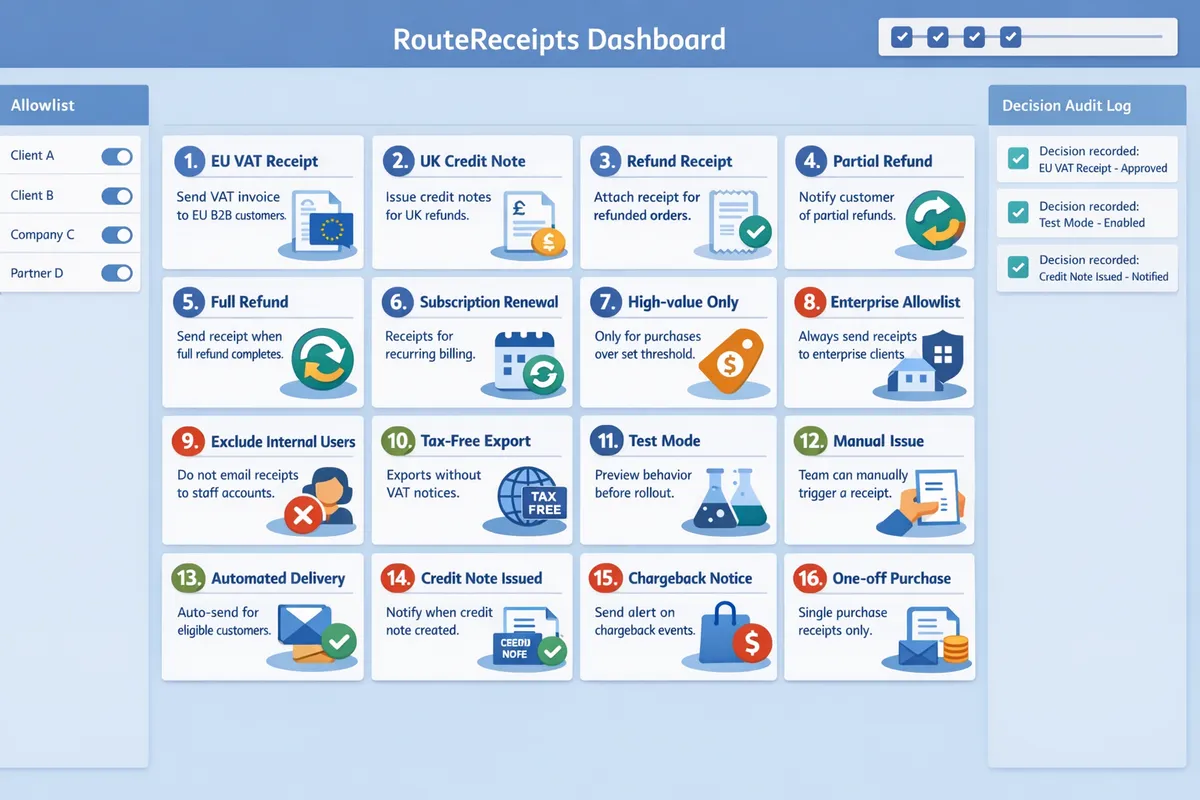
A stepwise implementation and audit process ensures consistent receipt behavior and reduces support inquiries.
A step-by-step rollout plus a robust audit process prevents duplicate and missing receipts and reduces receipt-related support tickets. Route Receipts integrates directly with Stripe and its free plan includes 20 receipts per month to support initial testing. Follow a controlled sequence: disable Stripe automatic receipts, install Route Receipts, create named toggle profiles, validate with test transactions, then audit decisions and roll out by cohort.
⚙️ Turn off Stripe automated receipts and install Route Receipts
Turn off Stripe's automatic receipts before enabling Route Receipts to prevent duplicate emails. 1) In the Stripe Dashboard go to Settings → Email receipts (or Billing settings) and uncheck "Send receipts." 2) Install Route Receipts from the Stripe Marketplace and grant the requested access. 3) Follow the Route Receipts documentation for the initial setup and plan selection. 4) Confirm the app appears in your Stripe integrations list.
💡 Tip: Disable Stripe receipts and confirm the change on a sample transaction before creating profiles to avoid sending two emails for the same event.
See our Route Receipts documentation for step-by-step screenshots and plan details.
🏷️ Create, name, and scope toggle profiles to match finance workflows
Create clear, named toggle profiles in Route Receipts that map directly to your finance workflows and customer types. Use consistent patterns such as "EU-VAT-paid-invoice" or "Enterprise-expense" so finance, support, and sales can identify intent at a glance. Assign profiles by customer ID, customer email, connected account, or metadata fields (for example, tax_region: EU or billing_type: enterprise). For multi-brand setups, scope profiles to connected accounts so each storefront keeps its own receipt rules.
Which customers should receive receipts from Stripe becomes a business rule, not a technical guess. Document profile ownership (who updates rules) and put a short description on each profile explaining why receipts are sent or withheld.
🧪 Run acceptance tests for each profile and event type
Run acceptance tests for paid invoices, refunds, partial refunds, credit notes, and disputes to validate routing before wider rollout. Create test customers that represent each profile and trigger these events in a staging or low-volume production environment. For each test, record the expected outcome, then verify the actual email send and the Route Receipts decision audit log entry. Example test matrix rows: paid invoice (send), partial refund (send credit note), failed payment (no receipt), chargeback (no automated receipt).
Use our no-code beginner's guide to walk non-technical admins through test scenarios and checklist items.
🔍 Audit receipts and billing behavior using Route Receipts' decision audit log and Stripe event history
Use Route Receipts' decision audit log and Stripe's event history together to trace why a receipt was sent or withheld. Filter the audit log by customer ID, event type, or timestamp and then cross-check the corresponding Stripe event to confirm the trigger and payload. Common failure modes to document: Stripe auto-receipts still enabled, profile scoping mismatch (wrong connected account), and metadata key typos. Record these modes in your support playbook with the exact log queries to run when a customer reports a missing or duplicate receipt.
Refer to the Route Receipts FAQ for troubleshooting tips on duplicates and missing receipts.
📈 Roll out in stages and measure support ticket volume before and after each change
Roll out toggle profiles gradually and track support tickets and customer complaints for each cohort to quantify impact. Start with a pilot group such as 25–50 enterprise customers for 2–4 weeks, compare receipt-related ticket volume and support agent time before and after, then expand to additional segments. Log each profile change and use versioned profile names or descriptions so you can roll back quickly if an edge case emerges. If support volume increases, revisit the profile scope and test the failing scenarios identified in your audit log.
For background on why selective routing reduces finance overhead and inbox clutter, see Why Did We Build Route Receipts?.
Frequently Asked Questions
This FAQ answers common finance-team questions about stripe receipts control and Route Receipts. It focuses on implementation choices that reduce support tickets, preserve tax documentation, and make multi-brand receipt routing auditable. Each answer links to practical setup or testing steps you can apply in your Stripe dashboard.
How does Route Receipts decide which customers receive receipts from Stripe? 🤖
Route Receipts evaluates an allowlist and profile rules at payment success and then either permits Stripe's receipt to send or suppresses it. Route Receipts checks customer metadata, connected-account flags, and named profiles to match a payment to a routing rule. For example, mark enterprise customers with a metadata tag or add specific connected accounts to an "enterprise receipts" profile so only those customers get invoice emails. The decision audit log shows which profile matched and why, making it easy to prove routing choices during support escalations. See the Documentation for the exact dashboard steps to create allowlists and named profiles.
Can I still send paid invoices for VAT while suppressing simple receipts? 🧾
Yes. Configure a Route Receipts profile that sends paid invoices (VAT documents) to customers who require tax records while suppressing basic receipt confirmations for other customers. Create an allowlist for taxable customers and map that allowlist to a profile that permits invoice delivery but blocks plain receipt emails. For example, keep expense-reporting clients on the invoice-enabled profile and put low-touch customers on a suppressed-receipt profile. Confirm invoices include VAT lines and customer billing details before you suppress receipts. See our guide on receipts and paid invoices and the Documentation for step-by-step setup and examples.
What happens to refunds, partial refunds, and credit notes under different profiles? 🔁
Profiles can trigger credit-note emails for refunds and partial refunds to allowlisted recipients while suppressing them for others. Route Receipts applies the same profile logic at refund time and will send a credit-note email if the recipient is allowlisted for credit communications. Test full refunds, partial refunds, and credit-note issuance to verify that references to the original invoice and VAT adjustments appear correctly. Verify that partial refunds produce a credit note with the correct pro rata VAT line and invoice reference. Use the Route Receipts decision audit log alongside Stripe event history to confirm the exact email type that was sent for each refund.
💡 Tip: Use the audit log to confirm which profile matched a refund before checking the customer inbox; this isolates routing faults from email-delivery issues.
Do I need a developer to install and configure Route Receipts? 🛠️
No. Non-developers can install Route Receipts from the Stripe Marketplace and configure allowlists and profiles via the dashboard UI. The app installs as a Stripe integration and exposes a dashboard-native interface for creating allowlists, naming profiles, and toggling receipt behavior without writing webhooks or code. Typical setup steps are: install from the Marketplace, disable Stripe automatic receipts to avoid duplicates, create an allowlist, and assign profiles to connected accounts or customer segments. For a no-code walkthrough, see The No‑Code Way to Route Customer Receipts in Stripe and our Documentation.
How do I test that receipt routing works across multiple brands or connected accounts? 🔍
Create test payments in each connected account or storefront, apply the intended profile, and verify receipt delivery using the Route Receipts decision audit log and Stripe event history. Test in Stripe test mode and run these steps: 1) simulate a payment for brand A with the profile active, 2) verify the audit log shows the expected profile match, 3) check whether Stripe sent the receipt or Route Receipts suppressed it, and 4) repeat for refunds and partial refunds. Document one positive test and one negative test per storefront so support teams can reproduce results. See Documentation for the audit-log locations and recommended verification checklist.
Is customer consent or opt-in required to suppress receipts in certain regions? ⚖️
Consent and opt-in requirements depend on local regulations and your contractual terms with customers. In many EU cases, customers who need tax invoices must receive a VAT-compliant invoice even if you suppress simple payment confirmations; other jurisdictions allow suppression of non-tax receipts with documented consent. Capture consent as a metadata flag on the customer record and store a brief audit trail in your support procedures so finance can prove permission. Review Route Receipts' privacy handling and the legal terms for each region before changing default receipt behavior.
⚠️ Warning: Suppressing receipts without documented customer consent can create audit and tax risks in some jurisdictions; consult your tax advisor before wide rollouts.
Next steps to apply the 18 toggle profiles
Apply the recommended toggle profiles to reduce receipt noise and ensure compliant receipts reach the right customers.
RouteReceipts is a specialized application designed to enhance the way businesses manage their Stripe receipt distribution. It fills the gap in Stripe's default behavior by letting teams maintain an allowlist and route receipts only to customers who need them, without custom webhooks or heavy engineering work.
The toggle recipes in this article show clear rules for which customers should receive receipts from stripe, such as enterprise expense accounts, VAT-registered buyers, and users who need credit notes.
For pragmatic stripe receipts control, start with the EU VAT and refund recipes, test them on a staging account, and verify decisions in the audit log.
Get started by following the RouteReceipts setup guide in the documentation. For background on the design trade-offs and operational templates, see Why Did We Build Route Receipts?.
Subscribe to our newsletter for new recipes and implementation tips.
For anyone exploring a character design, it is worth considering how details related to costume sizing will affect the complete look. With practical wear in mind, it helps to assess details related to cosplay props together with fit and fabric. To compare practical details about details related to long cosplay wigs, heat resistant cosplay wigs for women offers a useful starting point for practical preparation. For an outfit that feels convincing, a balanced view of details related to photoshoot preparation can support both detail and comfort.