
Stripe Refund vs Credit Note for EU/UK VAT: When to Use Each, How It Affects Returns, and Customer Emailing Rules
A single misrecorded VAT adjustment can trigger an audit and add eight hours of reconciliation for a finance team. refund vs credit note in stripe is a decision that determines whether you return funds to a customer or issue a document that offsets future invoices, with different EU/UK VAT treatment and receipt-emailing consequences. This comparison-post helps finance teams choose the right route based on VAT reporting, returns processing, and Stripe receipt rules. RouteReceipts integrates into the Stripe dashboard to control which customers receive receipt emails, letting you keep enterprise clients informed while avoiding inbox clutter for others. See our RouteReceipts Stripe setup guide and RouteReceipts FAQ to match your receipt policy to VAT-compliance. Which option reduces audit risk and customer friction?
Use refunds to return money and credit notes to adjust invoices or customer balances in Stripe.
Use a refund when you must return cash to a customer’s payment method; use a credit note when you need to change an invoice or create a future credit in Stripe. Refunds affect bank reconciliation and reduce available cash immediately (subject to bank timing). Credit notes change invoicing and VAT lines while leaving cash in your account until you choose to refund or apply the balance.
Refunds return funds to the customer’s payment method and reverse the payment record in Stripe. 💸
A refund returns money to the customer’s card or payment method and marks the original payment as refunded in Stripe. Full refunds remove the full settled amount; partial refunds reduce the settled amount and leave a partially paid payment record. Timing varies by bank, so the customer may see the returned funds within a few business days while your ledger needs an immediate adjustment. Processing fees often remain a separate reconciliation item; confirm your policy in Stripe and your accounting system before booking the fee reversal.
Example. You capture a 200 EUR card payment, then issue a 50 EUR partial refund. Your available cash falls by 50 EUR; Stripe shows a 50 EUR refund on the payment, and your bank settlement will reconcile to a net 150 EUR for that charge.
⚠️ Warning: EU/UK VAT rules often require an invoice-level correction for sales that were invoiced. Issuing a payment refund without updating the invoice can leave VAT documentation inconsistent. Check local VAT guidance and your accounting process before issuing refunds.
If you want to control who receives receipt emails for refunds, RouteReceipts lets you stop automatic Stripe receipts for selected customers. See our article on why we built Route Receipts for the rationale and auditability of selective receipt routing.
Credit notes amend invoices, adjust VAT lines, and create or reduce a customer balance without immediately returning cash. 🧾
A credit note edits the original invoice in Stripe and records an entitlement on the customer account rather than sending money out. Credit notes can reference the original invoice ID, adjust taxable lines, and either create a positive customer balance or reduce an existing one. You keep the cash until the customer requests a refund or the credit applies to a later invoice, which affects cash flow planning differently than an immediate refund.
Example. An invoice billed 240 EUR including VAT should have been 200 EUR. You issue a 40 EUR credit note that corrects the VAT line and gives the customer a 40 EUR balance. Your cash remains in the bank, your VAT return can be adjusted to reflect the corrected taxable amount, and Stripe shows the credit note linked to the original invoice for audit trails.
Credit note events may trigger invoice emails. Use RouteReceipts to limit which customers receive invoice or credit-note emails and to avoid sending unnecessary notifications. See our setup documentation for instructions on disabling Stripe’s automatic receipts and creating allowlists.
Decision factors: choose refunds for cash returns and credit notes for billing or VAT corrections. 🔍
Pick a refund when the customer wants cash back, when a card dispute requires a returned amount, or when you need to reverse a cleared settlement immediately. Pick a credit note when the issue is an invoicing error, a VAT correction, a promised store credit, or when you want the correction recorded on the original invoice for audits.
Use this numbered decision flow to decide quickly:
- Did the customer request money back now? If yes, refund. If no, continue.
- Was an invoice already issued with VAT lines that must be corrected? If yes, issue a credit note that references the original invoice.
- Is this a subscription proration or future adjustment? Prefer a credit note applied to the next invoice.
- Is there a charge dispute or fraud claim? Issue a refund and follow Stripe dispute handling.
- Are you concerned about customer notifications? Use RouteReceipts to control who gets receipts for refunds, invoices, or credit notes.
| Factor | Refund | Credit note |
|---|---|---|
| Cash effect | Lowers bank balance immediately | Cash stays until you refund or apply credit |
| Stripe record | Payment marked refunded; appears on payment object | Invoice updated; credit note linked to invoice and customer balance |
| VAT documentation | May require separate invoice correction in some jurisdictions | Adjusts VAT on original invoice for audit trail |
| Customer-facing | Customer receives refund notification and sees returned funds | Customer sees invoice adjustment or balance credit; may prefer future credit |
| Typical use case | Customer requests immediate refund, disputed charge | Billing error, VAT correction, store credit for future invoices |
💡 Tip: If your team handles hundreds of invoices monthly, use RouteReceipts to keep customers and finance teams aligned by only sending invoice, refund, or credit-note emails to the customers who actually need them. See our no-code guide to selective delivery for step-by-step setup.
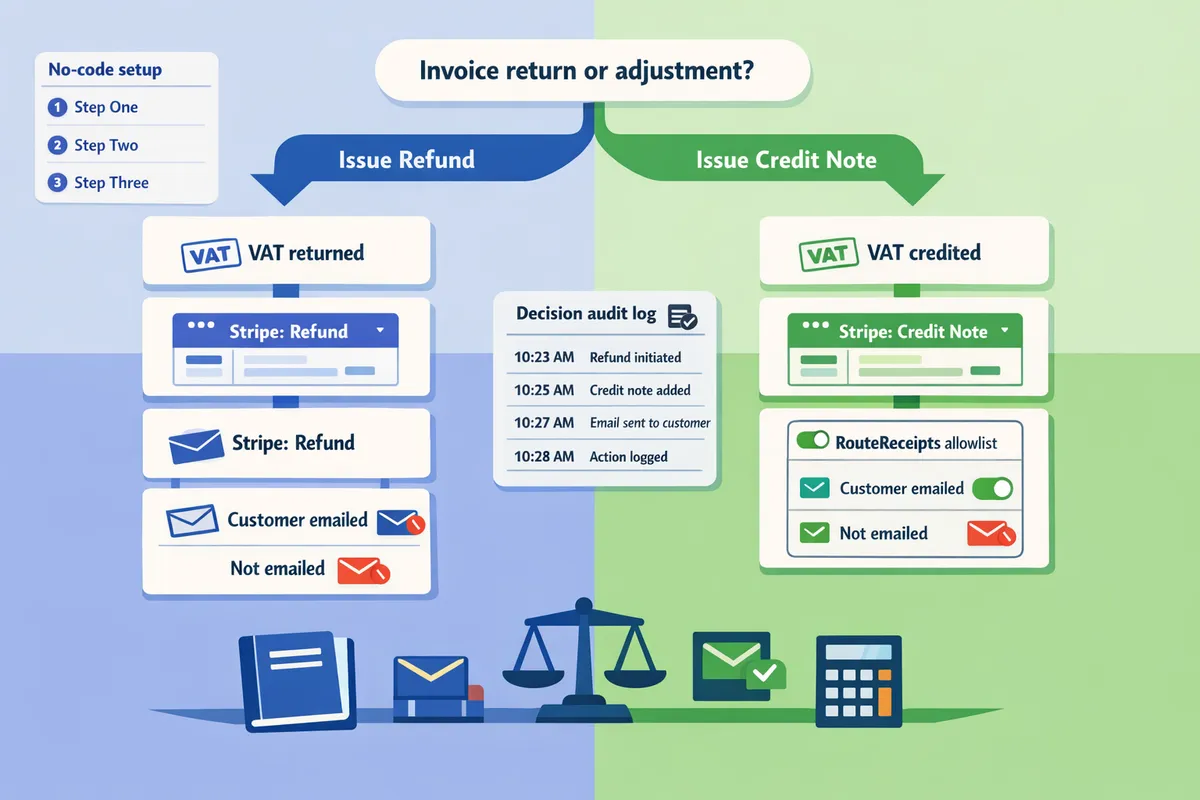
This side-by-side comparison shows how refunds and credit notes differ for VAT, accounting, Stripe behaviour, and customer messaging.
This comparison highlights the practical differences you need to decide between a refund and a credit note in Stripe for EU/UK VAT and customer emails. It focuses on cash flow timing, what posts to the Stripe ledger, VAT treatment under UK and EU rules, and which receipt or invoice email you should send. According to RouteReceipts, controlling who receives receipts matters for mixed workflows where some customers need an audit trail and others do not.
Comparison table: VAT, cash flow, ledger effect, accounting entry, and customer email 📊
The table below summarizes how refunds and credit notes differ across VAT, cash flow, Stripe ledger behavior, accounting entries, and receipt emails.
| Action | Cash flow | Stripe ledger effect | VAT treatment | Accounting entry | Customer email recommended |
|---|---|---|---|---|---|
| Full refund to card | Cash decreases immediately when Stripe processes the refund. | Refund posts against the original charge and reduces Stripe balance. | Output VAT is reduced for the period when refund is processed (use refund record to adjust return). | Debit revenue reversal, credit cash/bank. Record VAT reversal on sales VAT control account. | Send a refund receipt to the payer (use RouteReceipts to limit recipients). |
| Partial refund | Partial cash reduction; remaining revenue stays. | Stripe posts partial refund and retains residual charge. | Adjust VAT proportionally to the refunded taxable amount. | Debit partial revenue reversal, credit cash. Adjust VAT proportionally. | Send a partial refund receipt and reference the original invoice. |
| Credit note applied to invoice (no immediate cash) | No cash movement until customer uses balance or you issue a refund later. | Creates a credit note linked to the invoice; may increase customer balance or reduce receivable. | Credit note adjusts VAT on the original invoice; use it when taxable base or VAT rate changes. | Debit receivables (or sales returns), credit revenue; adjust VAT control account. | Send the credit note (invoice adjustment) email only to customers who require it; control with RouteReceipts. |
| Credit note + immediate refund | Cash decreases if you convert credit to a refund; ledger shows both credit note and refund. | Stripe may first record credit note then process refund against customer/payment method. | VAT is adjusted by the credit note; refund confirms cash reversal for accounting. | Record credit note, then record refund (debit revenue reversal, credit cash). | Send both the credit-note email and refund receipt when appropriate; prevent duplicate emails with RouteReceipts. |
- Use RouteReceipts documentation for setup steps to disable Stripe automatic receipts and route the correct emails to chosen customers. See the RouteReceipts documentation for receipt routing and allowlist setup.
- The table focuses on typical behaviors; the article later includes numeric examples and a cross-border row for UK vs EU VAT specifics.
When a credit note requires a VAT adjustment (UK / EU) 🇪🇺
Credit notes adjust VAT on the original invoice and must be used when the taxable base, VAT rate, or tax status for the sale changes. For example, a tax-exempt correction (you invoiced a VATable sale but it should have been zero-rated) requires a credit note that amends the VAT amount on the original invoice rather than a simple refund. For partial VAT reversals, issue a proportional credit note that shows the VAT amount reversed so the VAT return can be adjusted in the same tax period as the accounting entry.
Cross-border supplies need special care: B2B intra-EU supplies and UK exports often require invoice-level corrections rather than payment refunds to preserve the original supply documentation. Use a credit note when the reason for change is a billing or tax error and you want the audit trail tied to the original invoice. According to RouteReceipts' FAQ, routing the credit-note email only to the buyer's billing contact reduces confusion for international customers.
⚠️ Warning: Issuing a cash refund instead of a credit note can misstate output VAT for the tax period and trigger correction notices. Always confirm the VAT treatment before choosing a cash refund when the tax base changed.
Accounting and reconciliation checklist for refunds vs credit notes 🧾
Refunds hit cash and reduce revenue immediately, while credit notes reduce receivables and reserve value for future invoices. For Xero: 1) Match the refund to the original payment in the bank feed; 2) Create a credit note that references the invoice number when adjusting VAT; 3) Apply the credit note to the invoice or leave it on the customer account if you expect future invoices. For QuickBooks Online: 1) Record the refund as a bank transaction linked to the original sale; 2) Use the credit memo feature to reduce the invoice and adjust sales tax; 3) Apply customer credits to next invoices rather than leaving unapplied credits.
Common reconciliation mistakes: not linking the credit note to the original invoice, forgetting to reverse VAT on the tax return, and leaving unapplied customer credits across currencies. For multi-currency refunds, convert the refund at the same exchange rate used on the original invoice or document the exchange variance explicitly. According to RouteReceipts documentation, disable Stripe's automatic receipts before enabling selective routing to avoid duplicate notifications when you both credit and refund the same customer.
💡 Tip: Disable Stripe automatic receipts before enabling Route Receipts to prevent duplicate emails when issuing both a credit note and a refund.
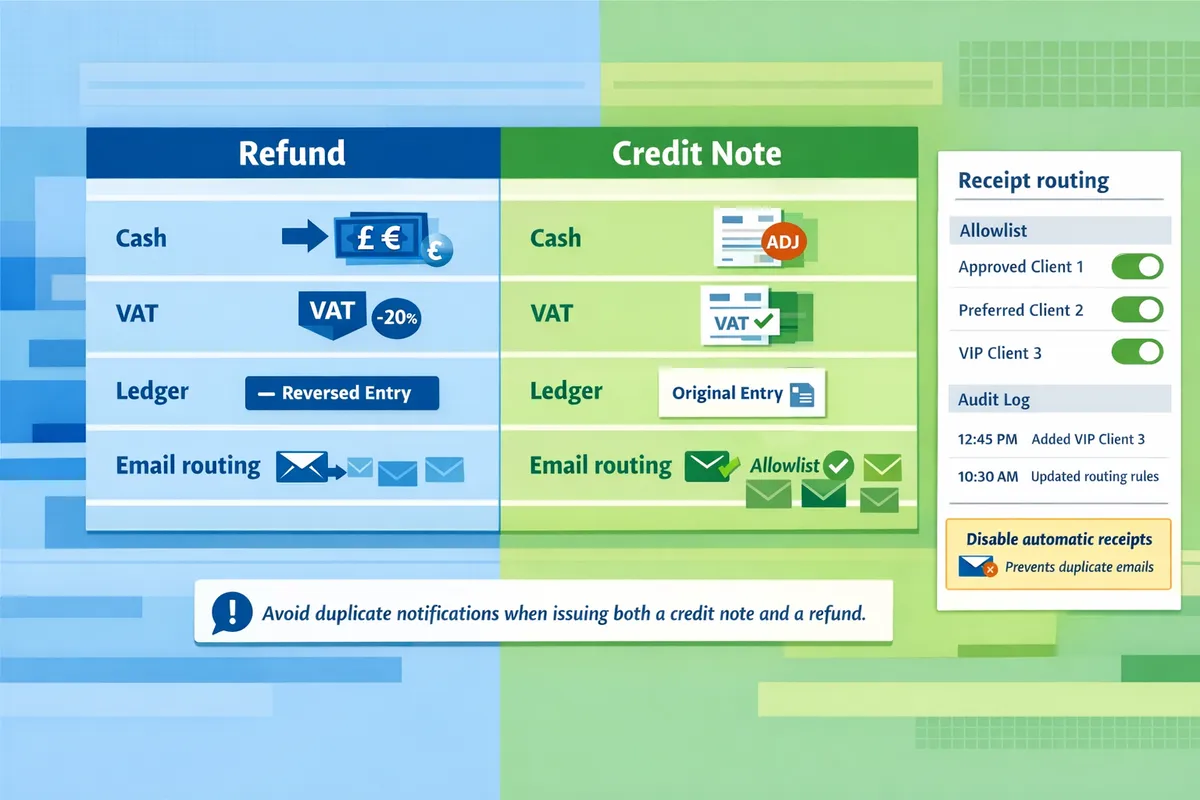
For UK and EU SMB finance teams, credit notes keep invoice history intact while refunds return cash and change VAT treatment.
Credit notes adjust the original invoice and keep the accounting trail intact; refunds return funds and reduce the taxable sales amount. This choice affects bank reconciliation, VAT reporting period, and what the customer sees in their inbox. The sections below weigh practical pros and cons, give a short decision flow for common merchant scenarios, and show how Route Receipts reduces email noise and reconciliation work.
Choose refunds for cancelled orders or disputed payments 🔁
Use refunds when you must return money to a customer’s payment method and clear the liability. For VAT, a processed refund reduces the taxable sale in the period when you make the refund. For example, a €100 sale that included €20 VAT becomes a returned sale; you must reduce output VAT by €20 in the VAT return covering the refund date.
Business consequences of DIY refunds:
- Immediate cash impact. Refunds reduce bank balances and may affect cash flow forecasts.
- Extra reconciliation work. Finance teams must match the refund to the original payment and annotate accounting records.
- Customer confusion and support load. Stripe can send an automatic refund receipt to the customer, which may prompt questions if you also send a follow-up email.
How Stripe behaves. Refunds appear on the payment and create a refund receipt by default; controlling who receives that receipt requires a routing tool or disabling Stripe receipts and using a selective sender. See our step-by-step setup for receipt routing in the documentation.
Choose credit notes for invoice corrections or future balances 🧾
Use credit notes when you want to amend an invoice, issue goodwill credit, or keep a customer balance without moving cash. Credit notes preserve the original invoice line items and VAT amounts while creating an offset that adjusts revenue and VAT in your records.
Pros and cons:
- Pros: preserves invoice audit trail, no immediate cash impact, simpler for subscription proration and staged billing.
- Cons: customers may not see the credit unless you email them; multi-entity or cross-border VAT reporting can require additional bookkeeping steps.
Example. If you issue a €50 credit on a €200 invoice that included €40 VAT, the invoice stays on record and the credit note reduces the net revenue and VAT proportionally. For VAT reporting, include the credit note in the VAT period when it is issued and document the reference to the original invoice for auditability.
For guidance on when a credit note is preferable to a refund in common merchant scenarios, see our discussion on selective receipt delivery in Why Did We Build Route Receipts?.
Route Receipts controls who receives refund, invoice, or credit emails ✅
Route Receipts is an app that lets finance teams selectively send invoice, refund, or credit-note emails from the Stripe dashboard. Route Receipts integrates via the Stripe Marketplace, adds an allowlist for chosen customers, logs each routing decision for audit, and manages plan usage from the same UI.
Operational benefits:
- Prevents unnecessary receipts for customers who do not need them, reducing support noise for finance teams.
- Keeps enterprise clients who require receipts on the allowlist while avoiding inbox clutter for consumers.
- Provides a decision audit log that shows who was sent a receipt and why, which helps VAT audits and internal controls.
The free plan includes 20 receipts per month, so small teams can test selective routing before upgrading. For setup and troubleshooting, consult the Route Receipts documentation and our FAQ for common configuration questions.
💡 Tip: Disable Stripe’s automatic receipts before enabling Route Receipts to avoid duplicate emails; our documentation explains the exact sequence for safe rollout.
Three-step decision flow and customer-email templates ✉️
Follow a simple three-step flow: decide refund versus credit note, choose the email option, and record the transaction in accounting. This reduces rework, keeps VAT records auditable, and lowers support contacts about unexpected emails.
- Decide refund vs credit note. If the customer needs cash back now, refund. If you need to correct an invoice or offer a future settlement, issue a credit note. Use the examples above to map typical cases (cancelled order = refund; billing correction = credit note).
- Choose the email action. Options: send a refund receipt, send a credit-note explanation that references the original invoice, or send no customer email. Use short, explicit subject lines such as 'Your refund for Invoice #1234' or 'Credit note issued for Invoice #1234.'
- Record the action. Add the refund or credit note reference to your accounting entry and note the VAT period it affects.
Sample copy snippets:
- Refund receipt subject: 'Refund processed for Invoice #1234 — €100 returned.' First line: 'We have issued a refund of €100 to your card ending in 4242.'
- Credit note email subject: 'Credit note for Invoice #1234 — €50 credit.' First line: 'We issued a €50 credit against Invoice #1234 that you can apply to future invoices.'
For copy-ready templates and timing recommendations tied to EU/UK VAT compliance, see the full article and our no-code guide on routing receipts for Stripe.
Frequently Asked Questions about refunds and credit notes in Stripe.
This FAQ gives compact, operational answers finance teams use when choosing between refunds and credit notes in Stripe for EU/UK VAT, reconciliation, and customer communication. Each answer is short and extractable so your team can act fast during month-end close or when a customer dispute appears.
How do refunds affect VAT reporting in the UK and EU? 🧾
Refunds reduce the taxable supply and normally require you to reduce output VAT in the VAT return for the period when the refund is processed. For a domestic UK sale invoiced at net £1,000 with 20% VAT, a full refund removes £1,000 of taxable sales and reduces output VAT by £200 in the same or next return if the period closed. For cross-border B2B within the EU, treat the refund the same way as the original supply—adjust reverse-charge reporting or EC sales lists if the original entry used those filings. If the refund covers multiple reporting periods or large amounts, expect extra paperwork or an amendment in that jurisdiction.
How does a Stripe credit note VAT adjustment UK EU process work? 📝
A credit note adjusts the original invoice's VAT lines and preserves the invoice audit trail while reducing the taxable amount. In Stripe you create a credit note that references the original invoice; the credit note should list the same VAT rates and line allocations as the invoice so your accounting system can map VAT codes correctly. Common pitfalls include crediting a multi-rate invoice with a single-line credit and losing the VAT split, or exporting a credit note as a generic negative amount which prevents automatic VAT mapping in Xero or QuickBooks. Always include line-level VAT details when generating credit notes to keep audit trails clear.
When does Stripe credit a customer balance instead of issuing a refund? 💳
Stripe credits a customer balance when you explicitly apply a credit note to the customer balance or when the refund path selected returns funds to the customer balance instead of the original payment method. For example, if you create a credit note and choose 'apply to customer balance,' the customer sees a positive balance on their account to use on future invoices. This behavior affects accounting: customer-balance credits create a liability until applied, while a direct refund immediately affects bank reconciliation. If you want cash returned, choose the refund to payment method option rather than applying a credit note to the balance.
When should I email customers about refunds versus credit notes? ✉️
Send a refund email for every refund; send a credit note email when the customer requests proof for expense reporting or when the credit will affect future invoicing. Refund emails document money movement and help reduce disputes and chargeback risk. Credit note emails often clutter inboxes for customers who do not require them, so reserve those emails for enterprise customers, expense-purposing requests, or when legal/regulatory proof is needed. RouteReceipts lets you avoid blanket sending by controlling which customers receive refund and credit-note emails via an allowlist.
💡 Tip: Send refund emails immediately to support dispute defense. For credit notes, use RouteReceipts allowlists to send only to customers who actually need the document.
How do I record refunds and credit notes in Xero or QuickBooks? 📚
Record refunds as a reduction of cash and revenue; record credit notes as a reduction of receivables or as a liability if applied to a customer balance. Practical steps: (1) Match the refund bank transaction to the Stripe refund in your bank feed and record a revenue reduction and VAT reversal for the same period where possible. (2) For a credit note applied to customer balance, post the credit note against the customer invoice in Xero/QuickBooks so the receivable decreases; if the credit sits unused, book it as a customer liability. Example: a £1,200 invoice (net £1,000 + £200 VAT) refunded fully should reduce bank by £1,200, reduce revenue by £1,000, and reduce VAT payable by £200 when reconciling.
How can RouteReceipts help avoid sending unnecessary refund or credit emails with Stripe? 🔧
RouteReceipts lets you control which customers receive invoice, refund, and credit note emails by using an allowlist and a dashboard-native decision flow. With RouteReceipts you can disable Stripe's automatic receipts to prevent duplicates, create an allowlist of customers who need receipts for expense reporting, and review a decision audit log for compliance. To get started, follow the quick setup steps in the RouteReceipts documentation and the no-code delivery guide for selective receipt routing. For background on selective receipt routing and implementation patterns, see Why Did We Build Route Receipts? and the RouteReceipts Stripe setup documentation.
Choose a refund when you must return funds and issue a credit note when you need to correct VAT or preserve the invoice record.
For EU and UK VAT, the accounting and customer communication trade-offs determine the right path; focusing on tax treatment and customer expectations will reduce returns and disputes. For practical decisions on refund vs credit note in stripe, weigh whether the customer needs money back now or a VAT-adjusted invoice for accounting.
RouteReceipts is a specialized application designed to enhance the way businesses manage their Stripe receipt distribution. This app addresses a significant limitation within Stripe's native functionality, which traditionally forces businesses to either send receipts to all customers or none at all. RouteReceipts empowers businesses with the flexibility to selectively send receipts to specific customers, thereby preventing unnecessary email clutter for those who do not require them. This is particularly beneficial for businesses with diverse customer bases, such as enterprise clients who need receipts for expense tracking and others who prefer not to receive them. By integrating directly into the Stripe dashboard, RouteReceipts allows users to manage an allowlist of customers effortlessly, without the need for complex coding or custom webhook integrations. The application features a dashboard-native user interface, a decision audit log for transparency, and a straightforward setup process via the Stripe Marketplace. RouteReceipts offers a tiered pricing model, starting with a free plan that includes 20 receipts per month, with the option to upgrade for higher volume needs. This solution is ideal for businesses seeking to streamline their financial communications and maintain a professional relationship with their clients by ensuring that only necessary communications are sent.
A shirt with a durable fabric will provide value for money. A shirt with a simple design often ages better than one with complex graphics that may date quickly. Supporters interested in Manchester United away shirt may benefit from a clear explanation of purchase planning and product-page checks before choosing a shirt. The fit of the chest should allow for comfortable breathing and movement.
When planning a cosplay look, it is worth considering how details related to Genshin Impact cosplay costumes will affect the complete look. When comparing costume options, reviewing details related to Halloween styling also makes comfort and movement easier to judge. For choices related to details related to cosplay costumes, game cosplay costumes with delivery information can help narrow the options for a specific purpose. For an outfit that feels convincing, it is useful to check details related to cosplay shoes against the wearer's own needs.
Schedule a consultation to map your VAT flows, decide when to issue refunds versus credit notes, and configure RouteReceipts for precise receipt delivery via the Stripe setup guide. For background on selective receipt routing and implementation patterns, see Why Did We Build Route Receipts? and the RouteReceipts Stripe setup documentation.